Showing: Posts
Ensembles Are Called Agents Now
Posts / 29 October, 2026
The GIFT-eval forecast benchmark allows submissions to be listed under model type “agentic”. From its README:
agentic: Multi-step systems that use agents or LLMs to reason, generate or select forecasts.
Its leaderboard is now dominated by models tagged as such (indicated by the yellow circle emoji). Not being able to check all of the submissions (as some did not even provide links to documentation let alone replication code), at least a good chunk of the top submissions are barely using “reasoning”. Instead, they are ensembles, combining models such as TimesFM, Chronos, Toto, and TiRex.
TW3Cast is a complicated ensemble. From its README:
Listed in the leaderboard’s multi-model (agentic) category, but it runs no agent and no LLM, and makes no inference-time decisions: a frozen per-configuration router over specialized models.
While there is a bit more to it, TW3Cast is a uniform ensemble for some datasets, as listed in its router.csv file. For example, for the Car Parts dataset, it uses a uniform ensemble of Chronos-2, TimesFM, and TiRex-2.
PRISM by Birla AI Labs is an ensemble:
Prism is a leakage-free probabilistic forecasting ensemble developed by the Frontier Research and DeepTech Team at Birla AI Labs. Rather than training a new model, Prism combines the quantile outputs of several pretrained foundation models, learning how to blend them from a held-out validation window that never touches test data. The key insight is that different models have complementary strengths: learning a separate blend at each quantile level means the model best at the median does not have to be the model that covers the tails.
RacineCast-1 and RacineCast-1-NC (i.e. non-commercial) are weighted ensembles of models. RacineAI summarizes their approach in this recipe:
0.55 · Toto-2.0-FnF + 0.16 · Toto-2.0-2.5B + 0.16 · TiRex-2 + 0.045 · Chronos-2 + 0.045 · FlowState-r1.1 + 0.03 · PatchTST-FM-r1
Back in July of this year, it ranked them first on the leaderboard.
55% of the RacineCast approach is Toto-2.0-FnF (as in Family-and-Friends). Toto-2.0-FnF is an ensemble of different Toto checkpoints and other models—meta-learned by a FFORMA-style XGBoost. It, too, is submitted as “agentic” to the GIFT-eval leaderboard.
My personal favorite, however, is IK-QuadTSFM. It is a uniform ensemble of Chronos-2, TimesFM-3, TiRex-2, and Toto-2.0-FT, and as such questions the additional complexity of any other “agentic” submission in its vicinity.
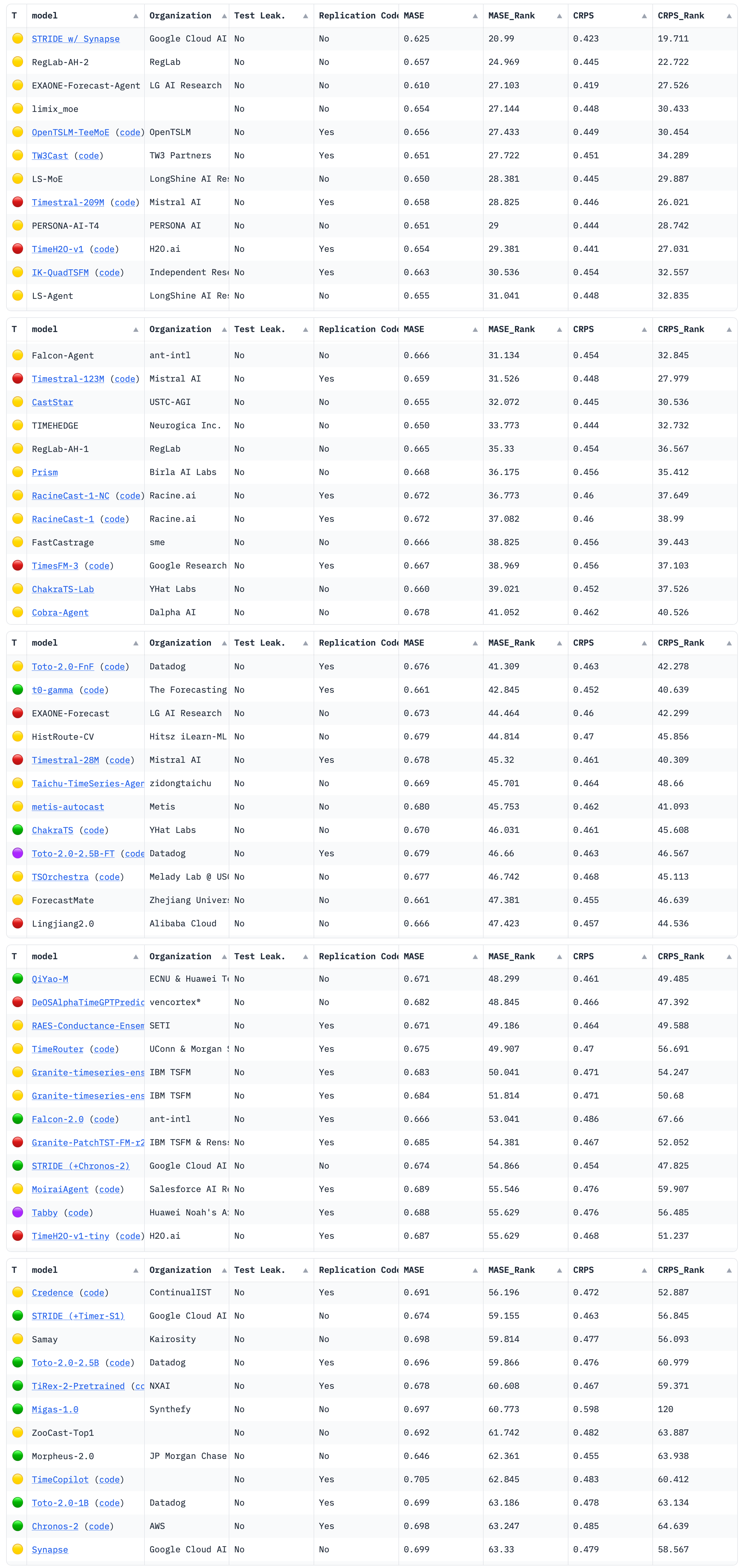
The above screenshot was taken on October 29, 2026. It shows the default sorting based on the MASE_Rank column. Sorting by MASE would shuffle the results somewhat, though “Stride w/ Synapse” and “EXAONE-Forecast-Agent” would continue to rank at the top. The rest would cover the range from 0.650 MASE (for LS-MoE and TIMEHEDGE) over 0.663 for the aforementioned IK-QuadTSFM and 0.667 for TimesFM, to 0.698 for Chronos-2.
A Flexible Model Family of Simple Forecast Methods
Posts / 19 October, 2023
Introducing a flexible model family that interpolates between simple forecast methods to produce interpretable probabilistic forecasts of seasonal data by weighting past observations.
In business forecasting applications for operational decisions, simple approaches are hard-to-beat and provide robust expectations that can be relied upon for short- to medium-term decisions. They’re often better at recovering from structural breaks or modeling seasonal peaks than more complicated models, and they don’t overfit unrealistic trends.
If that wasn’t enough, they’re interpretable. Not just explainable, but interpretable.
Still, when faced with thousands or millions of time series, not all of them will be modeled best by the naive method, nor will all be modeled best by the seasonal mean. You’d still like to pick a method that fits the series. Similarly, the all-or-nothing nature of approaches such as the seasonal naive method can be a bit black-or-white. A bit more smoothness and impact from multiple past observations can be helpful as long as we don’t compromise in robustness.
Assigning Weights Over Time
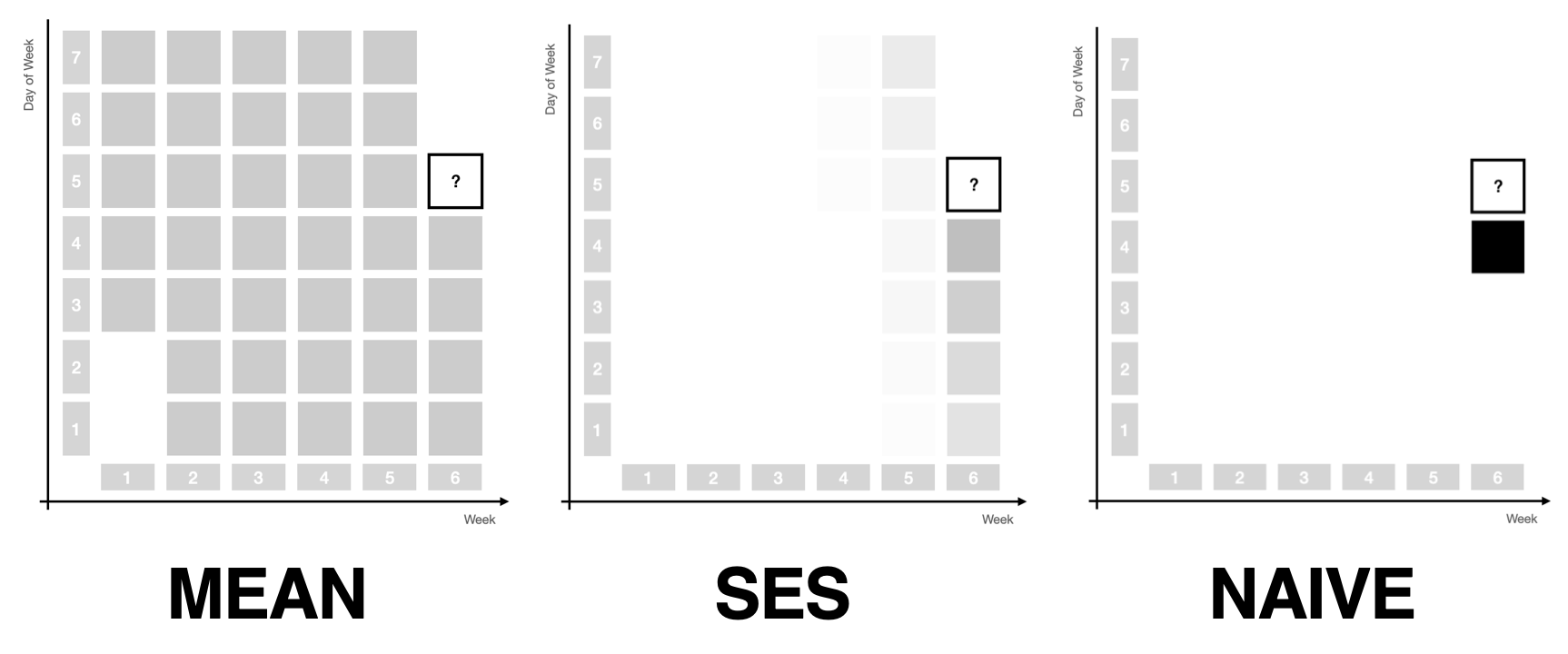
A bit more smoothness is what simple exponential smoothing offers for the mean and naive forecast methods: As you vary the single $\alpha$ parameter between 0 and 1, simple exponential smoothing will move from the mean forecast to the naive forecast, in between assigning exponentially decreasing weights to past observations. The prediction becomes the weighted average of the past observations. The mean forecast uses the same weight for all observations, whereas the naive method assigns all weight to the most recent observation.
In many applications, however, using only simple exponential smoothing could never suffice. A seasonal component in monthly or daily data is often the main signal that needs to be modeled and projected into the future. Not only are more recent observations more representative of the future, but so are observations that are close in the seasonal period: October 2023 is going to be more similar to September 2022 than to May 2023. Wednesday is more similar to Wednesday last week than to Monday.
This motivates two more ways of weighting past observations.
Assigning Weights Within and Across Seasonal Periods
First, observations can be weighted within a seasonal period. Due to seasonality, the observation exactly a year ago or exactly a week ago should get a larger weight than the observation 11 months ago or two days ago.
Second, observations can be weighted across seasonal periods, assigning more weight to the most recent period than to the period before that and the one before that.
As before, exponential weights make for a useful weighting structure. When assigning weights within a period, each period gets the same weight. When assigning weights across periods, each observation within a period gets the same weight.
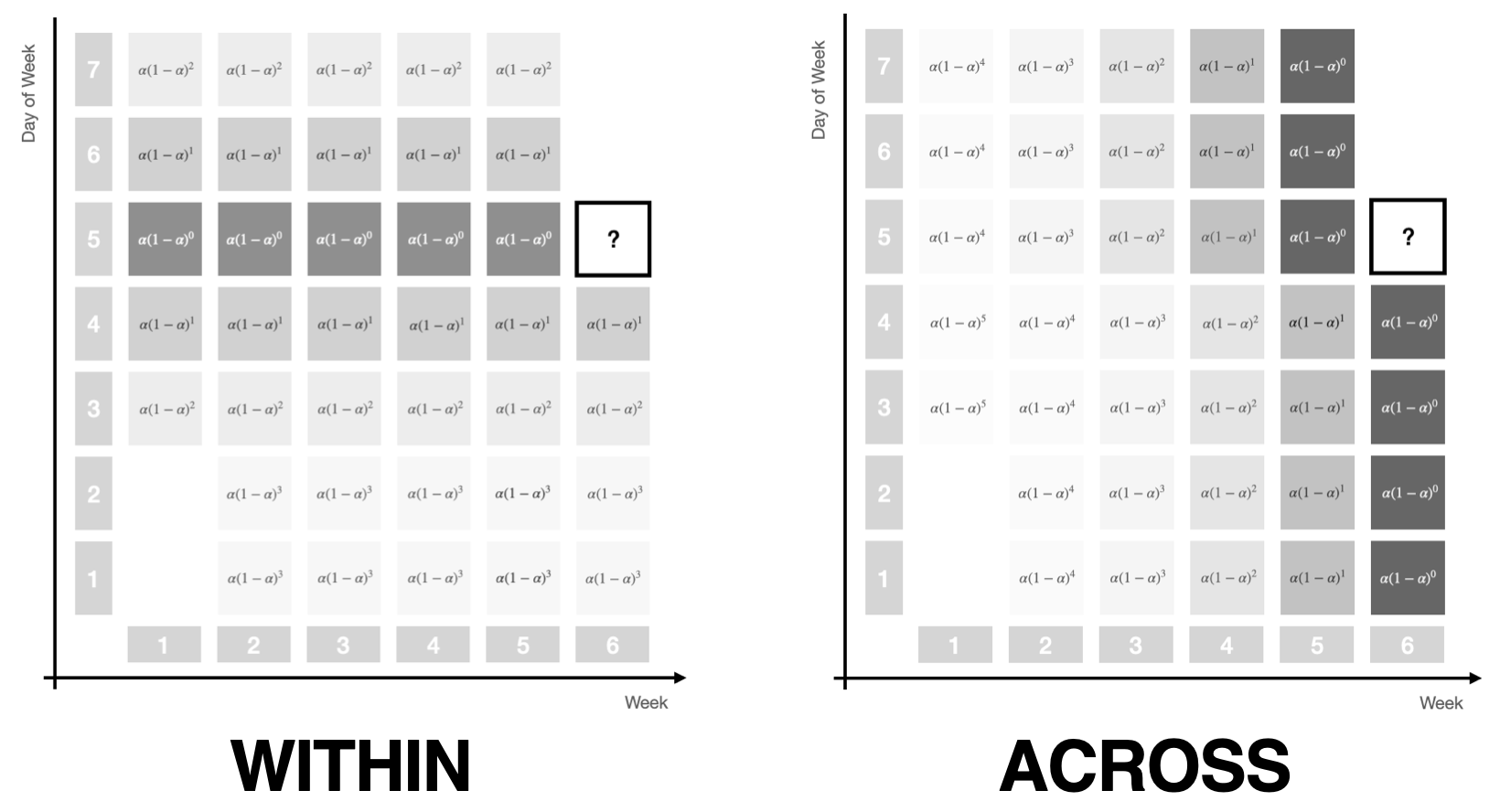
Note how both the within and the across period weighting schemes are each controlled by a single parameter if we give them a similar functional form as used in simple exponential smoothing. The picture above illustrates this by using the familiar $\alpha (1 - \alpha)^t$ notation.
As we vary the parameter from 0 to 1 for within-period weights, the same weight will be assigned to all observations in the period, then shifts away from observations that are currently in the middle of the period towards the edges, until all weight is assigned to the observation that’s in the same step of the period as the future observation.
For across-period weights, at first the same weight will be assigned to all periods, to then be exponentially decreased for past periods, until all weight will be assigned to just the most recent period.
Assigning Weights Over Time and Seasonal Periods
At this point we have three ways of assigning weights to past observations to move smoothly between forecast methods, namely using
- exponential weights that decrease over time controlled by a parameter $\alpha$
- seasonal within-period exponential weights controlled by a parameter $\alpha_s$, and
- seasonal across-period exponential weights controlled by a parameter $\alpha_{sd}$.
Combining all three weighting schemes through multiplication1 provides a powerful weight structure that depends on only three parameters and captures most signal sources in time series of operational business applications.
The picture below illustrates the complex weight pattern that this combination can achieve, smoothly assigning weights to observations close in season and time, and then decreasing from there.
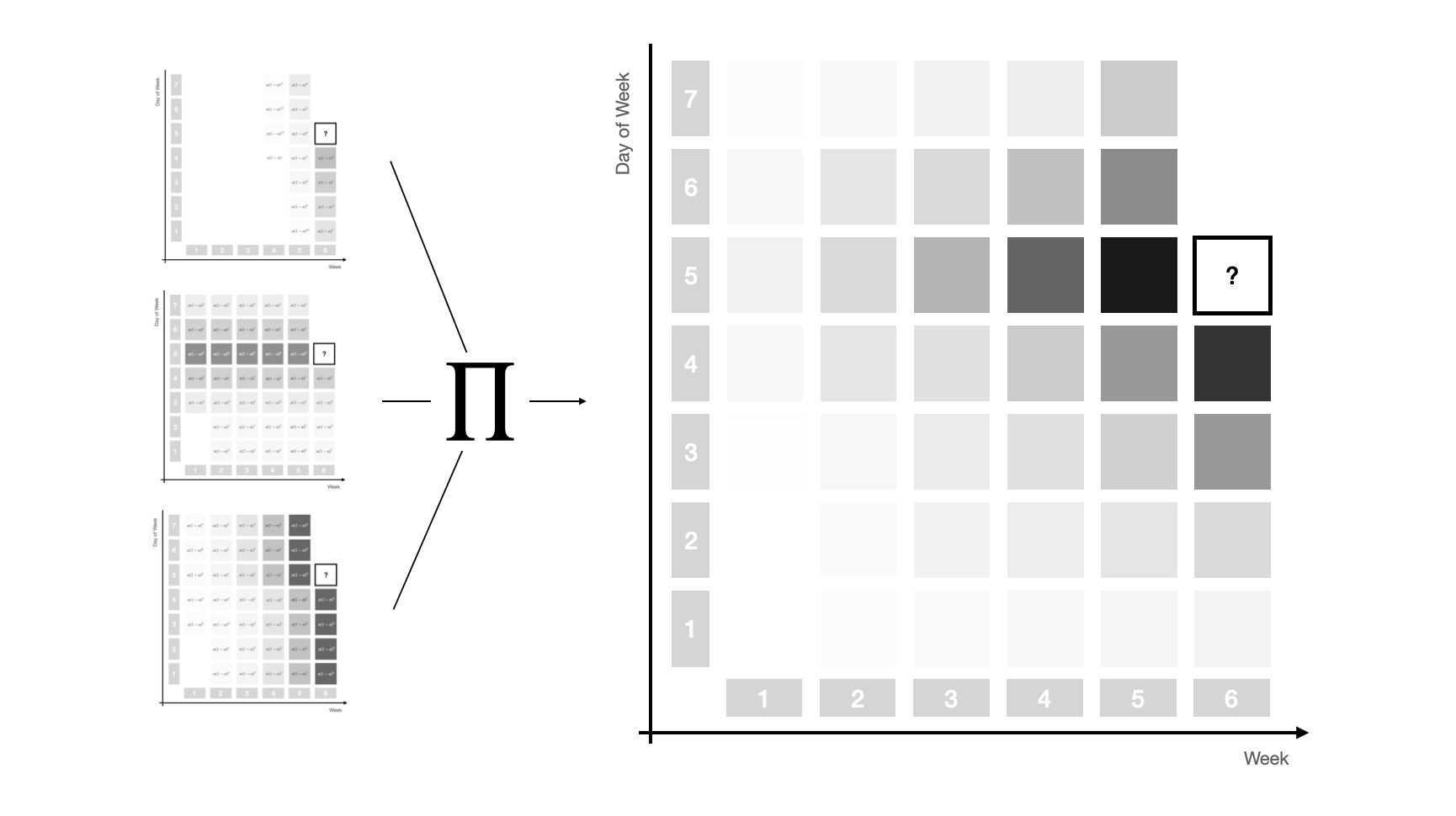
This three-dimensional exponential weighting structure captures the most important simple forecast methods as special cases. To make precise which set of parameters leads to which special case, let’s define a specific set of weights by the triplet $(\alpha, \alpha_{s}, \alpha_{sd})$.
Then, taking the average of weighted observations recovers
- the Naive method when all weight is assigned to the most recent observation $(1, 0, 0)$
- the Mean method when equal weight is assigned to all observations $(0, 0, 0)$,
but due to the additional seasonal structures it now also recovers
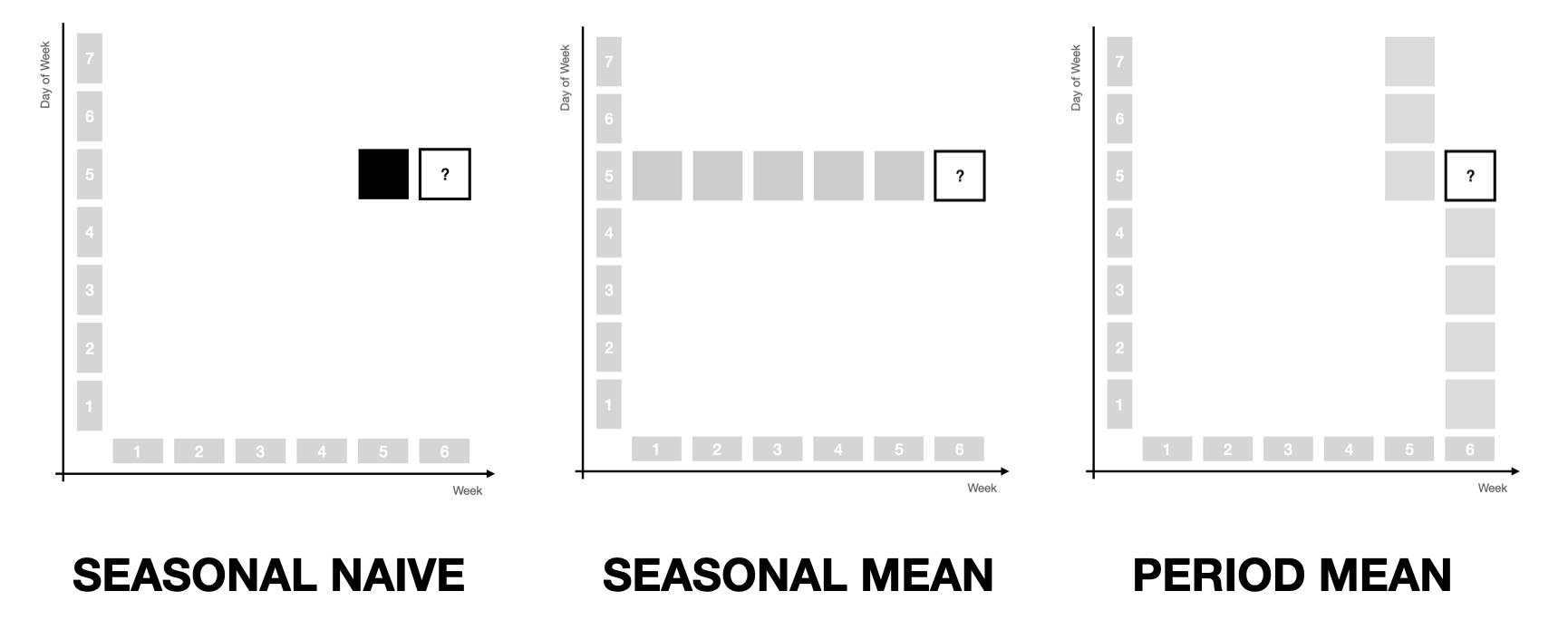
- the Seasonal Naive method when all weight is assigned to the observation a year ago $(0, 1, 1)$
- the Seasonal Mean method when equal weight is assigned to only the same months in the past $(0, 1, 0)$
- the Latest Period Mean method when equal weight is assigned to only observations from the twelve most recent months $(0, 0, 1)$.
The three latter cases are illustrated below.
Characteristics of the Model Family
What’s neat about this generalization of simple forecast methods is how the models built from the three parameter structure maintain the advantages of the simple methods that are found at the edges of the parameter space.
The reason for this is that we only apply weights to past observations in order to derive weighted average predictions.
For one, this implies that the models are robust in that they won’t predict outside the observed range of observations. In fact, you can think of them as regularized, stationary infinite-order AR models. While this is limiting when time series have sustained trends as their dominating signal, it also means that models won’t project a trend into the future by mistake. Depending on your data and the level of automation, this can be preferable.
For another, any model in this family of models is perfectly interpretable. In fact, all you need to understand how a prediction is formed is to look at the weights allocated to past observations. It doesn’t get more interpretable than that. Even ETS models are hard to understand in comparison: Which observations made us predict that trend into the future again?
Finally, the three-dimensional exponential weights structure enables a range of possible adaptations.
For example, instead of creating probabilistic sample paths from a parametric distribution fitted to residuals (as is usual for the simple forecast methods mentioned before, as well as ARIMA and ETS, but also DeepAR in a sense), sample paths can also be drawn as a non-parametric bootstrap from the weighted observations, which can be helpful for intermittent and low-count data. This has been described in Gasthaus (2016) and Alexandrov et al. (2019) for the Non-Parametric Time Series Forecaster (NPTS) that is also available in AWS Forecast and GluonTS. In fact, the NPTS model can be described by the $(\alpha, 0, 0)$ and $(0, 1, \alpha)$ model specifications, depending on whether the non-seasonal or seasonal version is used.
Also, due to the parameter space’s simplicity, even brute force evaluation of parameter combinations is feasible to fit models. While a bit slower, it allows the use of any kind of loss function when fitting the model.
Implementation of the Model Family in Threedx
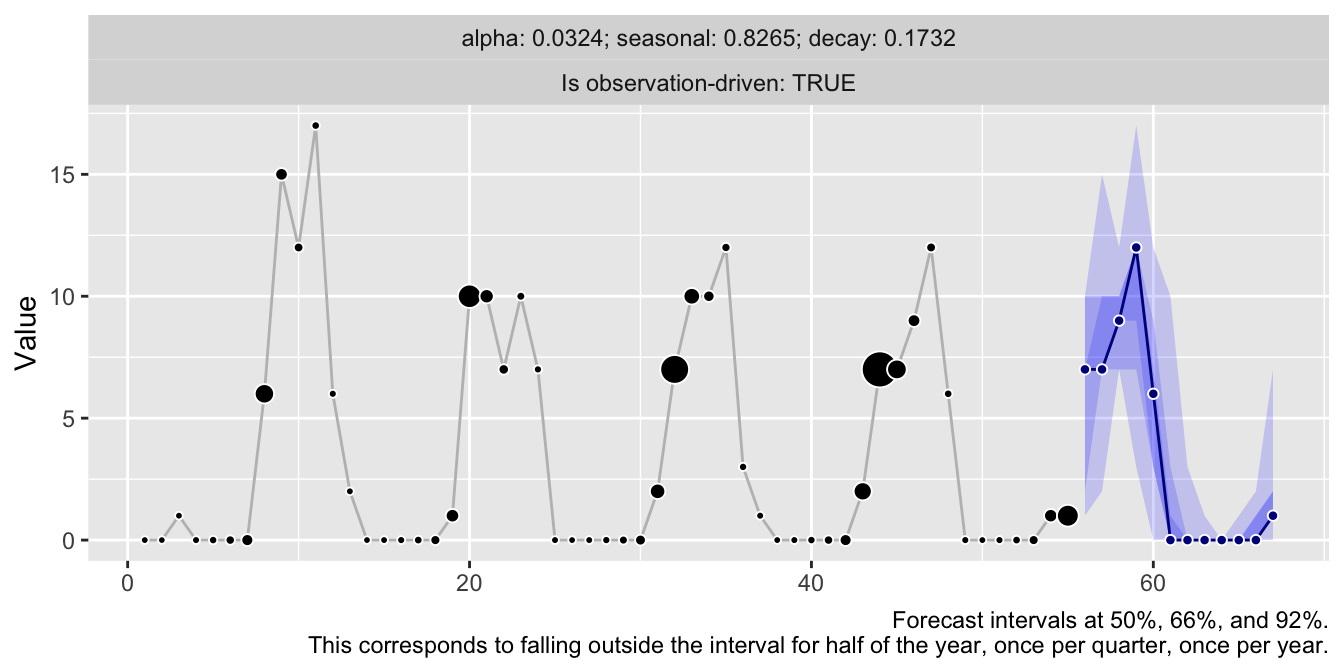
Have a look at the threedx repository for an implementation and check out the corresponding website for more details and examples of how this model family based on weighting past observations can be used to forecast time series.
library(threedx)

y <- rpois(
  n = 55,
  lambda = pmax(0.1, 1 + 10 * sinpi(6:59 / 6))
)

model <- threedx::learn_weights(
  y = y,
  period_length = 12L,
  alphas_grid = threedx::list_sampled_alphas(
	n_target = 1000L,
	include_edge_cases = TRUE
  ),
  loss_function = loss_mae
)

forecast <- predict(
  object = model,
  horizon = 12L,
  n_samples = 2500L,
  observation_driven = TRUE
)

autoplot(forecast)
References
Alexander Alexandrov, Konstantinos Benidis, Michael Bohlke-Schneider, Valentin Flunkert, Jan Gasthaus, Tim Januschowski, Danielle C. Maddix, Syama Rangapuram, David Salinas, Jasper Schulz, Lorenzo Stella, Ali Caner Türkmen, Yuyang Wang (2019). GluonTS: Probabilistic Time Series Models in Python. https://arxiv.org/abs/1906.05264
Jan Gasthaus (2016). Non-parametric time series forecaster. Technical report, Amazon, 2016.
Rob J. Hyndman, Anne B. Koehler, Ralph D. Snyder, and Simone Grose (2002). A State Space Framework for Automatic Forecasting using Exponential Smoothing Methods. https://doi.org/10.1016/S0169-2070(01)00110-8
Vincent Warmerdam (2018). Winning with Simple, even Linear, Models. PyData London 2018. https://youtu.be/68ABAU_V8qI?feature=shared&t=286
P. R. Winters (1960). Forecasting Sales by Exponentially Weighted Moving Averages. https://doi.org/10.1287/mnsc.6.3.324
-
And, of course, subsequent standardization so they continue to sum to 1. ↩︎
Legible Forecasts, and Design for Contestability
Posts / 31 August, 2022
Some models are inherently interpretable because one can read their decision boundary right off them. In fact, you could call them interpreted as there is nothing left for you to interpret: The entire model is written out for you to read.
For example, assume it’s July and we need to predict how many scoops of ice cream we’ll sell next month. The Seasonal Naive method tells us:
AS 12 MONTHS AGO IN August, PREDICT sales = 3021.
Slightly more complicated but with rules that are fitted on past data, this is what a Rule List could look like:
	 IF month IS June   THEN PREDICT sales = 5000,
ELSE IF month IS July   THEN PREDICT sales = 5900,
ELSE IF month IS August THEN PREDICT sales = 3050,
ELSE                         PREDICT sales = 1500.
The models are interpretable because their function $f_{\theta}(x)$ is human-readable. The function is put into words, literally. This makes it possible to understand why a value is predicted, and it makes it possible to disagree with a prediction. A stakeholder could challenge it:
Yes, 3050 is a good estimate, but this August we run a discount code in our podcast advertisements for the first time ever, which is not taken into account by the model. Thus we should be prepared for increased sales of up to 4000 scoops of our delicious ice cream.
Users of interpretable methods can contest predictions because the models are legible. This is important, because methods that can be contested can also be trusted—basically every time you inspect the prediction and don’t find a reason to contest. I haven’t seen the terms “legible” and “contestability” mentioned a lot if at all in the usual machine learning literature around ethics, explainability, and trustworthiness. Instead a paper by Hirsch et al. on PubMed used them to describe a machine learning system built for mental health patients and practicioners. If you want others to trust and act on your model’s predictions, I think these are great characteristics to strive for.
Unfortunately, compared to the examples above, structural time series models aren’t legible. Or what do you call the following?
$$ y_{t} = \mu_t + \tau_t + \epsilon_t, \quad \epsilon_t \sim N(0, \sigma) $$$$ \mu_{t+1} = \mu_t + \delta_t + \eta_{\mu,t}, \quad \eta_{\mu,t} \sim N(0, \sigma_{\mu}) $$
$$ \delta_{t+1} = D + \phi(\delta_t - D) + \eta_{\delta,t}, \quad \eta_{\delta,t} \sim N(0, \sigma_{\delta}) $$
$$ \tau_{t+1} = - \sum_{s=1}^{S-1} \tau_t + \eta_{\tau, t}, \quad \eta_{\tau,t} \sim N(0, \sigma_{\tau}) $$
Sure, structural time series models are interpretable. That’s because they are made of a set of parameters where every parameter serves a predefined purpose. But it will take considerable effort and background knowledge to interpret not just individual parameters but all of them together to understand why the model predicts 3309 scoops of ice cream for August.
What though if we could write an interpreter for the coefficients? Not an explanation model that approximates the fitted model, but a function that puts the fitted parameters into words—again, the goal is legibility.
Let’s give it a shot.
Fit the Model
I will use the model described by the equations above for this. It’s implemented in the bsts package in R, and corresponds to the specification with semilocal linear trend and seasonal effects.
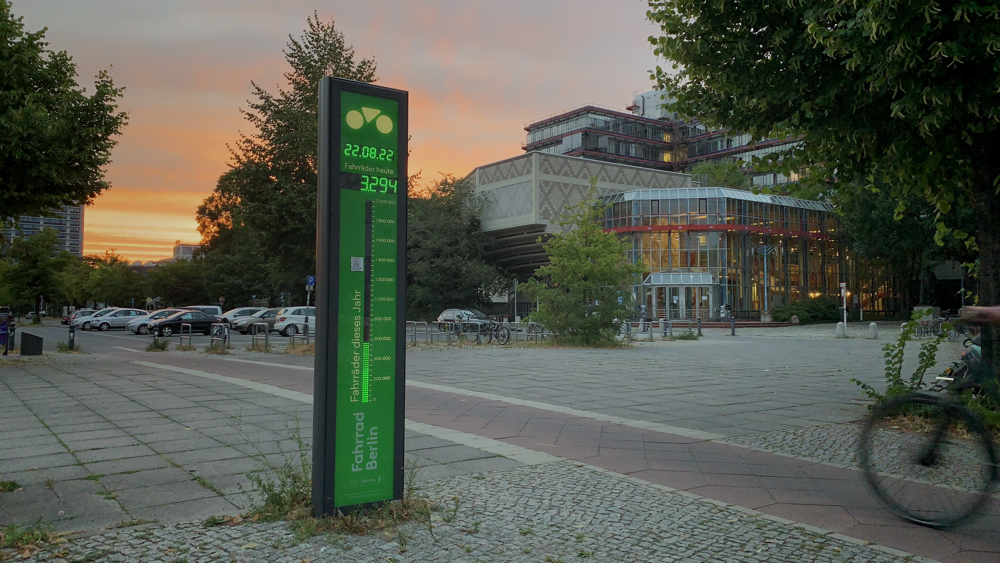
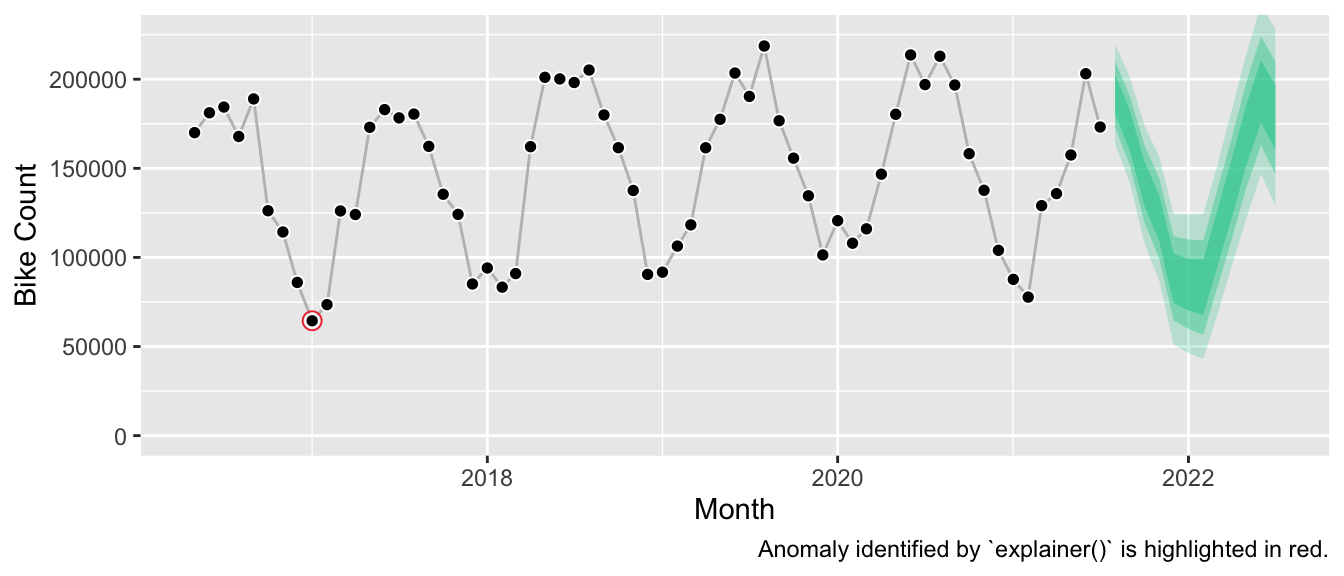
Let’s fit this model against monthly counts of bikes that passed the publicly available counter station at Maybachufer in Berlin; I aggregated the hourly data from the original dataset made available by the “Berlin Senatsverwaltung für Umwelt, Mobilität, Verbraucher- und Klimaschutz” on their website.1 It’s a smooth series of about five years history if we cut it off after June 2021 to keep a holdout year:
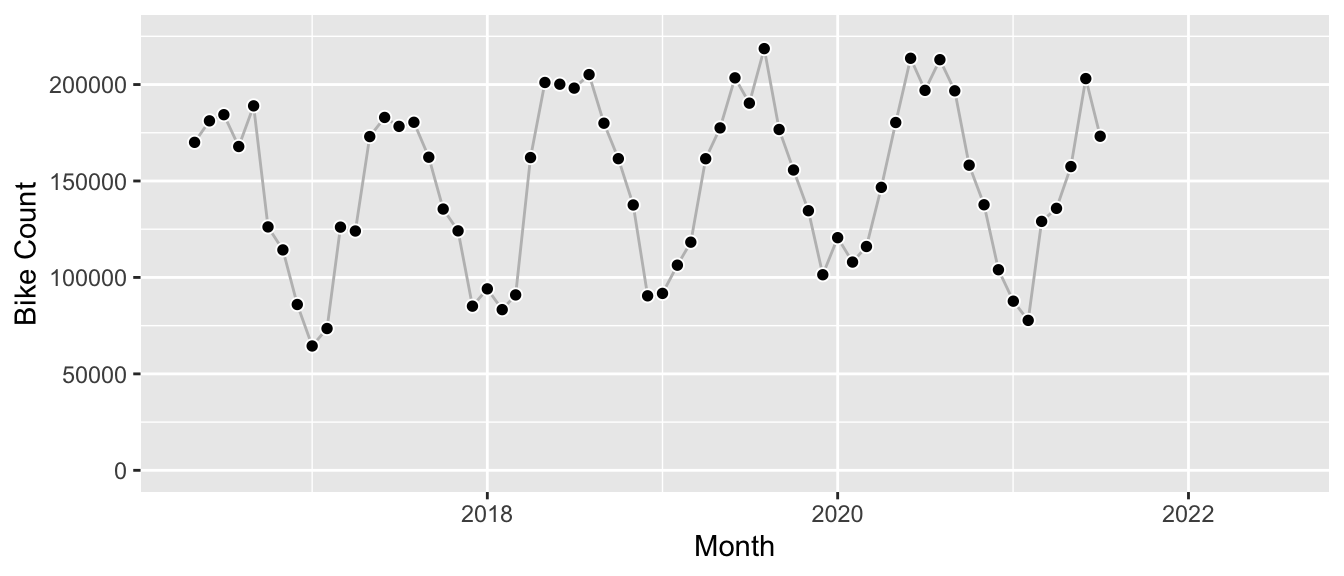
We construct the model by combining the semilocal linear trend with the monthly seasonality and fit it using the vector of the time series.
y <- df[df$date < as.Date("2021-08-01"), ]$n_bikes

state_spec <- bsts::AddSeasonal(
  state.specification = list(),
  y = y,
  nseasons = 12
)

state_spec <- bsts::AddSemilocalLinearTrend(
  state.specification = state_spec,
  y = y
)

bsts_fit <- bsts::bsts(
  formula = y,
  state.specification = state_spec,
  ping = 0,
  niter = 6000,
  seed = 7267
)
At this point we haven’t called predict() to produce a forecast. All we have are the fitted parameters of the model hidden in the bsts_fit object.2 Let’s plug them into our equation to print the model in the best form available out-of-the box:
$$ \mu_{t+1} = \mu_t + \delta_t + \eta_{\mu,t}, \quad \eta_{\mu,t} \sim N(0, 411) $$
$$ \delta_{t+1} = -1.86 + -0.59 \cdot (\delta_t + 1.86) + \eta_{\delta,t}, \quad \eta_{\delta,t} \sim N(0, 8866) $$
$$ \tau_{t+1} = \sum_{s=1}^{11} \tau_t + \eta_{\tau, t}, \quad \eta_{\tau,t} \sim N(0, 141) $$
$$ \mu_T = 136570, \quad \delta_T = 3388 $$
$$ \tau_T = 39881, \quad \sum_{s=1}^{11} \tau_{T-s+1} = 51118 $$
Well. I mean, one can interpret this. But would one show this as part of a user interface? Ask business stakeholders to make sense of it? Probably not. Can I type the values into a calculator and get the prediction for next month? Yes. Do I want to? No.
Make the Model Legible
Let’s try something different. In comparison to the numerical parameter values, a semantic representation should be much easier to parse. If there is one thing we can parse well, it’s text.3
The following function generates such legible representation of the fitted model, describes how the model puts the forecast together, and summarizes miscellaneous information such as comparison against benchmarks and detected anomalies.
Note that the paragraphs up to the horizontal divider below are automatically generated text returned by the function, based on the specifics of the model it received as input.
# devtools::install_github("timradtke/explainer")

explanation <- explainer::explain(
  object = bsts_fit,
  burn = 1000,
  seasonality = 12,
  start_period = 5
)
print(explanation)
The chosen model takes into account seasonality and allows for a long-run trend with short-term fluctuation around the trend.
The model explains most of the observed variation in the series at hand. This indicates that the series contains signals such as trend or seasonality, but it doesn’t guarantee that the model’s forecast projects them appropriately into the future.
Historically, the model has predicted the series at hand better than both the current year’s runrate, and the value from a year ago.
The current level of the series is lower than the average level observed in the history of the series, and lower than a year ago. The current level is neither clearly decreasing nor clearly increasing.
The model estimates a strong seasonal component in the series which will be projected into the future.
The model does not predict a clear upward or downward long-run trend.
The series’ seasonality is expected to push up next month’s observation, similar to a year ago.
Both observation noise and changes of the level of the series contribute to the forecast uncertainty. The level of the time series fluctuated historically both due to noise and due to changes in the trend.
Over the course of the series, there has been a single anomaly 4.5 years ago.
This model representation isn’t as succinct as the set of equations. But you can read it from top to bottom. There’s no need to jump back and forth to grasp the size of the seasonal effect. It describes the characteristics of the fitted structural time series model without asking the reader to know what a structural time series model is. By doing so, it makes the model legible (literally), and contestable: For example, the model does not project a long-term trend (even though the model family allows for it). Given subject matter expertise, this could be challenged. Maybe 2020 and 2021 are unusual for some reason, and the upward behavior of the years prior will eventually continue.
What’s hidden in the function definition of explainer(), is that this interpretation relies on arbitrary thresholds. I purposely avoided printing any numbers to indicate the strength of model components. Consequently, it’s not left to the reader to determine whether the model shows a long term trend, whether the level is expected to increase, and which source of uncertainty is the strongest. It’s based on predefined cutoffs.
However, this allows us to play a bit with the information that is provided by the model object. Instead of purely interpreting the model parameters, one can expose how the model’s training (!) error compares to simple benchmarks like the seasonal naive method. If it compared unfavorably, this would presumably indicate that the model should not be relied upon. Similarly, the in-sample errors are used to identify potentially anomalous observations.4 Given the smooth bike counts, this isn’t as relevant here. But it could be valuable information to the user if a recent observation was unexpectedly large.
The Forecast
Finally, to complete the picture: The corresponding forecast looks as follows.
References
Tad Hirsch, Kritzia Merced, Shrikanth Narayanan, Zac E. Imel, David C. Atkins (2017). Designing Contestability: Interaction Design, Machine Learning, and Mental Health. DIS (Des Interact Syst Conf).
Fulton Wang, Cynthia Rudin (2015). Falling Rule Lists. Proceedings of the Eighteenth International Conference on Artificial Intelligence and Statistics.
Berlin Senatsverwaltung für Umwelt, Mobilität, Verbraucher- und Klimaschutz. Ergebnisse der automatischen Radzählstellen (Jahresdatei). 2021-12-31. Data licence Germany – attribution – version 2.0.
-
Their Excel file appears to be updated once a year which means the data for 2022 is not yet available. One can see the latest data on their interactive map. ↩︎
-
As we used Bayesian inference, we don’t have a fitted parameter, but samples from parameters’ posterior distributions derived via MCMC. I will not mention it in the rest of the article and only show the posterior median. ↩︎
-
Okay, after visual representations. ↩︎
-
See also the documentation of
bsts::bsts.prediction.errrors(). ↩︎
Where Is the Seasonal Naive Benchmark?
Posts / 30 August, 2022
Yesterday morning, I retweeted this tweet by sklearn_inria that promotes a scikit-learn tutorial notebook on time-related feature engineering. It’s a neat notebook that shows off some fantastic ways of creating features to predict time series within a scikit-learn pipeline.
There are, however, two things that irk me:
- All features of the dataset including the hourly weather are passed to the model. I don’t know the details of this dataset, but skimming what I believe to be its description on the OpenML repository, I suspect this might introduce data leakage as in reality we can’t know the exact hourly humidity and temperature days in advance.
- There is no comparison against the simplest benchmark method, the one predicting the value from a week ago (the seasonal naive method). Given the daily and weekly seasonality, it should be possible to capture a ton of signal by predicting the same number of bike rentals that were observed a week ago.
To be clear, I don’t think it’s the responsibility of a scikit-learn tutorial to be all encompassing. It’s created to show off scikit-learn features. That’s what it does, and that’s fine. But here we can have some fun, so let’s see how far we can get when we drop the weather-related columns, and by using the simplest of benchmarks only.
To start off, let’s do a bit of a speed run through the pipeline setup used in the original notebook.
First Look at the Bike Sharing Data
The data used in the notebook are bike sharing demand observed as hourly time series for a period of about two years in 2011 and 2012. In contrast to other datasets of its kind, this dataset consists of a single series. The tutorial loads it from the OpenML repository:
from sklearn.datasets import fetch_openml

bike_sharing = fetch_openml("Bike_Sharing_Demand", version=2, as_frame=True)
df = bike_sharing.frame
To take a sneak peek at what the time series looks like, the tutorial computes the average hourly demand over observed across the entire dataset:
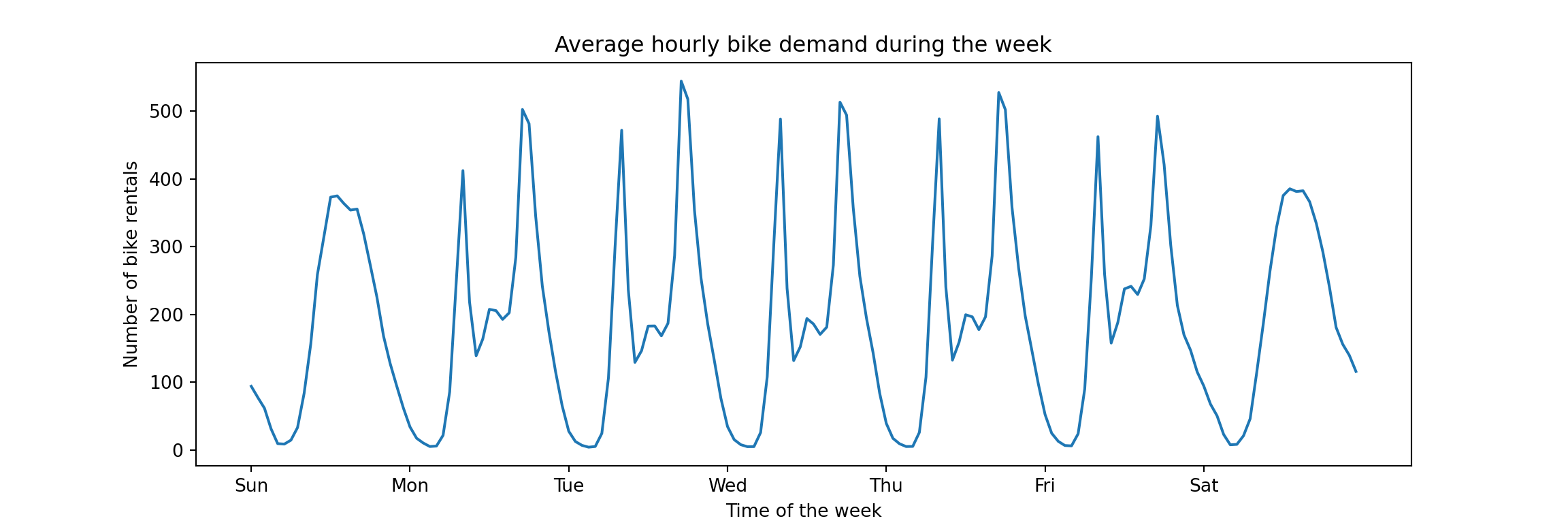
Unsurprisingly, the bike sharing demand is highly seasonal. There is a within-day pattern that repeats on weekdays corresponding to demand from commuters. Also, weekends are clearly distinct from weekdays but likely similar across weekends (in theory this is not visible from this plot, but…). Absent any drastic trends, and ignoring the slower yearly seasonality given that we will focus on short-term forecasts, most of the signal from one week to the next will come from the daily and weekly seasonality. Any model we use should be designed to capture it. And that’s what the tutorial does, it demonstrates different ways to capture the seasonal patterns via feature engineering.
While most of the feature engineering is done to reduce the error of linear regression-based models, the best model of the tutorial turns out to be the gradient boosting model that is evaluated first and uses none of the fancy transformations. That’s the model we focus on now.
Setup of the Original Gradient Boosting Pipeline
First, the target column count is standardized by dividing by the largest observation. Thus we don’t predict the count of bike rentals directly, but the share of the largest possible hourly demand. This means that a mean absolute error of 0.01 corresponds to 1pp difference from the actually observed percent of maximum demand. The transformed column is assigned to y, then dropped from the dataframe to create the feature matrix X.
y = df["count"] / df["count"].max()
X = df.drop("count", axis="columns")
The initial model matrix consists of the following features (the range shown here is a bit misleading for the categorical columns). Note the weather-related columns such as temp, humidity, and windspeed. These are the problematic features mentioned in the introduction.
for col in X.columns:
	print(f"'{col}' with values in [{min(X[col])}, {max(X[col])}]")
As heavy_rain was a rare occurence, it’s grouped together with rain.
X["weather"].replace(to_replace="heavy_rain", value="rain", inplace=True)
The tutorial uses a time series cross validation with five splits and a gap between train and validation of 48 hours. This gap of 48 hours is what we’ll use as the definition of the necessary lag between the moment of creating the prediction, and the moment that we predict. For example, if we need to schedule 48 hours in advance the number of bikes brought into circulation from repairs, then we can’t wait to observe the demand at 3pm today to plan for tomorrow’s demand. Instead, the latest information we can take into account is the demand observed yesterday, 48 hours in advance.
Thus, we won’t consider a daily seasonal naive model that projects the observation from 24 hours ago into the future. And because of this lag, the weather columns are somewhat unrealistic. But more on this in a moment.
We define the splits, each of which evaluates on a test set of about 42 days.
from sklearn.model_selection import TimeSeriesSplit

ts_cv = TimeSeriesSplit(
	n_splits=5,
	gap=48,
	max_train_size=10000,
	test_size=1000,
)

all_splits = list(ts_cv.split(X, y))

# this split is used to plot predictions from the models below
train_0, test_0 = all_splits[0]
The splits will be used to evaluate the model pipelines. For that, an evaluation helper is defined that uses both MAE and RMSE as metrics.
def print_metrics(mae, rmse):
  print(
		f"Mean Absolute Error:     {mae.mean():.3f} +/- {mae.std():.3f}\n"
		f"Root Mean Squared Error: {rmse.mean():.3f} +/- {rmse.std():.3f}"
	)

def evaluate(model, X, y, cv):
	cv_results = cross_validate(
		model,
		X,
		y,
		cv=cv,
		scoring=["neg_mean_absolute_error", "neg_root_mean_squared_error"],
	)
	mae = -cv_results["test_neg_mean_absolute_error"]
	rmse = -cv_results["test_neg_root_mean_squared_error"]
	print_metrics(mae, rmse)
Next, the tutorial defines the pipeline object (note the inclusion of the weather column).
import numpy as np
import matplotlib.pyplot as plt
from sklearn.pipeline import make_pipeline
from sklearn.preprocessing import OrdinalEncoder
from sklearn.compose import ColumnTransformer
from sklearn.ensemble import HistGradientBoostingRegressor
from sklearn.model_selection import cross_validate

categorical_columns = [
	"weather",
	"season",
	"holiday",
	"workingday",
]
categories = [
	["clear", "misty", "rain"],
	["spring", "summer", "fall", "winter"],
	["False", "True"],
	["False", "True"],
]
ordinal_encoder = OrdinalEncoder(categories=categories)

gbrt_pipeline = make_pipeline(
	ColumnTransformer(
		transformers=[
			("categorical", ordinal_encoder, categorical_columns),
		],
		remainder="passthrough",
	),
	HistGradientBoostingRegressor(
		categorical_features=range(4),
	),
)
And finally the cross validation performance is being evaluated. Note that we pass the entire model matrix X here—including columns describing the hourly temperature, humidity, and wind speed!
evaluate(gbrt_pipeline, X, y, cv=ts_cv)
This reproduces the performance shown in the tutorial notebook exactly, perfect. Given the standardization that was applied on the series, the mean absolute error corresponds to an error of about 4.4% of the highest hourly demand observed across the time period. Given the maximum of 977 hourly bike rentals, that’s an error of about 42 bike rentals.
Let’s drop the weather-related features and evaluate again.
Gradient Boosting Without Weather Features
We define the pipeline as before, dropping weather from the categorical columns and then explicitly selecting columns from X to not pass through the temperature, humidity, and wind speed. We only keep the columns for which we can know the values in advance.
categorical_columns_no_weather = [
	"season",
	"holiday",
	"workingday",
]
categories_no_weather = [
	["spring", "summer", "fall", "winter"],
	["False", "True"],
	["False", "True"],
]
ordinal_encoder_no_weather = OrdinalEncoder(categories=categories_no_weather)

gbrt_no_weather_pipeline = make_pipeline(
	ColumnTransformer(
		transformers=[
			("categorical", ordinal_encoder_no_weather, categorical_columns_no_weather),
		],
		remainder="passthrough",
	),
	HistGradientBoostingRegressor(
		categorical_features=range(3),
	),
)

X_no_weather = X[
  ['season', 'year', 'month', 'hour', 'holiday', 'weekday', 'workingday']
]
Evaluate the new pipeline on the same time series splits:
evaluate(gbrt_no_weather_pipeline, X_no_weather, y, cv=ts_cv)
The MAE increased by 1.8pp. Note also the increase in the standard deviation across splits. The performance clearly worsened, but still isn’t too shabby given that we didn’t put much effort into building this model.
Can we get away with even less work?
Comparison with Seasonal Naive Method
Given that the data has several seasonal effects (daily, weekly, yearly), there is no one way to set up a seasonal naive prediction: We could use the value from 24 hours ago, the value from a week ago (168 hours), or even a mix of the two.1 As desribed above, we’ll focus on the weekly seasonal naive prediction due to the gap of 48 hours between train and test sets. A lag of one week is anyway more realistic for operational decisions.
Given the simplicity of the seasonal naive method, we just need to shift the label series. Since the cross validation splits use a gap of 48 hours that is smaller than our lag, we don’t need to do this for each cross validation split. We can do it once across the entire data set and still don’t introduce target leakage.2
snaive = y.shift(168)
print(snaive[165:172])
A custom cross validation loop gives us the performance of the seasonal naive method (i.e., of the new column) compared to the target, on the same splits that we used for the gradient boosting models.
mae = np.empty(5)
rmse = np.empty(5)

for i in range(5):
	_, test_idx = all_splits[i]
	mae[i] = np.mean(np.abs(
	  y.iloc[test_idx].values - snaive.iloc[test_idx].values
	))
	rmse[i] = np.sqrt(np.mean(np.square(
	  y.iloc[test_idx].values - snaive.iloc[test_idx].values
	)))

print_metrics(mae, rmse)
How is that for a one-liner: 7.3% mean absolute error compared to the 6.2% of the gradient boosted trees model without weather features. Given that the seasonal naive method requires neither code nor infrastructure, and is inherently interpretable, one has to check the details of the business case whether any other method is worth the effort. A large chunk of the time series’ signal is already captured by this method.
Then again, the gradient boosted trees pipeline we compare against is the simplest version possible and only served as baseline in the tutorial. It could likely be improved further.
But the dataset at hand is also quite simple. Real use cases would likely have multiple series and require uncertainty quantification, thus increasing the effort going into building a model. This makes it even more important to compare against the simplest of benchmarks.
We can round this analysis off by plotting the predictions and errors of the models, similar to what was done in the scikit-learn notebook.
Graph of Predictions Over Time
We generate predictions for the first test set as defined by the cross validation split.
gbrt_pipeline.fit(X.iloc[train_0], y.iloc[train_0])
gbrt_predictions = gbrt_pipeline.predict(X.iloc[test_0])

gbrt_no_weather_pipeline.fit(X_no_weather.iloc[train_0], y.iloc[train_0])
gbrt_no_weather_predictions = gbrt_no_weather_pipeline.predict(
  X_no_weather.iloc[test_0]
)

snaive_predictions = snaive.iloc[test_0].values
Those we can then use to visualize the last week of the test set:3
last_hours = slice(-168, None)
fig, ax = plt.subplots(figsize=(12, 4))
fig.suptitle("Predictions by models and naive method")
ax.plot(
	gbrt_predictions[last_hours],
	"x-",
	label="Gradient Boosted Trees",
)
ax.plot(
	gbrt_no_weather_predictions[last_hours],
	"x-",
	label="Gradient Boosted Trees without Weather",
)
ax.plot(
	snaive_predictions[last_hours],
	"x-",
	label="Weekly Seasonal Naive",
)
ax.plot(
	y.iloc[test_0].values[last_hours],
	"x-",
	alpha=0.5,
	label="Actual demand",
	color="black",
)
_ = ax.legend()
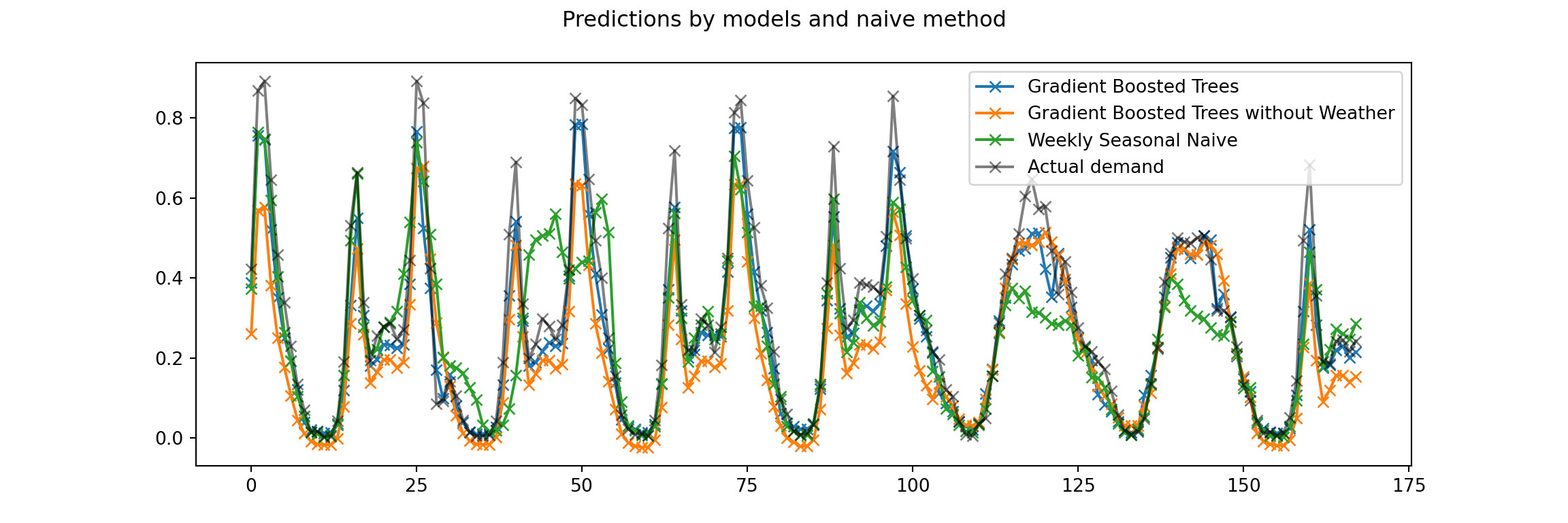
While the graph is a bit busy, the seasonal patterns are clear. While the gradient boosted trees model without the weather information underestimates the demand on most of the weekdays and isn’t able to predict the rush-hour peaks, the seasonal naive does a bit better in these respects. But it also makes larger errors on this weekend in particular, presumably due to a very different previous weekend.
To compare more than just a week of predictions against actuals, we can use a scatterplot.
Graph of Predictions Against Actuals
The graph of predictions over time is great to see the actual behavior of the time series. But consistent problems can become apparent in a scatterplot of all predictions against realized values for the current test set. The predictions from a perfect model would fall on the diagonal line, any deviation from it is the error of the prediction.
fig, axes = plt.subplots(ncols=3, figsize=(12, 4), sharey=True)
predictions = [
	gbrt_predictions,
	gbrt_no_weather_predictions,
	snaive_predictions,
]
labels = [
	"GBT",
	"GBT without Weather",
	"Seasonal Naive",
]
for ax, pred, label in zip(axes, predictions, labels):
	ax.scatter(y.iloc[test_0].values, pred, alpha=0.3, label=label)
	ax.plot([0, 1], [0, 1], "--", label="Perfect model")
	ax.set(
		xlim=(0, 1),
		ylim=(0, 1),
		xlabel="True demand",
		ylabel="Predicted demand",
	)
	ax.legend()

plt.show()
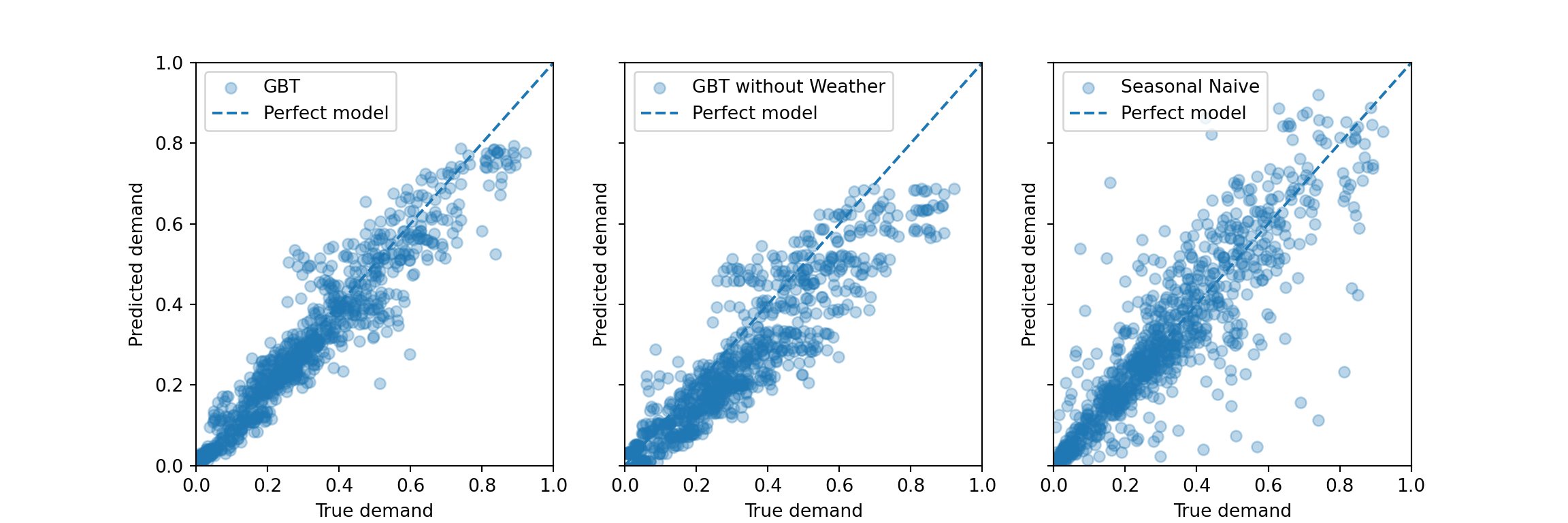
As discussed in the tutorial notebook, the gradient boosted trees models systematically underestimate the peak demand. For the model without weather information, this also appears to hold for the range of lower demand—similar to what is visible in the graph of demand over time above.
In comparison, the seasonal naive method appears to make some errors that are larger in absolute size, but it doesn’t systematically under- or overestimate. This makes sense as its predictions adjust entirely from week to week: A too large prediction in one week tends to imply a too low prediction the week thereafter if the data is noisy around some average level. Then the seasonal naive method is low bias, high variance. A bias would easily be introduced by a strong trend that persisted over time in the series, though.
-
For example, using observations from a week ago for weekends, but observations from a day ago for weekdays—to represent the difference between them. Mondays would have to count as weekends. ↩︎
-
The original cross validation setup predicts 42 days into the future. While the gradient boosting models don’t see the target test period, we need to assume for the current seasonal naive implementation that we only have to forecast at most 5 days into the future: We use the last week of the training period to predict the first week of the test period, and then use the first week of the test period to predict the next week of the test period. Maybe a future blog post can evaluate how well a seasonal naive model would perform if we used the last week of the train period to forecast the entire test period. ↩︎
-
The scikit-learn notebook showed the last four days, but I prefer to show a bit more data from an entire week period. It makes the plot more busy though. ↩︎
When Quantiles Do Not Suffice, Use Sample Paths Instead
Posts / 25 July, 2022
I don’t need to convince you that you should absolutely, to one hundred percent, quantify your forecast uncertainty—right? We agree about the advantages of using probabilistic measures to answer questions and to automate decision making—correct? Great. Then let’s dive a bit deeper.
So you’re forecasting not just to fill some numbers in a spreadsheet, you are trying to solve a problem, possibly aiming to make optimal decisions in a process concerned with the future. Then please, before you start to forecast, ask yourself the following: “Does my problem concern a single time period, or does it span multiple periods?”
This is a crucial question. Depending on your answer, you’ll either be fine with marginal forecast distributions, or you’ll have to take it a step further and estimate useful forecast joint forecast distributions.
Marginal Forecast Distributions
Marginal forecast distributions, summarized to a handful of quantiles, look like this:
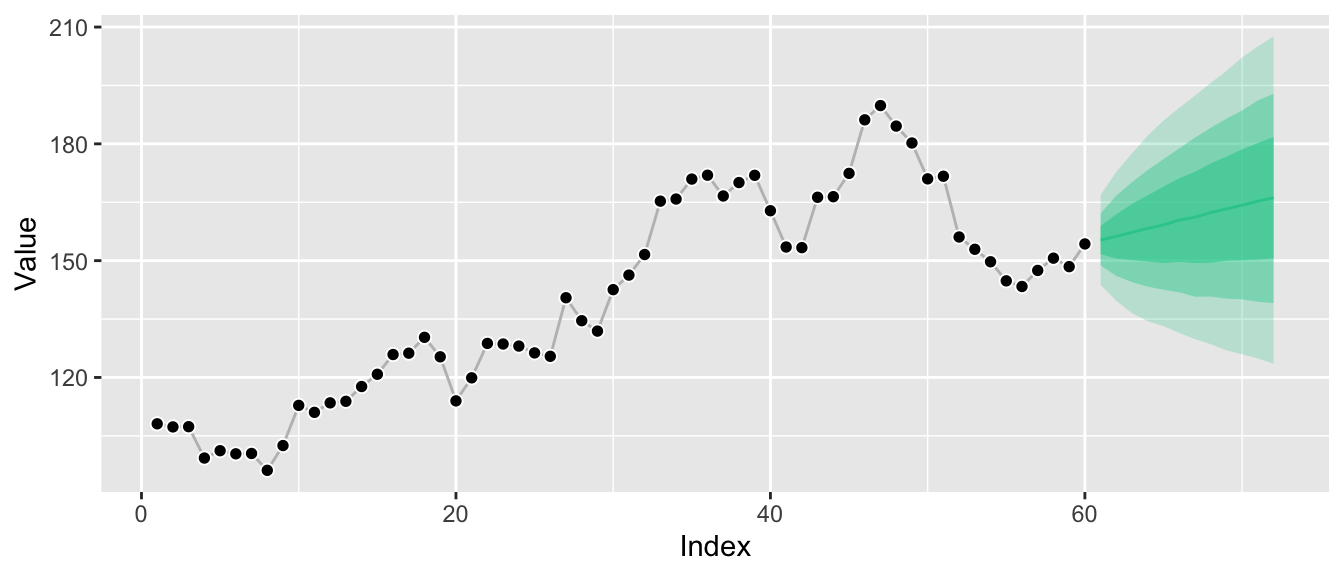
While this kind of visualization is extremely common, it hides the fact that we only know the distributions at the individual points in time, not how they relate to each other. A more honest visualization might be something along these lines:
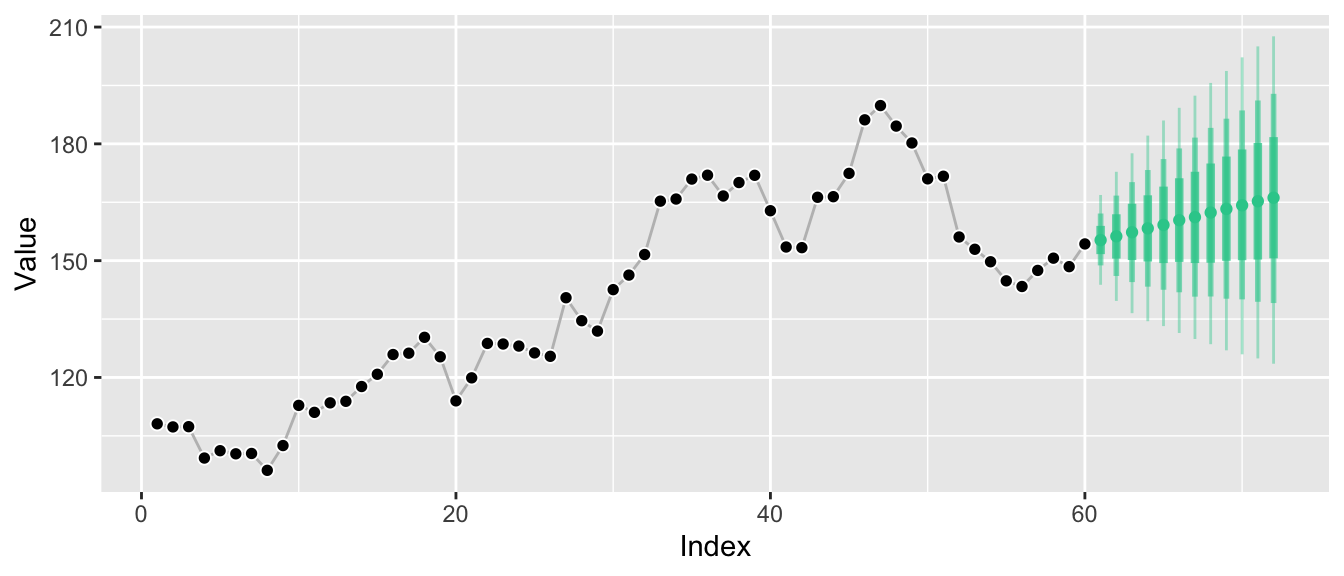
Marginal forecast distributions describe the probability of outcomes at a single point in time. If you sample observations at a monthly frequency, a marginal forecast distribution describes possible outcomes for a single month. If you sample observations for your time series every hour, a marginal forecast distribution describes possible outcomes for a given hour. Of course you can have marginal forecast distributions for several months or hours. But they don’t tell you how January relates to February.
Marginal forecasts can answer questions such as:
- “How likely is it that the wind turbine can cover the electricity load in the next hour without us activating the coal plant?”
- “Do I need to buy additional beach chairs to be able to offer one to 95% of my hotel guests that ask for one today?”
It’s easy to believe that marginal forecast distributions are the only forecast distributions there are. After all, in many cases forecast quantiles are the default output of forecast libraries1 and all you need in forecasting competitions (if at all). And as in electricity load forecasting, sometimes marginal forecast distributions really are all that’s needed to solve a problem.
But there are common problems in which one needs to quantify uncertainty across multiple time periods, flexibly. Problems in which the question is inter-temporal. To answer questions as simple as “How likely is it that the weather is going to be hot both tomorrow and the day after tomorrow?” we need joint forecast distributions.
Joint Forecast Distributions
Whereas marginal forecast distributions quantify the uncertainty of an outcome $Y_{t_i}$ at a single time period $t_i$, joint forecast distributions do so for the outcomes $Y_{t_i}$, $Y_{t_j}$, … at multiple future time periods $t_i$, $t_j$, … The graphs above have visualized the marginal distributions $P(Y_{T+1} | Y_{T}, Y_{T-1}, ...)$, $P(Y_{T+2} | Y_{T}, Y_{T-1}, ...)$, and so on. Since these are separate distributions, it was illustrative to turn the ribbon graph into separate vertical lines, each representing one of the marginal distributions.
Now, however, we turn our attention to one big joint distribution over all future time periods of interest: $P(Y_{T+1}, Y_{T+2}, ... | Y_{T}, Y_{T-1}, ...)$. The main selling point of joint distributions is that they not only tell us how future periods relate to the past, but also describe how future periods relate to each other. Given their inherent high dimensionality (were often interested in more than 2 forecast horizons), however, it’s difficult to visualize the relationships implied by the joint distribution.
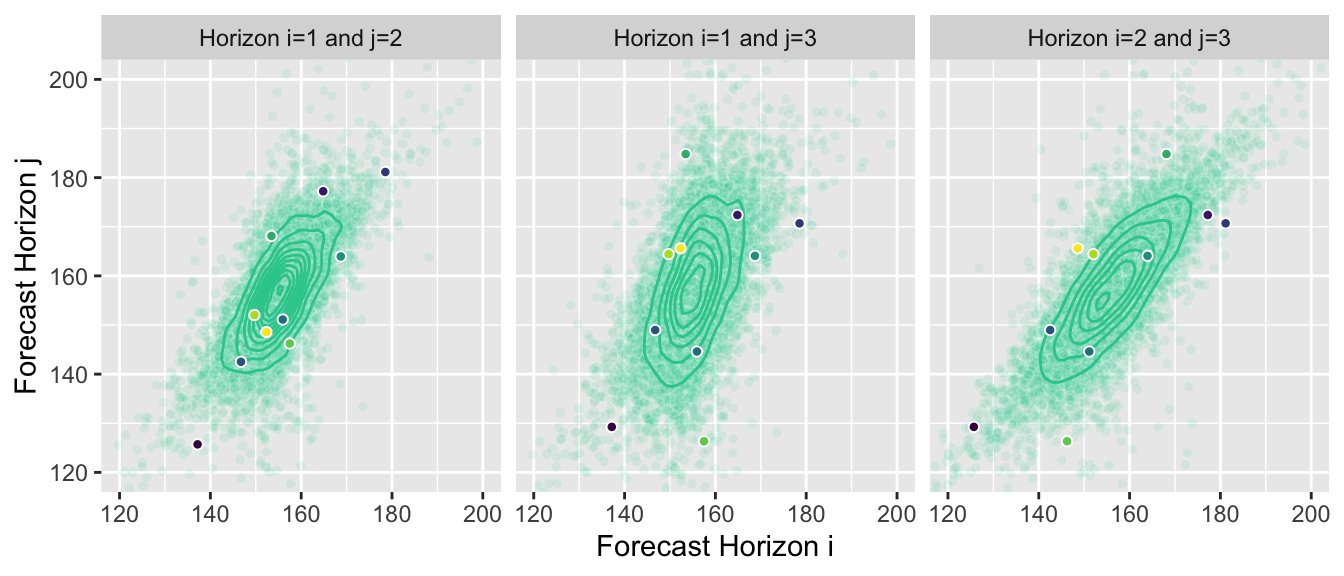
You could, of course, summarize them as marginal forecasts and visualize them in the same way. But this hides most of the information contained in the joint distribution forecast. Instead we can, for example, visualize the two-dimensional joint distributions for forecast horizons 1 and 2, 2 and 3, and 1 and 3, respectively:
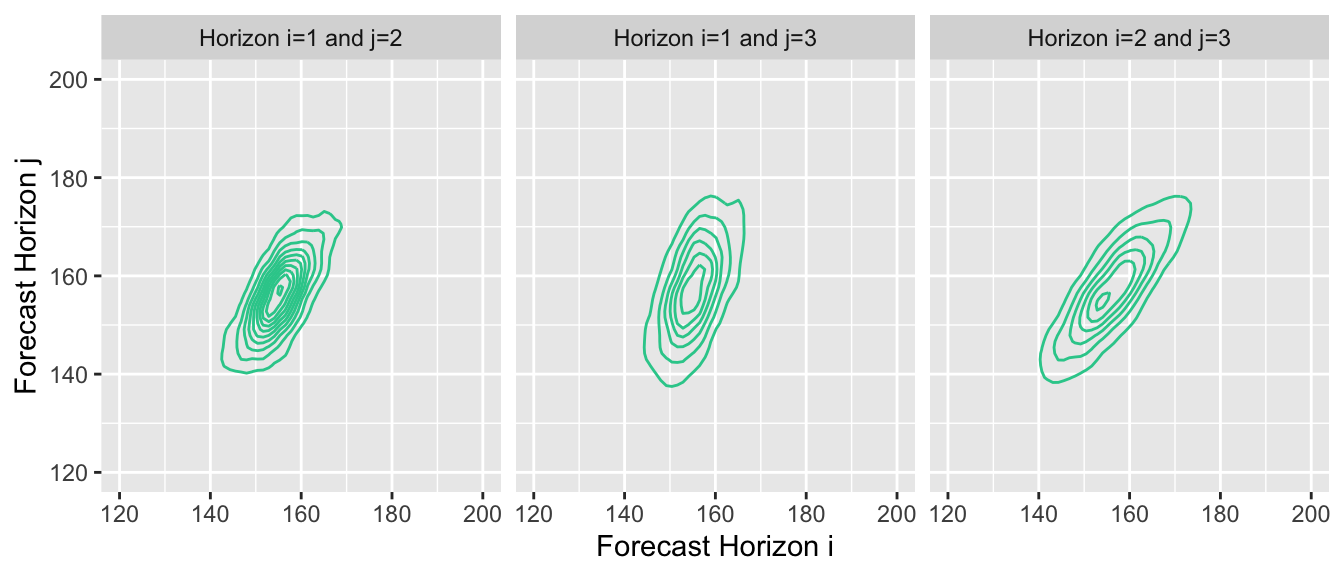
This reveals the correlation between outcomes at subsequent points in time. Given that our example time series exhibits strong autocorrelation, proper forecasts will project that autocorrelation into the future, and the estimated joint forecast distribution will represent it.
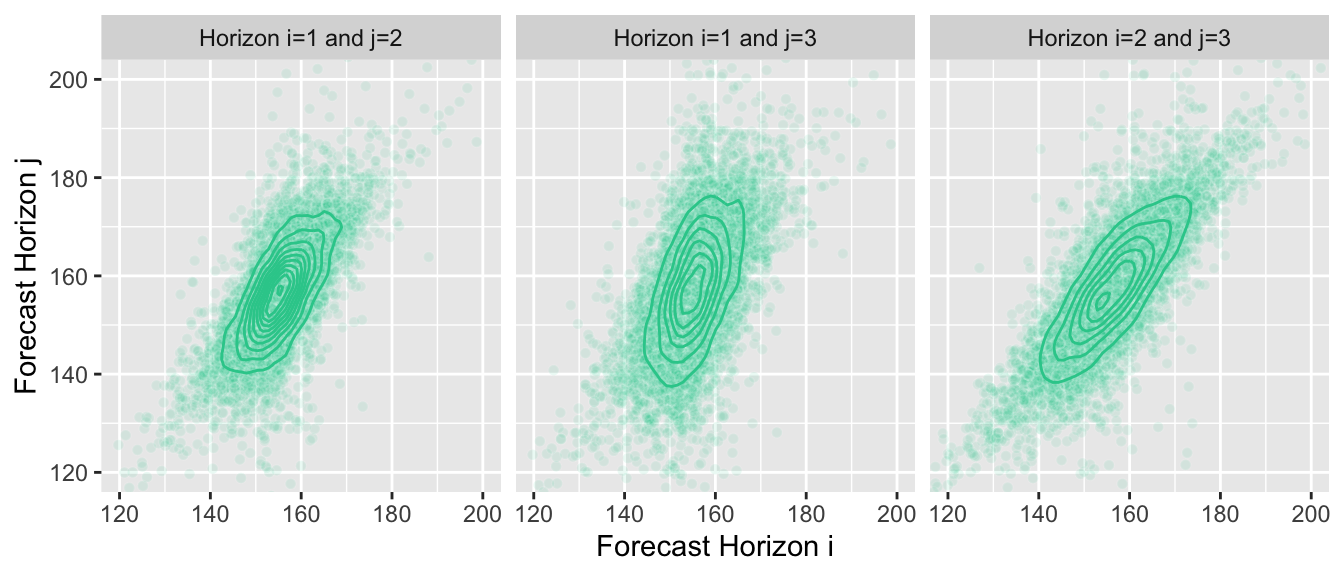
Unsurprisingly, when forecasting, we usually aren’t able to derive a closed form definition of the joint distribution. A great way to represent the distribution is by drawing many samples from it instead. If we choose our forecast model wisely, it can generate these samples for us. We can then use the samples to answer questions for which we usually needed to compute integrals with the density function.
Here is the same plot of the joint distributions, but now with the samples that I’m using in the background to generate the graphs—I don’t know the joint distribution, the contour lines are an approximation of the true density computed from samples:
Joint Forecasts as Sample Paths
While the plots above are nice, the best way to think about and work with joint forecasts are sample paths. Sample paths are samples from the joint forecast distribution.2 They represent possible paths that the time series is expected to take into the future. Not every model can provide them, but often a model can generate a sample path iteratively starting at the last observation and then simulating an outcome over several forecast horizons. By drawing many sample paths from the model, we can infer which ranges of outcomes are likely.
So let’s pick 10 sample paths from all the available ones, …
… and then render them as possible continuations of the original time series.
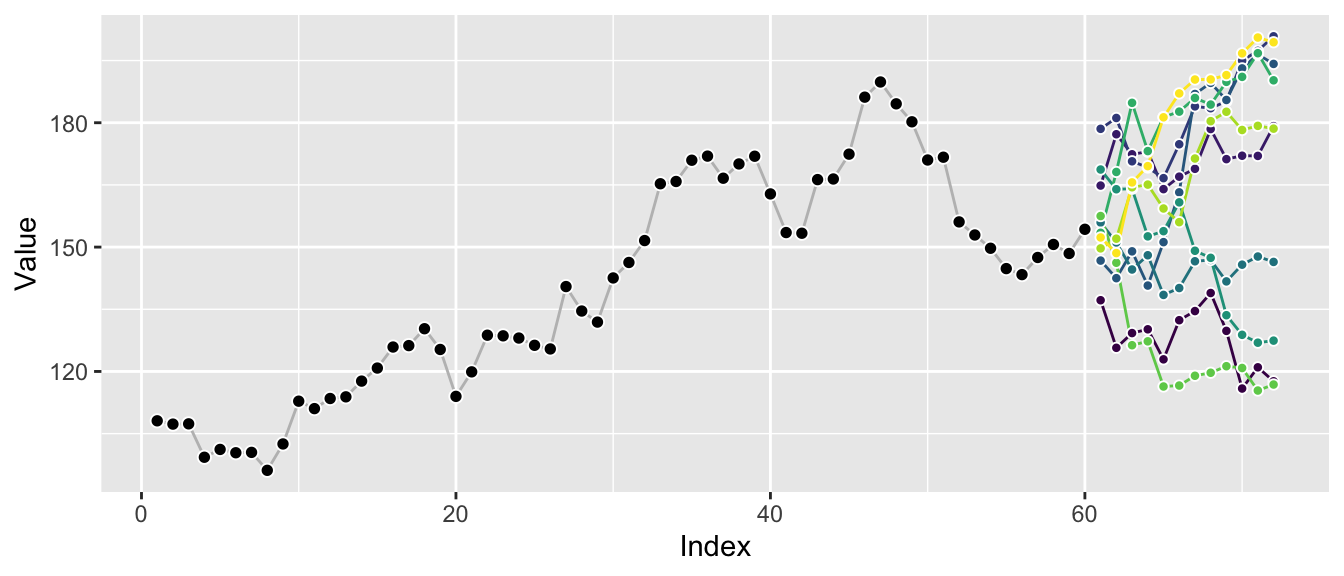
Plotting a few sample paths is great to get a quick sense of possible outcomes and how well the forecast model represents the characteristics of the original series. The correlation between the different horizons becomes apparent, in contrast to the graphs of marginal distributions above.
Plotting many sample paths on top of each other makes it harder to spot these correlations, but we get a sense of the overall possible ranges that can be achieved.
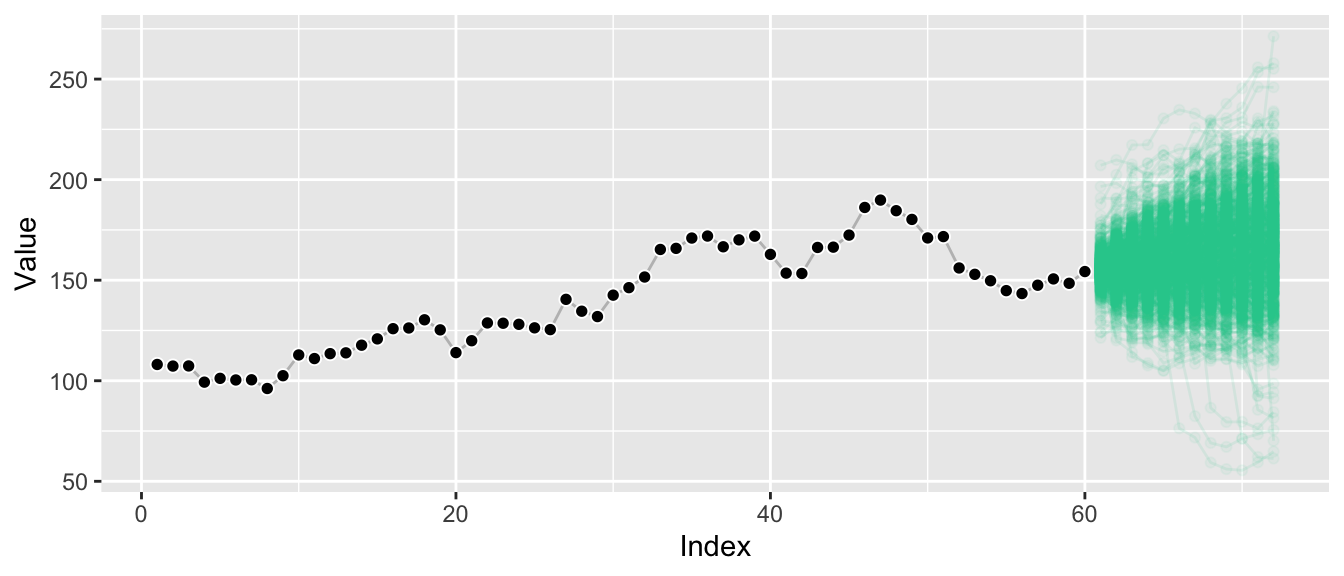
And we see that the extremal quantiles at the last horizon are usually only reached if the sample paths trended toward them at earlier points as well—in contrast to what the marginal distributions might suggest.
In fact, given sufficient samples, we can take this a step further and derive conditional sample paths: Demanding that we reach a point higher than at the last observation at forecast horizon 6 (this level is indicated by the horizontal line), let’s plot all sample paths that lead us there.
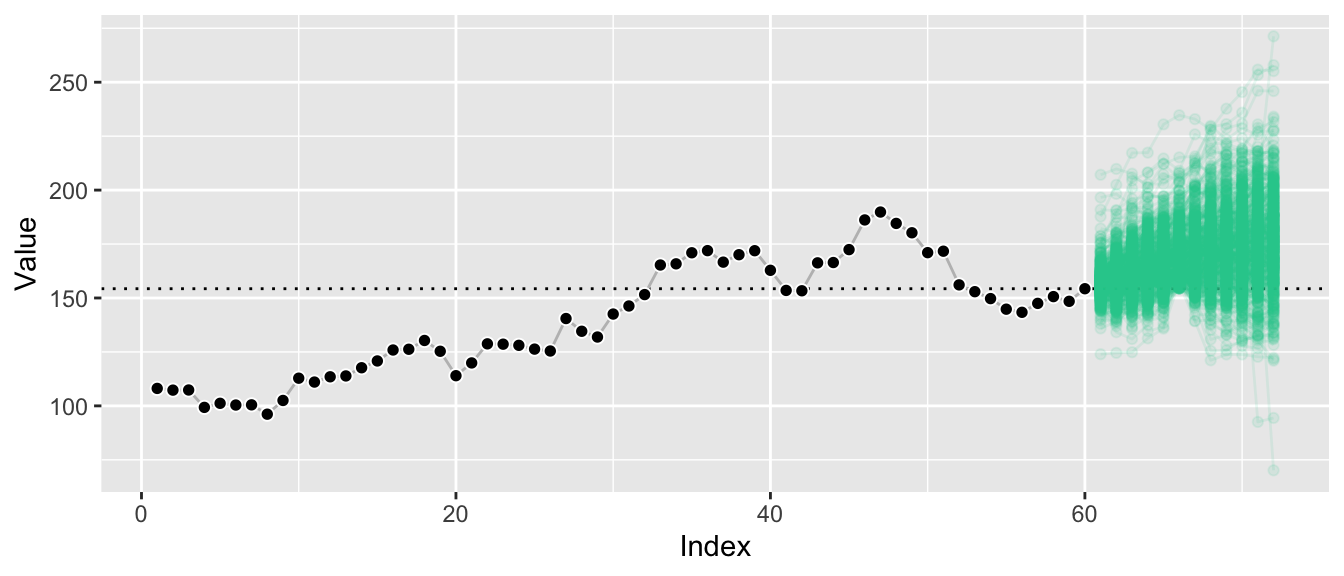
By conditioning on paths that reach a certain value at horizon 6, we filter out a large chunk of outcomes that were deemed likely before. The remaining sample paths illustrate the forecast distribution conditioned on a certain outcome at also a future point, whereas usually forecast distributions are only ever presented conditioned on the past.
This illustrates that we can answer hard questions in simple ways when we have access to sample paths.
Answering Hard Questions by Summing and Counting
When you have quantiles of the marginal forecast distribution, then all you have are quantiles from the marginal forecast distribution. Samples from the marginal forecast distribution are a bit better, as they let you compute quantiles of arbitrary functions of your outcome at a single point in time. Samples from the joint distribution though are where it’s at: With them we can answer questions across arbitrary combinations of forecast horizons, arbitrary functions of those forecasts, at arbitrary quantiles. And since we’re working with samples, we don’t even have to compute integrals: All we need to do is to sum and to count, following the Monte-Carlo method3.
Scenario 1: Forecast of Costs for the Full Year
Suppose the time series above represents the costs of a business division of the company you work for as data scientist. Your stakeholders asked for forecasts for the upcoming year and you provided them with the marginal quantile forecasts from the first graph above. They like those, but follow up with: “So what’s the 50% prediction interval for the costs we will generate in the entire year?”
Oops! If all you had were marginal quantiles, you’d be hard pressed to provide an answer. Sure, you can sum up the mean predictions to get a mean prediction for the full year, but you can’t expect to sum up every month’s 25% quantile to get the 25% quantile for the full year—quantiles aren’t additive.
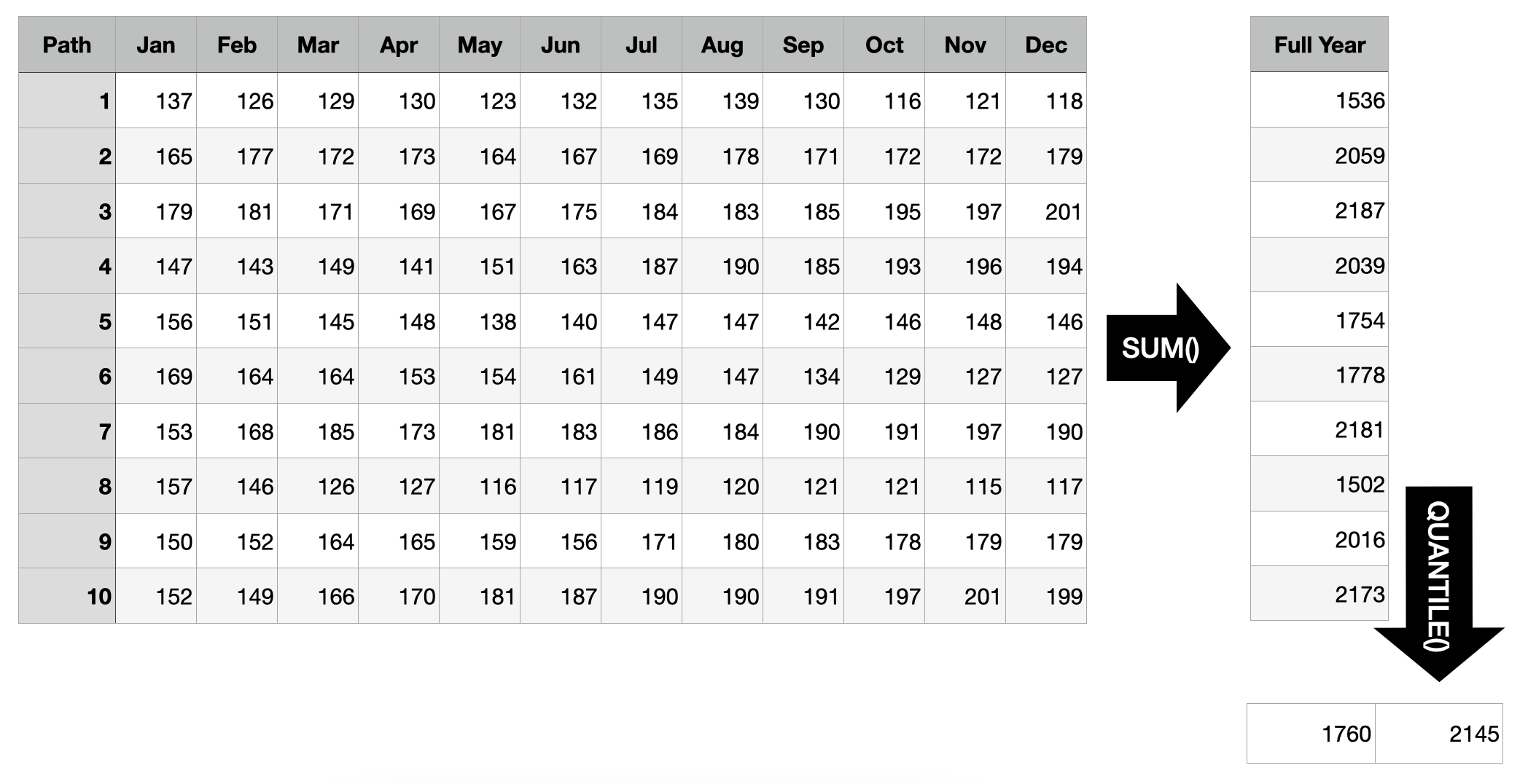
Luckily, you generated joint forecast distributions and saved them as sample paths. So all you need to do to find the answer is to sum up each sample path’s realizations before computing the quantiles of those sums. Based on the example below, there is a 50% probability that the total costs generated in the coming year will range from 1760 to 2145.
Scenario 2: Out-of-Stock Forecast
Prolific data scientist that you are, you provided other stakeholders with monthly demand forecasts. “When do we need to create the next replenishment order for this product given that it takes two months for the order to arrive, a current inventory level of 900 units, and a service level of 90% (in one of 10 cases a stock-out is acceptable)?”, they ask you.
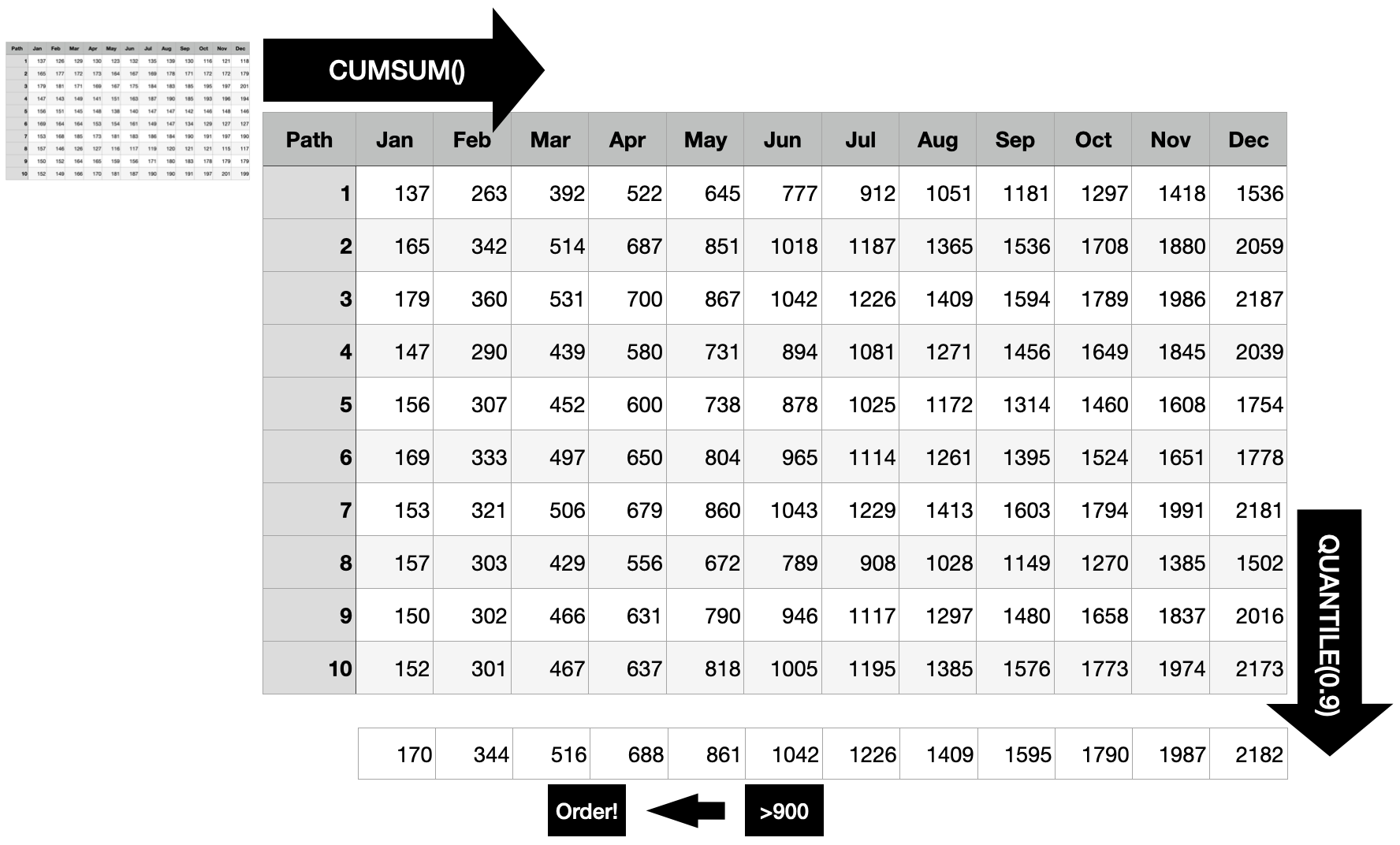
Different from the first scenario where you always had to sum all 12 months, here you need to predict the optimal point in time to trigger the order. To do so, first compute the cumulative sum for each sample path. This way, you get the distribution of the “total sum until each point in time”, at each point in time.
For each point in time, you want to know whether the 90% quantile is larger than the current stock, because as soon as this is the case, there is a larger than 90% probability that the current inventory will not suffice until the end of that month. Consequently, the order should be triggered 2 months before that point to ensure you don’t run out of stock with 90% probability.
Scenario 3: Order Size
“Assuming that we indeed trigger the order in April and that the entire inventory is used up when the delivery arrives: How much should we order to cover at least 3 months with 90% probability?”
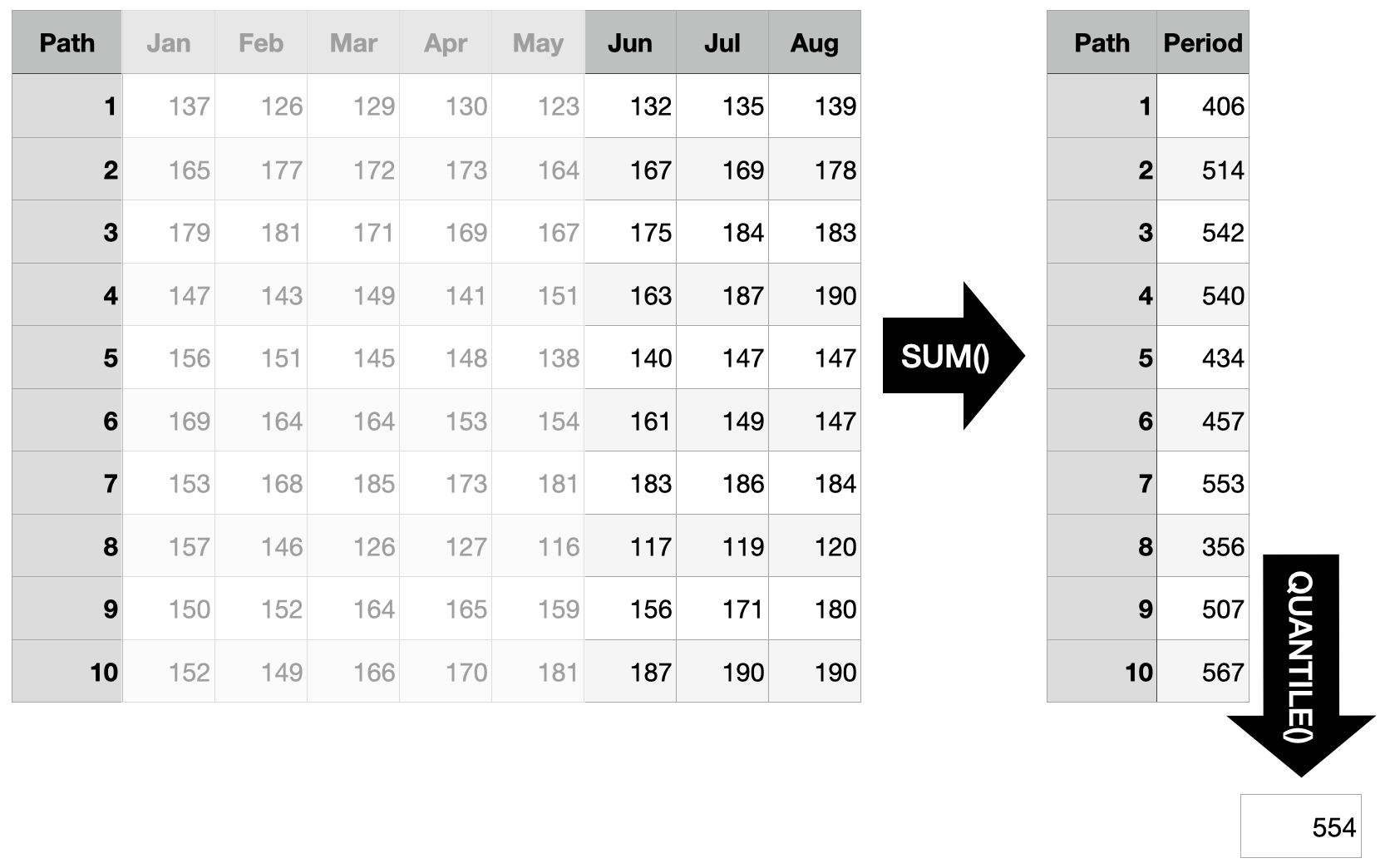
Since we are using sample paths to generate our answers, it is straightforward to answer questions which are concerned with an arbitrary time interval in the future. Instead of starting the sum at the first forecast horizon, take the sum over the three months in question (forecast horizons 6 through 8) and determine the quantile in question. To cover the demand of the three months in question with a probability of 90%, you need to order at least 554 units based on the sample paths shown below.
The Sum of Quantiles Is not the Quantile of the Sums
The reason all of this is even relevant is that the sum of quantiles is not the quantile of the sums. In scenario 1 above we solved the problem by computing the quantile of the sum. But we can’t answer the question by taking the sum of the quantiles. In contrast to the expected value, quantile functions are not additive.
This implies that marginal forecast distributions in the form of quantiles will only ever be able to answer a limited set of questions. In contrast, joint distributions can be summarized to the marginal distributions and thus offer the full flexibility to answer any question concerning the future.
There are important problems for which marginal forecasts suffice. Electricity load forecasting, for example. But to provide actionable recommendations in problems such as inventory management, one needs access to the joint forecast distribution.
When reading papers and blog posts describing models designed for forecasting, the difference between marginal forecast distributions and joint forecast distributions is often swept under the carpet (by those that only offer marginal distributions). A showcase of this is the Multi-Horizon Quantile Recurrent Forecaster paper by Wen et al. at Amazon. While they evaluate their model on an internal Amazon demand forecasting data set, they noticeably don’t use the same evaluation metric that a different Amazon team around Salinas et al. used in the DeepAR paper. Salinas et al.’s $\rho$-risk metric evaluates the demand forecasts over a span of time points, very similar to the three scenarios described above. Thus unsurprisingly, they make a point of using sample paths to do so:
To obtain such a quantile prediction from a set of sample paths, each realization is first summed in the given span. The samples of these sums then represent the estimated distribution for $Z_i(L, S)$ and we can take the $\rho$-quantile from the empirical distribution.
To their credit, while Wen et al. don’t discuss this shortcoming in their MQ-RNN paper, they did publish a follow-up paper, Sample Path Generation for Probabilistic Demand Forecasting by Madeka et al., that tries to turn their neural network’s quantiles into sample paths. As part of this, they also describe in detail why their quantiles do not suffice for inter-temporal decision making:
However, since quantiles aren’t additive, in order to predict the total demand for any wider future interval all required intervals are usually appended to the target vector during model training. The separate optimization of these overlapping intervals can lead to inconsistent forecasts, i.e. forecasts which imply an invalid joint distribution between different horizons. As a result, inter-temporal decision making algorithms that depend on the joint or step-wise conditional distribution of future demand cannot utilize these forecasts.
Choose your model based on the questions you want to answer.
References
Michael Betancourt (2021). Sampling. Retrieved from https://github.com/betanalpha/knitr_case_studies/tree/master/sampling, commit eb27fbdb5063220f3d335024d2ae5e2bfdf70955.
Dhruv Madeka, Lucas Swiniarski, Dean Foster, Leo Razoumov, Kari Torkkola, Ruofeng Wen (2018). Sample Path Generation for Probabilistic Demand Forecasting. Link to PDF from 4th Workshop on Mining and Learning from Time Series.
David Salinas, Valentin Flunkert, Jan Gasthaus (2017). DeepAR: Probabilistic Forecasting with Autoregressive Recurrent Networks. https://arxiv.org/abs/1704.04110.
Syama Sundar Rangapuram, Matthias W. Seeger, Jan Gasthaus, Lorenzo Stella, Yuyang Wang, Tim Januschowski (2018). Deep State Space Models for Time Series Forecasting. Advances in Neural Information Processing Systems 31 (NeurIPS 2018). (Section 4.2 and the subsequent remarks are especially relevant).
Ruofeng Wen, Kari Torkkola, Balakrishnan Narayanaswamy, Dhruv Madeka (2017). A Multi-Horizon Quantile Recurrent Forecaster. https://arxiv.org/abs/1711.11053.
Appendix: Drawing Sample Paths
Generating high-quality sample paths from a model is not always easy. For the examples above, instead of fitting a model, I used the function by which I generated the observed time series to also generate the “forecasted” sample paths as possible continuations of the observed series. This is as if I had chosen the correct model class and recovered the exact parameter of the data generating process. Also called cheating.
It also shows, though, why it helps to be able to write down a data generating process when you want to generate sample paths. The one I used above is a random walk with drift and Student’s t-distributed noise with 4 degrees of freedom:
$$ y_t = y_{t-1} + \mu + \sigma \cdot \epsilon_t $$$$ \epsilon_t \sim Student(4) $$The following function implements this model. $\mu$ / mu regulates the drift of the series, whereas $\sigma$ / sigma determines the size of the noise. We use a Student’s t-distributed noise to not have just a Normal distribution. The initial_value is used to provide an overall level when generating the initial series, and to condition the forecasts on the input series.
random_student_walk <- function(n, mu, sigma, initial_value) {
  y <- rep(NA, times = n)

  y[1] <- initial_value + mu + sigma * rt(n = 1, df = 4)
  for (i in 2:n) {
	y[i] <- y[i-1] + mu + sigma * rt(n = 1, df = 4)
  }

  return(y)
}
The observed series can then be generated using an initial value of 100:
set.seed(572)
n_obs <- 60

y <- random_student_walk(
  n = n_obs, mu = 1, sigma = 5, initial_value = 100
)
tail(y)
## [1] 145 143 147 151 148 154
We can generate one forecasted sample path by conditioning on the last observation (assuming really well estimated parameters and choice of model):
random_student_walk(n = 12, mu = 1, sigma = 5, initial_value = y[n_obs])
## [1] 166 162 158 175 177 178 179 179 183 181 190 184
And another one:
random_student_walk(n = 12, mu = 1, sigma = 5, initial_value = y[n_obs])
## [1] 145 145 146 147 141 139 135 135 162 166 164 161
Third time’s a charm:
random_student_walk(n = 12, mu = 1, sigma = 5, initial_value = y[n_obs])
## [1] 162 153 155 157 152 152 149 158 160 173 182 184
-
Try
forecast::forecast(AirPassengers)to see what I mean. ↩︎ -
Since the joint distribution is multidimensional across forecast horizons, a single sample is not a scalar but a vector. Many samples form a matrix. If we considered multiple time series, sample paths would form a tensor. ↩︎
-
Obviously we’re still computing integrals—just instead of doing the math we approximate them by counting samples. ↩︎
Failure Modes of State Space Models
Posts / 5 July, 2022
State space models are great, but they will fail in predictable ways.
Well, claiming that they “fail” is a bit unfair. They actually behave exactly as they should given the input data. But if the input data fails to adhere to the Normal assumption or lacks stationarity, then this will affect the prediction derived from the state space models in perhaps unexpected yet deterministic ways.
This article ensures that none of us is surprised by these “failure modes”.
The Model
To keep it instructive and because the analysis extends to the other standard model families of Innovation State Space Models (as in forecast::ets(), for example) and Structural Time Series Models / Multiple Sources of Error State Space Models (as in bsts::bsts(), for example), let’s consider the univariate local level model.
Written as Structural Model, we have:
$$ y_t = l_{t-1} + \epsilon_t $$$$ l_t = l_{t-1} + \eta_t $$for the measurement and the transition equation, respectively, where
$$ \epsilon_t \sim N(0, \sigma_{\epsilon}) $$$$ \eta_t \sim N(0, \sigma_{\eta}). $$The equivalent model in Innovation State Space form can be written as:
$$ y_t = l_{t-1} + \epsilon_t $$$$ l_t = l_{t-1} + \alpha \cdot \epsilon_t $$where
$$ \epsilon_t \sim N(0, \sigma_{\epsilon}). $$In the following we will focus on the Innovation State Space Model formulation as we use the forecast package to fit the model in our examples. However, the conclusions translate to the Structural Model as
for $\alpha \in (0,1)$ as is the parameter space allowed by the forecast::ets() implementation. For details, see chapter 13.4 of Hyndman et al. (2008).
This local level model is equivalent to simple exponential smoothing. As such, it presents a trade-off between the two extremes of random walk and mean forecast models. The mean model implies a constant level that doesn’t change over time. The random walk model implies a level that adjusts fully to the most recent observation. The simple exponential smoothing forecast is a mix of the two: As $\alpha$ tends towards 1, the resulting model adjusts more to the most recent observations, thus behaving similar to the random walk. Inversely, as $\alpha$ tends to 0, the level is barely adjusted based on the most recent observations and equals instead the arithmetic mean of all observations.
Equivalently: If $\sigma_{\epsilon}$ is larger then $\sigma_{\eta}$, the model will dominantly be driven by the observation noise and tend to the global mean. But if $\sigma_{\eta}$ is much larger than $\sigma_{\epsilon}$, the model is driven by the innovation noise: The level adjusts a lot and dominates the observation noise, thus favoring a model more similar to a random walk.
These simple observations have strong implications as to how state space models behave in the presence of anomalies and structural breaks.
But let’s first look at an example series produced by this model.
#' Sample a Local-Level Time Series via Multiple Sources of Error
gen_ssm_series <- function(n, sigma_obs, sigma_level, l_0 = 0) {
  l_t <- rep(l_0, times = n + 1)
  y_t <- rep(NA, times = n + 1)

  for (i in 2:(n+1)) {
	l_t[i] <- l_t[i-1] + rnorm(n = 1, mean = 0, sd = sigma_level)
	y_t[i] <- l_t[i-1] + rnorm(n = 1, mean = 0, sd = sigma_obs)
  }

  return(y_t[-1])
}
We use $\sigma_{\epsilon} = 1$ and $\sigma_{\eta} = 1$ (equivalent to $\alpha = 0.62$) to generate a series based on equally strong measurement and transition noise.
library(ggplot2)
library(forecast)
set.seed(365)

df <- data.frame(
  index = 1:80,
  value = gen_ssm_series(n = 80, sigma_obs = 1, sigma_level = 1)
)

ggp_base <- ggplot(df, aes(x = index, y = value)) +
  geom_line(color = "grey") +
  geom_point(pch = 21, color = "white", fill = "black", cex = 2) +
  labs(x = "Index", y = "Value")
print(ggp_base)
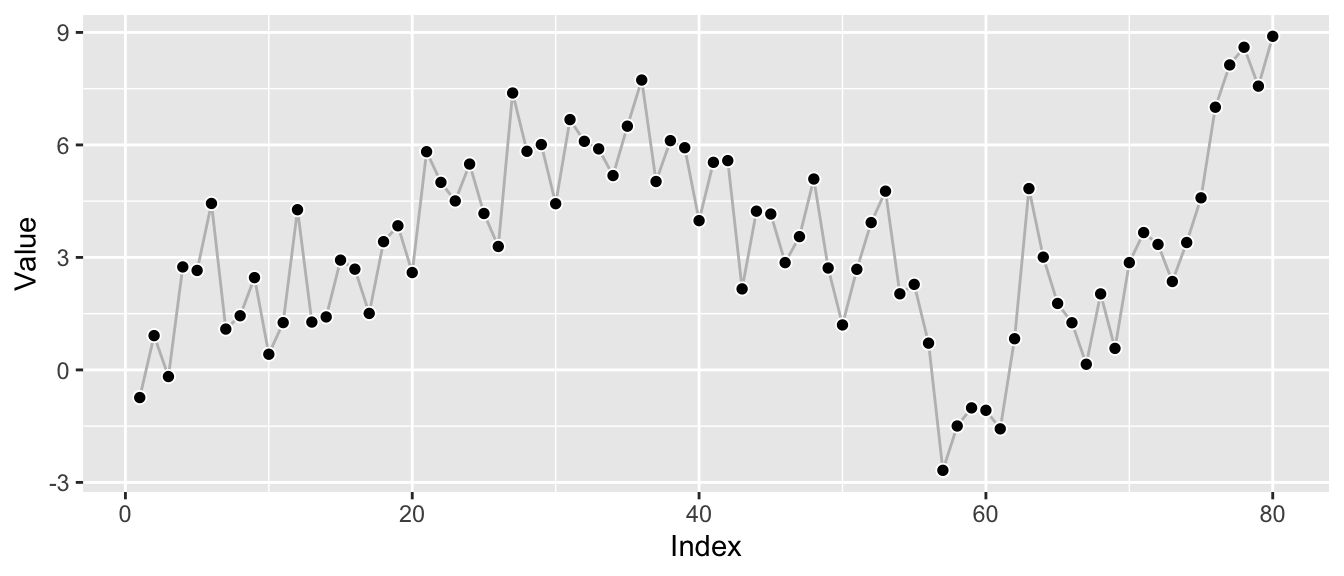
Knowing the true underlying model, we can fit a local-level model using the forecast package to try to recover the parameters.
ets_fit <- forecast::ets(y = df$value, model = "ANN")
print(ets_fit)
## ETS(A,N,N)
##
## Call:
##  forecast::ets(y = df$value, model = "ANN")
##
##   Smoothing parameters:
##     alpha = 0.618
##
##   Initial states:
##     l = -0.1009
##
##   sigma:  1.6243
##
##      AIC     AICc      BIC
## 432.1522 432.4680 439.2983
With alpha estimated as about the expected 0.62, the fitting procedure appears able to recover the underlying model well.1 Let’s take a quick look at the corresponding forecast:
ggp_base +
  autolayer(forecast::forecast(ets_fit, h = 12))
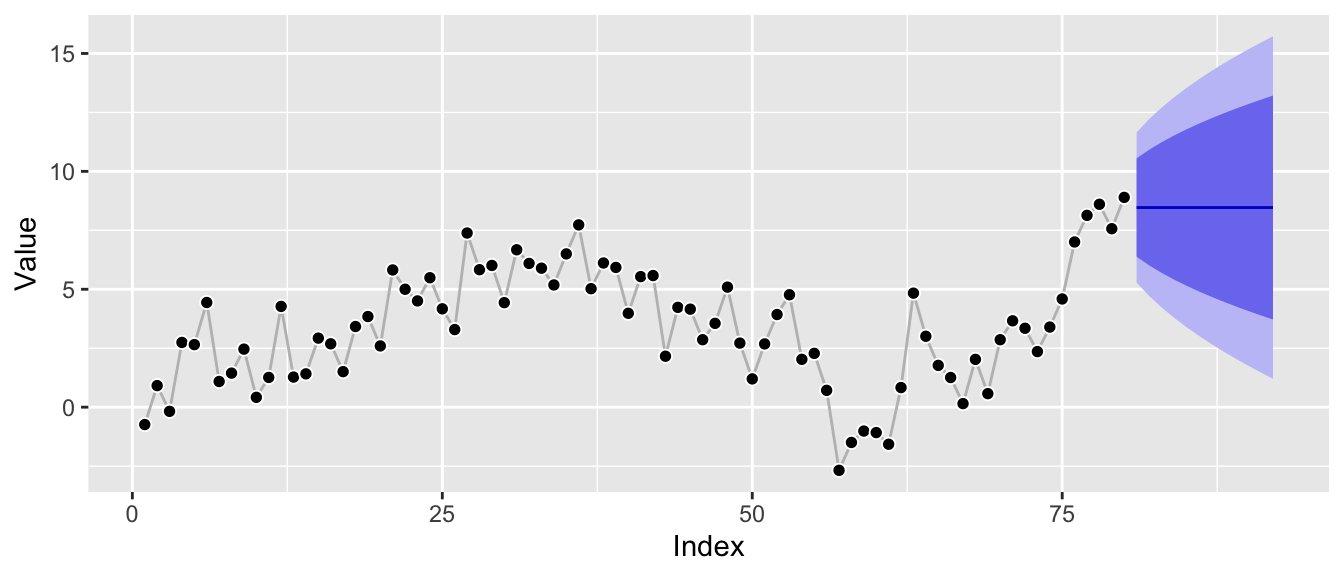
The model can be interpreted as interpolation between random walk and mean forecast, so it’s expected to be close to the recent level of the series. Additionally, the prediction intervals are increasing in width, but not as fast as those of a random walk model would, and clearly not constant as those of a mean forecast as the local level is expected to fluctuate in the future.
So far so good. Now how is this impacted by anomalies and structural breaks?
Cause for Trouble #1: Anomalies
Let’s consider an anomalous observation by adding it to the above series. To make the effect instructive, I won’t hold back—let’s make it really anomalous. This might look ridiculous, but believe me, this stuff exists.2
df_w_anomaly <- df
df_w_anomaly$value[55] <- df_w_anomaly$value[55] + 100

ggp_w_anomaly <- ggplot(df_w_anomaly, aes(x = index, y = value)) +
  geom_line(color = "grey") +
  geom_point(pch = 21, color = "white", fill = "black", cex = 2) +
  labs(x = "Index", y = "Value")
print(ggp_w_anomaly)
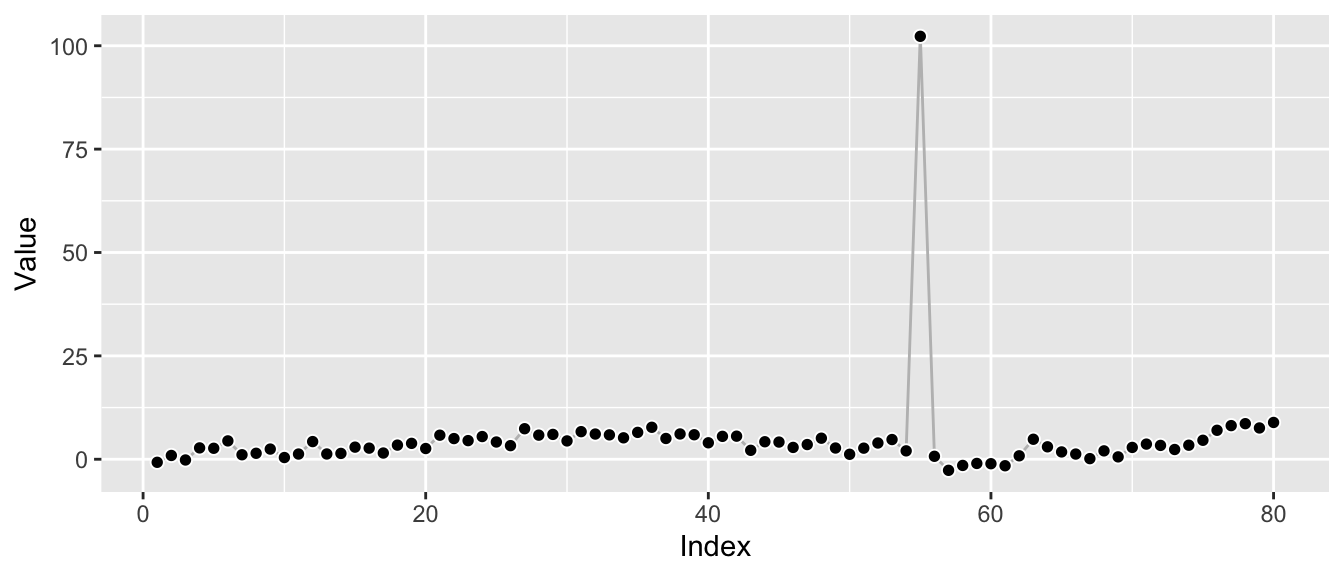
Let’s refit the model to consider the impact the anomaly has on the parameter estimates.
ets_fit_w_anomaly <- forecast::ets(y = df_w_anomaly$value, model = "ANN")
print(ets_fit_w_anomaly)
## ETS(A,N,N)
##
## Call:
##  forecast::ets(y = df_w_anomaly$value, model = "ANN")
##
##   Smoothing parameters:
##     alpha = 1e-04
##
##   Initial states:
##     l = 4.6512
##
##   sigma:  11.4091
##
##      AIC     AICc      BIC
## 744.0427 744.3584 751.1887
Remember that the original fit of the model above resulted in an alpha value of r round(ets_fit$par["alpha"], 2) which reflected the underlying local-level model. In contrast, the alpha value now dropped to r round(ets_fit_w_anomaly$par["alpha"], 2): Instead of estimating a smooth interpolation of random walk and mean forecast, this alpha parameter corresponds to an essentially pure mean forecast.
This is immediately visible from the corresponding prediction intervals which are now constant:
ggp_w_anomaly +
  autolayer(forecast::forecast(ets_fit_w_anomaly, h = 12))
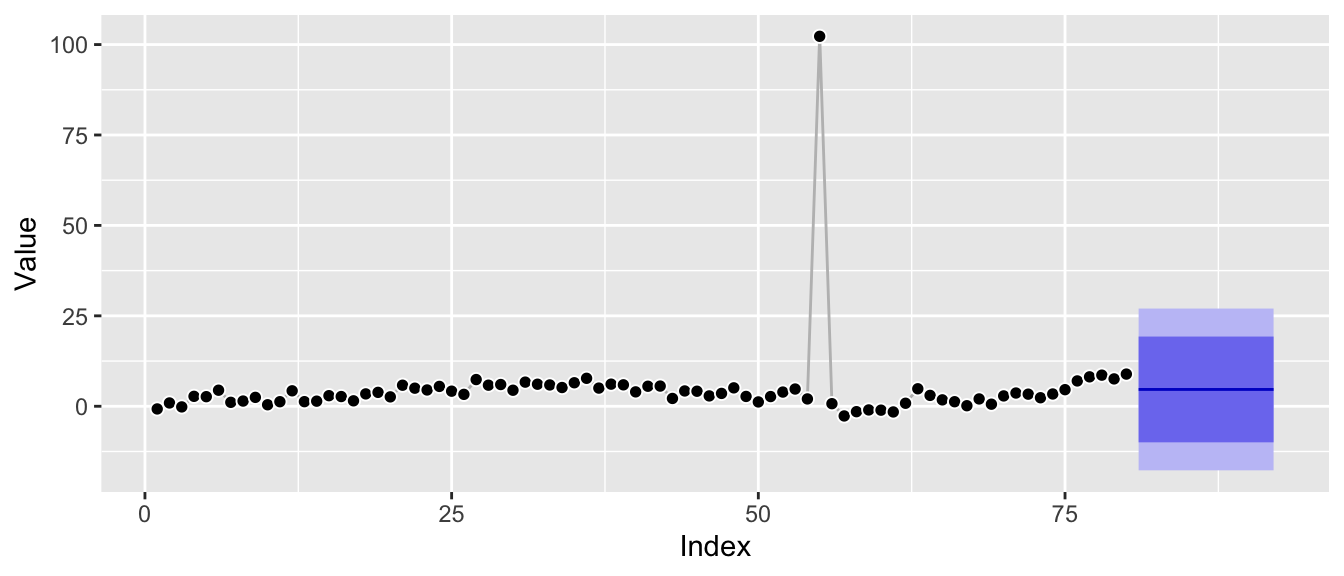
Zooming in to roughly the scale of the original plot it’s also clear that the underlying Gaussian distributional assumption translates the anomaly into much larger prediction intervals:
ggp_w_anomaly +
  autolayer(forecast::forecast(ets_fit_w_anomaly, h = 12)) +
  coord_cartesian(ylim = c(-2.5, 15))
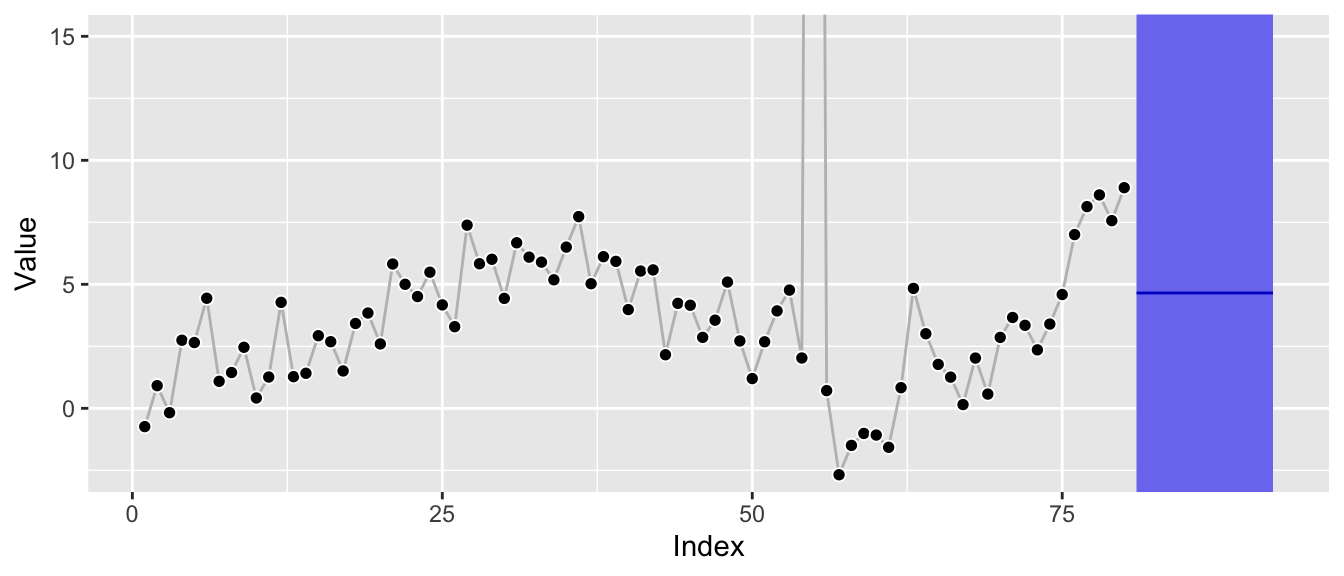
Additionally, the forecast is clearly biased away from the most recent level as the current level of the series is not equal to its global average.
Depending on the series itself and the size of the anomaly, a single anomaly leads the estimation procedure to choose an edge case of the structural time series parameter space, leading to poor forecasts.
The reason for this is simple: The mean forecast has the overall smallest (squared) errors once the anomaly is added. By choosing a mean forecast rather than something closer to a random walk, we only make the error introduced by the anomaly once, whereas a random walk would make it twice: Once for the anomaly itself, and then a second time right after the anomaly when jumping back to the actual level.
df_w_anomaly_residuals <- data.frame(
  index = rep(df_w_anomaly$index, times = 2),
  residuals = c(
	df_w_anomaly$value - mean(df_w_anomaly$value),
	df_w_anomaly$value -
	  c(NA, df_w_anomaly$value[-length(df_w_anomaly$index)])
  ),
  Model = rep(c("Mean", "Random Walk"),
			  each = length(df_w_anomaly$index))
)

ggplot(df_w_anomaly_residuals, aes(x = index, y = residuals)) +
  geom_line(color = "grey") +
  geom_point(pch = 21, color = "white", fill = "black", cex = 2) +
  labs(x = "Index", y = "Residual") +
  facet_wrap(~ Model)
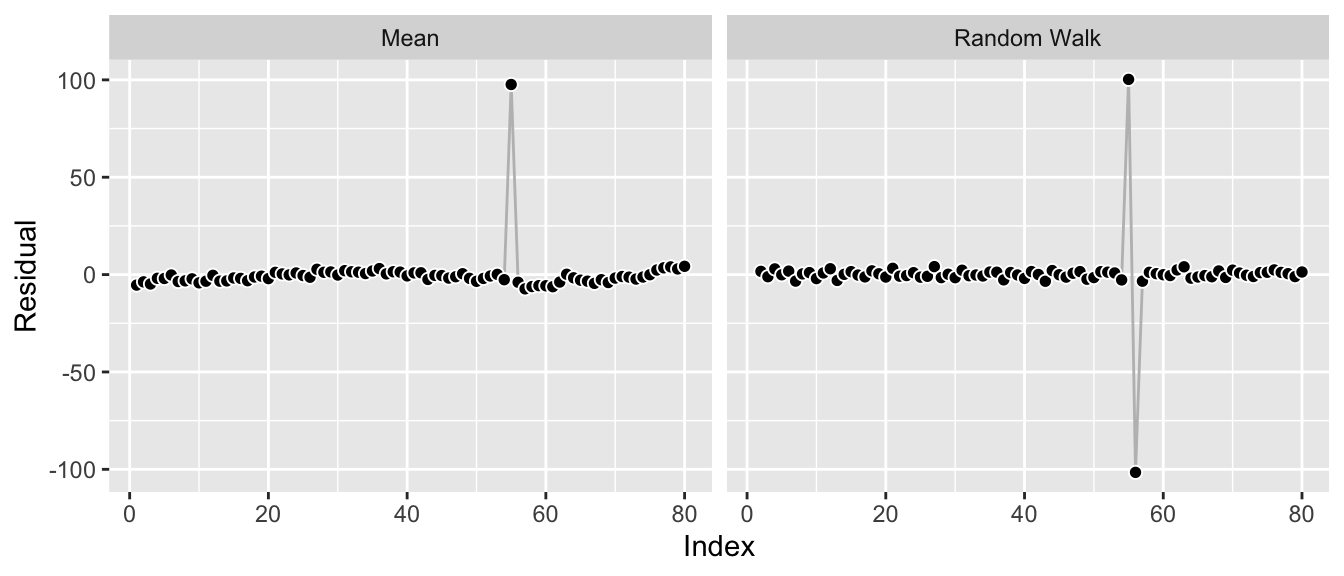
Let’s move on to the other cause for trouble: structural breaks.
Cause for Trouble #2: Structural Breaks
While there are many kinds of structural breaks, I’m concerned with level shifts here. This is a bit simplistic but instructive: Let’s shift the last 25 observations upward by a constant to introduce the shift for this example.
df_w_shift <- df
df_w_shift$value[55:80] <- df_w_shift$value[55:80] + 25

ggp_w_shift <- ggplot(df_w_shift, aes(x = index, y = value)) +
  geom_line(color = "grey") +
  geom_point(pch = 21, color = "white", fill = "black", cex = 2) +
  labs(x = "Index", y = "Value")
print(ggp_w_shift)
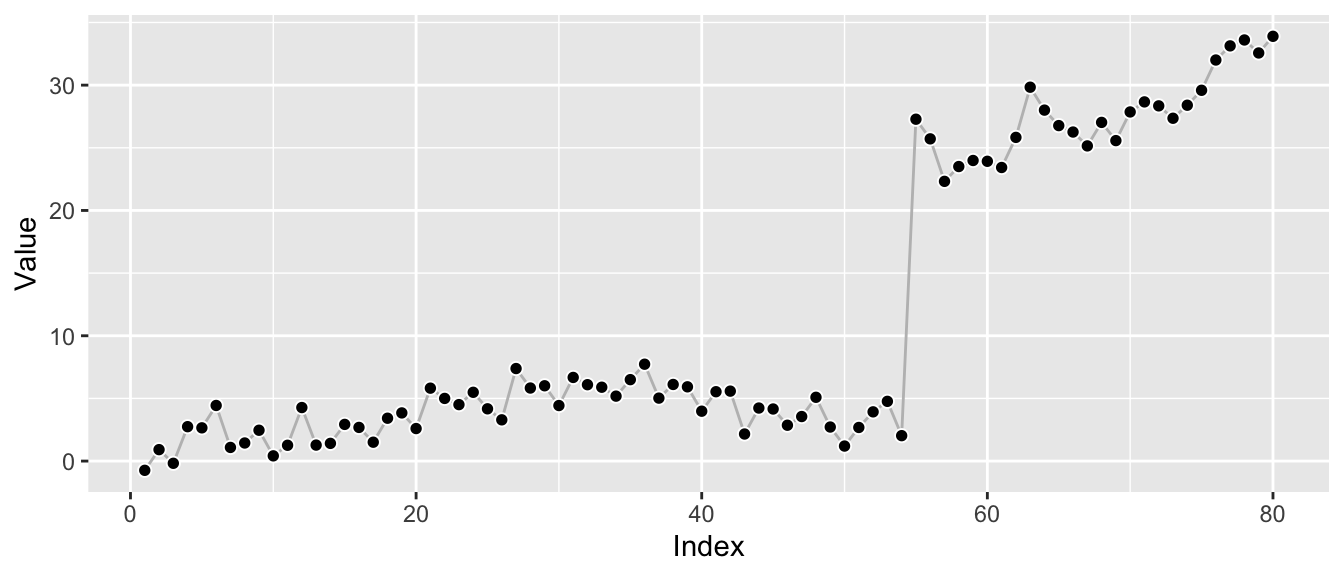
As before, let’s refit the model to consider the impact the level shift has on the parameter estimates.
ets_fit_w_shift <- forecast::ets(y = df_w_shift$value, model = "ANN")
print(ets_fit_w_shift)
## ETS(A,N,N)
##
## Call:
##  forecast::ets(y = df_w_shift$value, model = "ANN")
##
##   Smoothing parameters:
##     alpha = 0.7575
##
##   Initial states:
##     l = -0.3653
##
##   sigma:  3.2533
##
##      AIC     AICc      BIC
## 543.2815 543.5973 550.4275
The structural break leads to a new estimate of alpha at r round(ets_fit_w_shift$par["alpha"], 2). Whereas the anomaly pushed the model towards a mean forecast, the level shift pushes it towards a random walk (though not all the way there) as that’s the model that adjusts quickest to the new level, thus avoiding the source of the single largest error in this data.
Again, this is visible from the residuals of the two edge cases:
df_w_shift_residuals <- data.frame(
  index = rep(df_w_shift$index, times = 2),
  residuals = c(
	df_w_shift$value - mean(df_w_shift$value),
	df_w_shift$value -
	  c(NA, df_w_shift$value[-length(df_w_shift$index)])
  ),
  Model = rep(c("Mean", "Random Walk"),
			  each = length(df_w_shift$index))
)

ggplot(df_w_shift_residuals, aes(x = index, y = residuals)) +
  geom_line(color = "grey") +
  geom_point(pch = 21, color = "white", fill = "black", cex = 2) +
  labs(x = "Index", y = "Residual") +
  facet_wrap(~ Model)
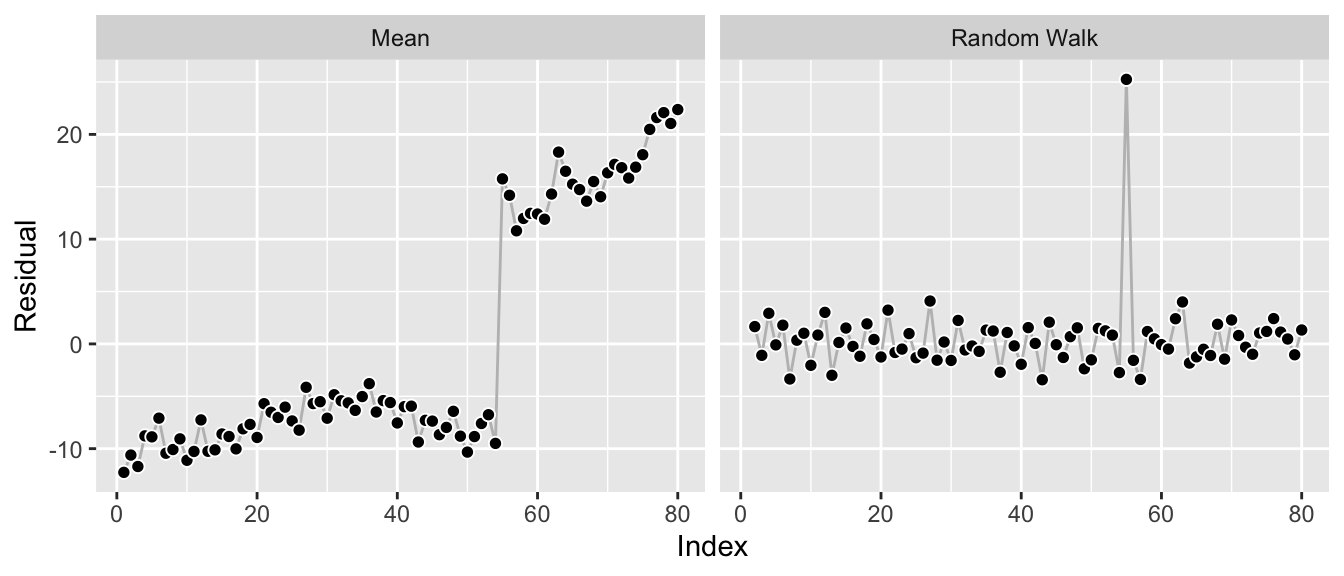
While the residuals look reasonable, a random walk forecast is not really ideal for the data. It’s good to model the shift, yes—but beyond that it leads to prediction intervals that are larger and growing faster than the period before the shift or the period after the shift would imply by themselves.
ggp_w_shift +
  autolayer(forecast::forecast(ets_fit_w_shift, h = 12))
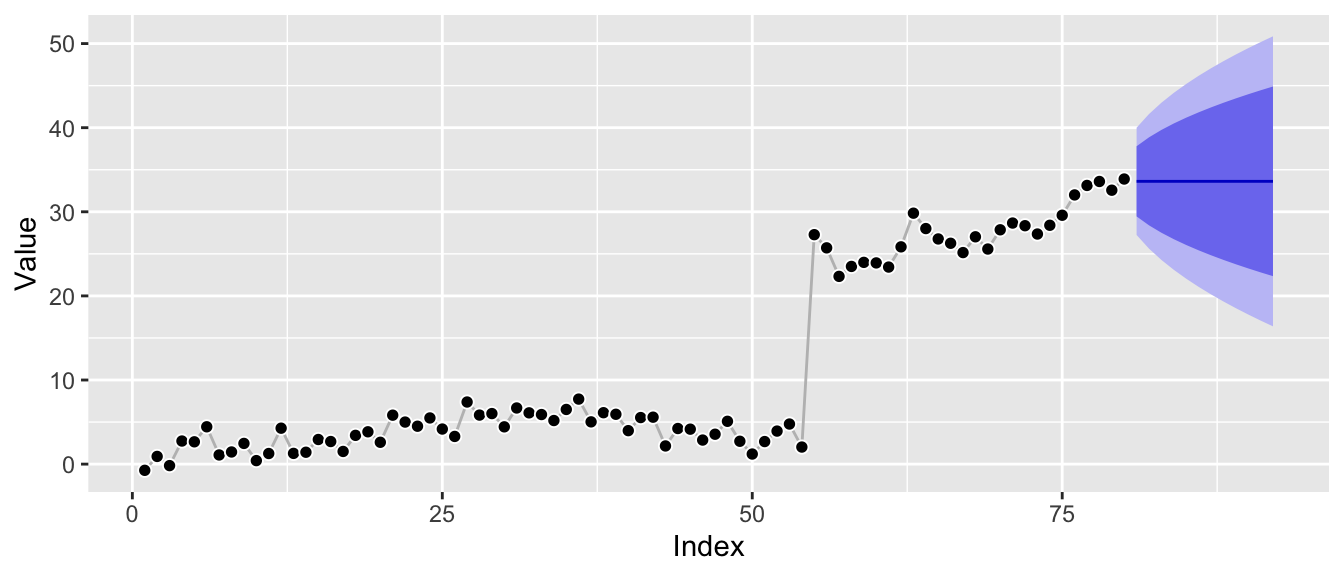
Everything Works as Intended
At this point, let me just reiterate that everything here works as intended.
Anomalies are just large observation noise so that’s what the model focuses on, resulting in a forecast dominated by observation noise—the mean forecast.
Level shifts are just large transition noise, so that’s what the model focuses on, resulting in a forecast dominated by transition noise—the random walk forecast.
If you use standard state space model implementations for your applications, you might as well write unit tests that check these behaviors and show them to your stakeholders. If your stakeholders’ time series show these patterns, then your models will adjust their forecasts accordingly.
Everything Works as Intended, and yet…
These fits frustrate me. The time series look good for the most part! But a single anomaly, a single level shift can mess the forecast up and make the forecast distribution useless.
With regard to anomalies, it would be nice to have model parameters that are robust against them but to reflect them properly in the uncertainty of the forecast. If we had fitted a model with alpha close to the original one but larger prediction intervals due to a larger sigma—that’s one thing. But the impact on the alpha and the corresponding bias of the forecast is not really acceptable. A low-hanging solution appears to be a different distributional assumption that replaces the Gaussian distribution as done in the models of the Orbit package. While this may fix the distorted sigma estimate, it won’t in general “fix” the smoothing parameters.
The level shift is also a bummer. Even forgetting the first half of the series and only using the observations after the shift would lead to a more appropriate model fit! But forgetting history is not something the state space models do: All observations are used to evaluate the likelihood, always.
Messy data needs messier models than the clean standard implementations with proven convergence behaviors.
References
Andrew C. Harvey (1990). Forecasting, Structural Time Series Models and the Kalman Filter. https://doi.org/10.1017/CBO9781107049994.
Rob Hyndman, Anne Koehler, Keith Ord, Ralph Snyder (2008). Forecasting with Exponential Smoothing: The State Space Approach. https://doi.org/10.1007/978-3-540-71918-2.
Edwin Ng, Zhishi Wang, Huigang Chen, Steve Yang, Slawek Smyl (2020). Orbit: Probabilistic Forecast with Exponential Smoothing. https://arxiv.org/abs/2004.08492.
Steven L. Scott (2017). Fitting Bayesian structural time series with the bsts R package. https://www.unofficialgoogledatascience.com/2017/07/fitting-bayesian-structural-time-series.html.
What Needs to Prove True for This to Work?
Posts / 12 August, 2021
Data science projects are a tricky bunch. They entice you with challenging problems and promise a huge return if successful. In contrast to more traditional software engineering projects, however, data science projects entail more upfront uncertainty: You’ll not know until you tried whether the technology is good enough to solve the problem. Consequently, a data science endeavor fails more often, or doesn’t turn out to be the smash hit you and your stakeholders expected it to be.
To get started working on projects that are sucessful, you want to cut your losses on projects that will not work out; there is no honor in sticking with a problem just because you started. Don’t get caught up in a project that simmers on and on and doesn’t realize the value that was promised in the original slide deck. Even better: Don’t start the project that will not succeed.
While this last recommendation is hard if not impossible to get right, ask yourself “What needs to prove true for this to work?” to make it a bit easier.1 Asking this question is a powerful way to drill into the assumptions that underlie any project—data science or not.
By asking “What needs to prove true for this to work?” you as data scientist are explicit about the assumptions that are made on your contribution to a new project. You start validating whether you can deliver what others hope you will deliver.
For example, let’s assume your task is to provide an image classification algorithm that improves over an existing method. The images are scans of parts of human patients and will need to be acquired. An implicit assumption is that you will evaluate and compare the performance of the algorithms. One easily neglects that this requires observations beyond those used to train the algorithm—potentially even quite many if you want to provide any useful level of certainty. Thus, before committing resources to the project, the required amount of samples can be determined and communicated.2
For each project, you’ll encounter several assumptions that need to prove true. You can rank them by their importance and their uncertainty. Similarly to how an active learning algorithm selects the next observation to be labelled, you need to clarify the most important assumptions with the largest uncertainty first and then proceed to the next one. Or, if you can’t clarify them, choose a project for which the assumptions are not as uncertain.
All this is encapsulated in data scientists’ natural drive to access a project’s data as soon as possible. Nothing reduces the general uncertainty more than having a look at the data you’re supposed to work with.
There is a flip side to this: If you don’t yet have access to the data or when data acquisition is part of the project, you can still (or likely have to) formalize what you need the data to look like to deliver a useful product. You could, for example, simulate data to get a feeling for how the data can be analyzed, and to show at what noise level which model performance can be achieved.
If you do have data, establish a human baseline performance. How well can you predict the data? If you can’t do it, why do you expect the algorithm to be able to do it? Think about it like an econometrics professor: Which theory would explain that your available features can predict the outcome?
All this applies to every project you are about to embark on, but also to different steps within a project. To say it in the words of Christensen, Allworth, and Dillon:
[K]eep thinking about the most important assumptions that have to prove true, and how you can swiftly and inexpensively test if they are valid. Make sure you are being realistic about the path ahead of you.
-
The first time I saw this was in the book “How Will You Measure Your Life?” by Clayton M. Christensen, James Allworth, and Karen Dillon, which is excellent. They in turn attribute it to a process called “discovery-driven planning” by Ian MacMillan and Rita McGrath. ↩︎
-
See the paper “Sample Size Planning for Classification Models” (2012) by Beleites et al. for an example of what this can look like. ↩︎
Embedding Many Time Series via Recurrence Plots
Posts / 14 June, 2020
We demonstrate how recurrence plots can be used to embed a large set of time series via UMAP and HDBSCAN to quickly identify groups of series with unique characteristics such as seasonality or outliers. The approach supports exploratory analysis of time series via visualization that scales poorly when combined with large sets of related time series. We show how it works using a Walmart dataset of sales and a Citi Bike dataset of bike rides.
Traditional time series courses act as if we had plenty of time to take care of time series individually, one after another. In reality, though, we’re often faced with a large set of time series—too large to look at each time series yet alone to check them repeatedly. This conflicts with the value that comes from visualizing time series to understand how they might need to be modeled. Randomly picking time series from the larger set is one way to deal with this issue. But I’ve also come to appreciate the following combination of tricks to quickly become aware of broader patterns and issues in a given set of data.
Recurrence Plots
Recurrence plots are not a new idea but I only became aware of them through the recent paper by Lia et al. (2020) who build on top of the original description by Eckmann et al. (1987). Given a time series with observations $y_1, ..., y_T$, the authors check for each combination of two observations $i$ and $j$ with $i < j$ whether $|y_j - y_i| < \epsilon$ with $\epsilon > 0$. If this holds, then the observation has recurred.
Given that many important patterns in time series can be described by how similar two points in the time series are to each other, plotting this recurrence information can be helpful to spot said patterns.
I suppose that the binary measure was used in 1987 as it was easier to print a graph in black-and-white rather than shades of color. Nowadays though, we can look at the continuous version of the (absolute) difference between two points. Using all combinations of $i$ and $j$, we get following square recurrence plots:
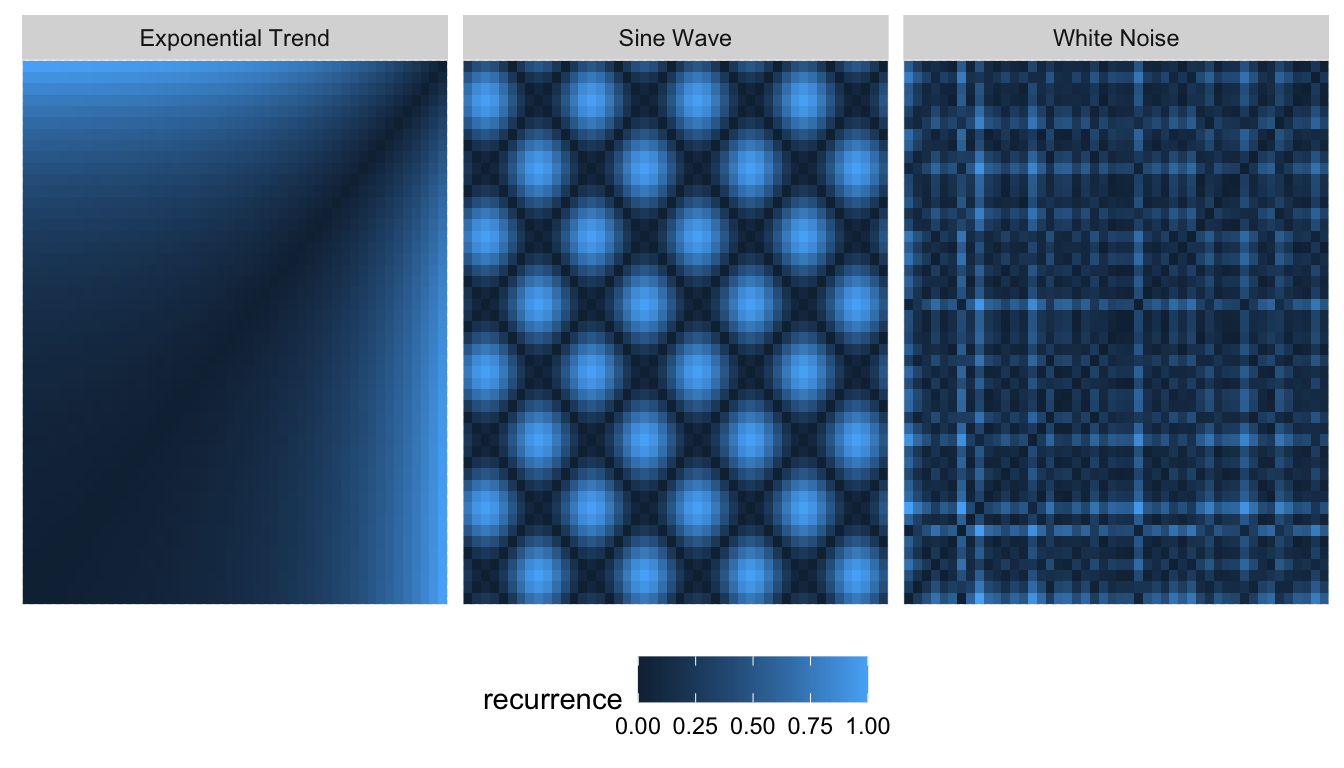
Real time series, of course, do not have patterns this clean. This makes it difficult to draw conclusions from these graphs when they resemble the one on the right rather than the two on the left. Lia et al. (2020) thus took to Convolutional Neural Networks to analyze a large set of time series via recurrence plots.
Lia et al. (2020) had a specific task that needed solving. However, when it comes to exploration of the data set only, UMAP is a favorite of mine. Similarly to how UMAP can embed the MNIST dataset, we can run UMAP on recurrence plots of many time series to project each time series onto a two-dimensional space. In this representation, time series with similar recurrence plots should be clustered and spotting commonalities among them becomes easier.
UMAP on Recurrence Plots
To explore the usefulness of recurrence plots combined with UMAP, we consider two freely available data sets of many time series: 1) Daily number of rides starting from Citi Bike stations in New York, and 2) daily sales of products at 10 different Walmart locations in the US.
Both datasets consist of daily observations. Here, however, we load them aggregated to monthly values (date is formatted as YYYY-MM-01). The reason for this is mostly that the recurrence plots create large datasets: What previously was a time series of $N$ observations turns into at least $N^2/2$ observations. This is a major drawback to consider—especially when going beyond a single series.
glimpse(citibike)
## Observations: 46,170
## Variables: 3
## $ id    <dbl> 72, 72, 72, 72, 72, 72, 72, 72, 72, 72, 72, 72, 72, 72, 72…
## $ date  <date> 2013-07-01, 2013-08-01, 2013-09-01, 2013-10-01, 2013-11-0…
## $ value <dbl> 3575, 3675, 3153, 3325, 2122, 1213, 924, 676, 1433, 2380, …
```r
glimpse(walmart)
## Observations: 320,000
## Variables: 3
## $ id    <chr> "FOODS_1_012_CA_1_validation", "FOODS_1_012_CA_1_validatio…
## $ date  <date> 2011-01-01, 2011-02-01, 2011-03-01, 2011-04-01, 2011-05-0…
## $ value <dbl> 0, 0, 0, 0, 0, 0, 4, 3, 0, 0, 0, 0, 0, 0, 0, 0, 15, 89, 13…
Note that for both datasets the observations are non-negative counts. This is what a randomly picked time series from the citibike dataset looks like:
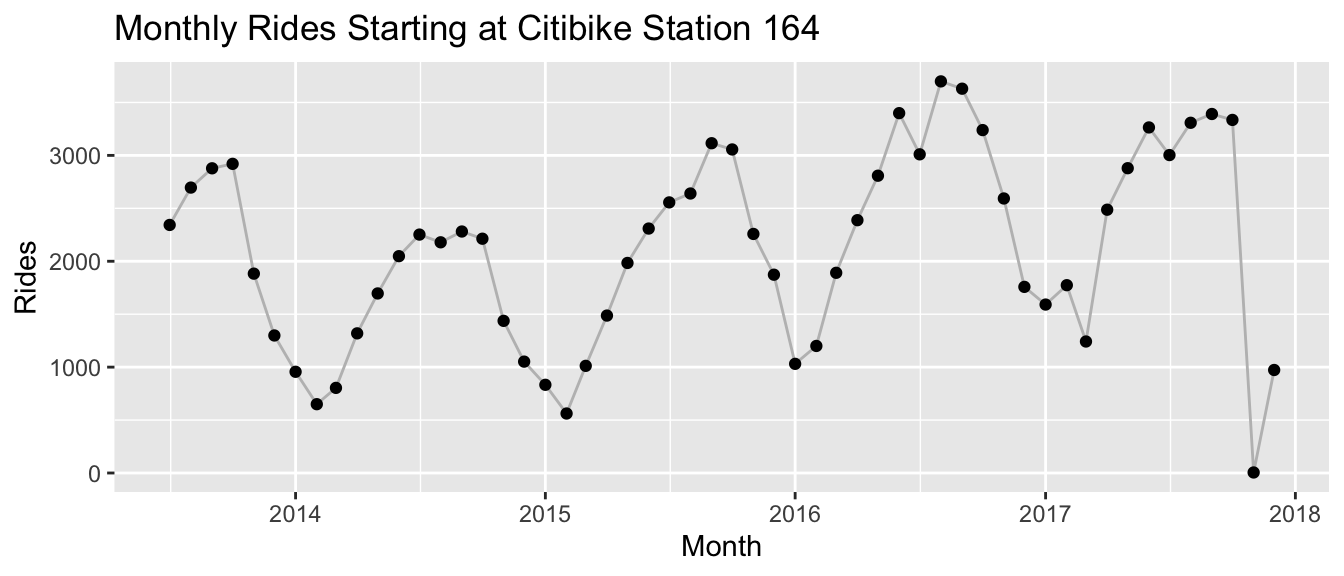
And this is what sales for a randomly picked product at Walmart look like:
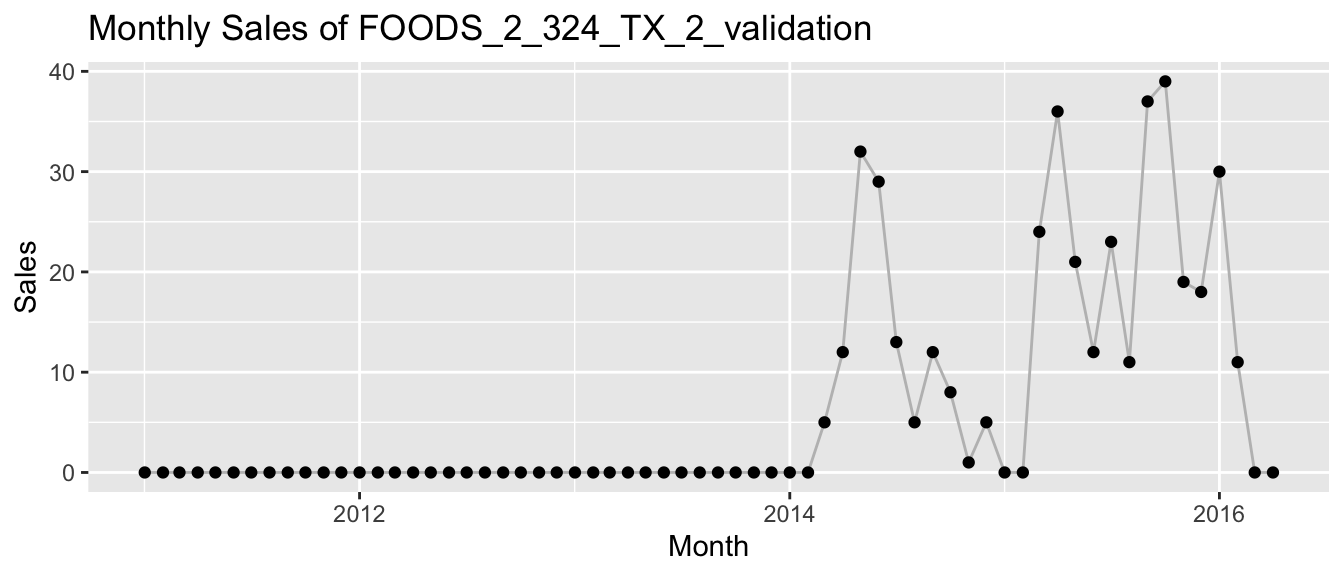
The latter time series of Walmart highlight another detail that needs to be considered when using recurrence plots the way I do: Since we want to feed every pixel of the recurrence plot as a feature to UMAP, we need the same number of pixels for each time series. To achieve this when new Citi Bike stations are added over time and products are launched or discontinued at Walmart, I pad each time series with zeros as needed. At least in the case of count time series the zero is a natural choice. However, we will see in the following that even in this case the padding does have a strong impact on the results.
To run the analysis, we first need to compute the recurrence plots for each time series of the dataset. We start by analyzing the Walmart dataset.
UMAP and Recurrence Plots for Walmart Sales
In the following, I use a few convenience functions shared as tiny R package recur on Github. They wrap in part functions from the umap and hdbscan package which do the actual work.
We take the dataset and compute the recurrence plot for each product. The recur::measure() function does exactly this. Here, we return the recurrence pixels in a long table after having computed the full $N \times N$ matrix. Before computing the recurrence values, it min-max standardizes all values for each time series to values between 0 and 1.
walmart_recur <- recur::measure(walmart, shape = "long", size = "square")
The recurrence plot of the product shown above looks as follows, with a large area reserved for the initial zero padding. The area with recurrence of points after the product started selling appears without obvious pattern and is limited to less than a quarter of the pixels.
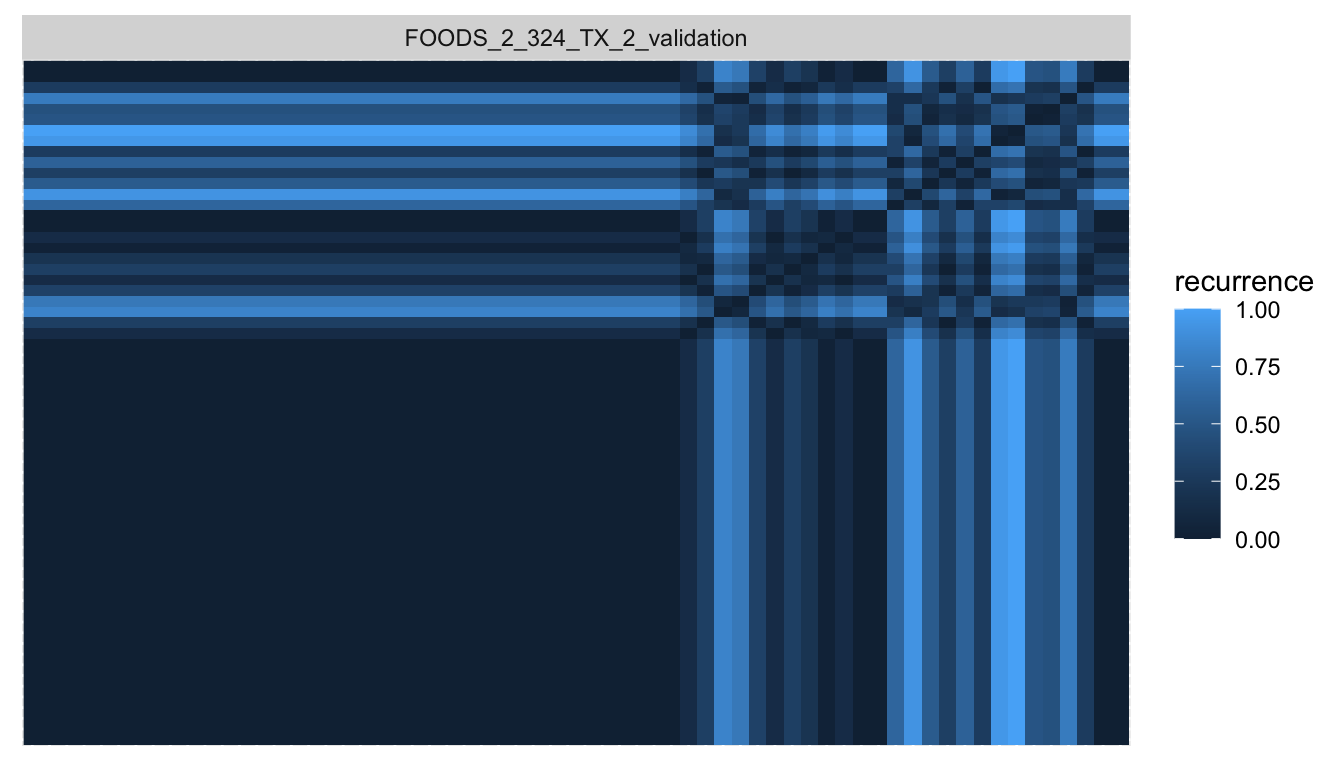
With the recurrence pixels for each time series in hand, we can pass them to UMAP to get a two-dimensional embedding of the time series. recur::embed() is a convenience function that first calls recur::measure() and then umap::umap() to do this.
walmart_embed <- recur::embed(data = walmart)
Even before visualizing the embedding, we continue and cluster the products in the embedding space via HDBSCAN where the recur::cluster() function calls dbscan::hdbscan() to do so.
walmart_cluster <- recur::cluster(walmart_embed)
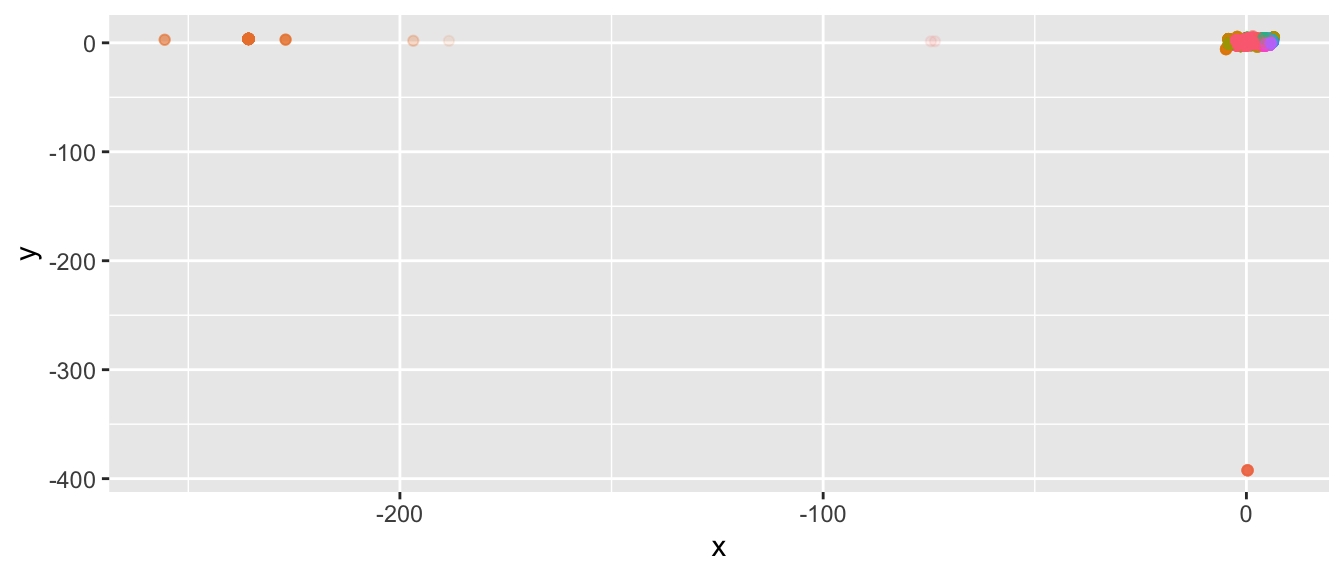
There appear to exist groups of time series that are very different from the rest. If we focus on the central, largest set of time series, we see that they are mostly densely clustered.
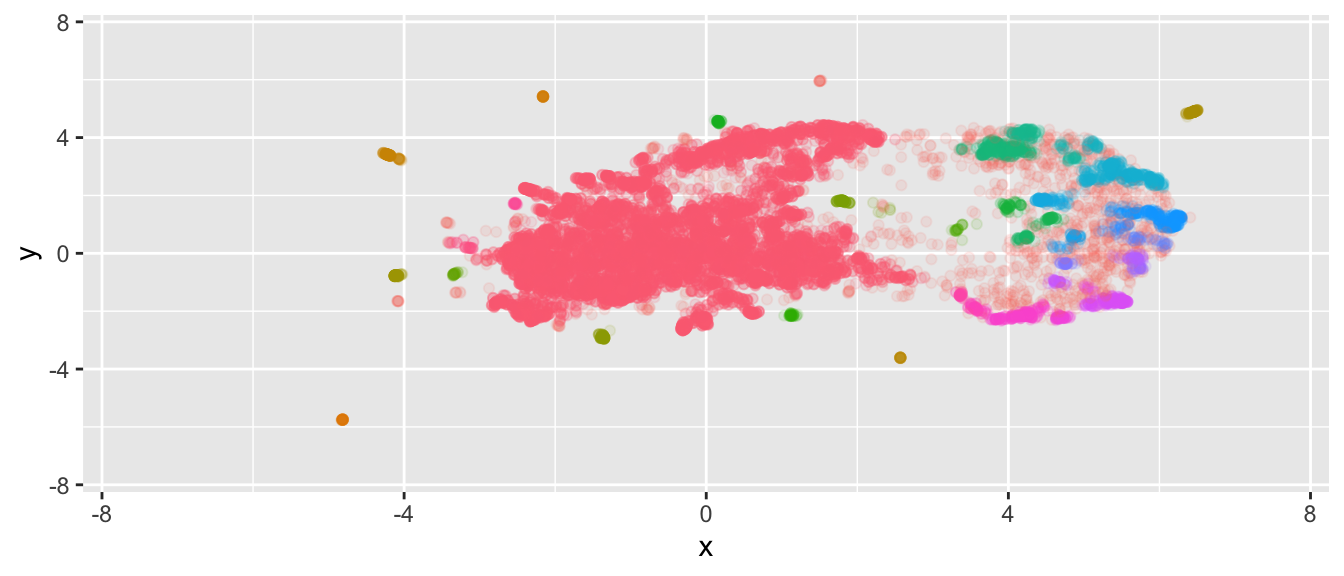
Since this by itself might not be overly useful, we can instead look at the $n$ time series in cluster $k$ with the largest HDBSCAN cluster membership probability using the following function:
plot_top_n_from_cluster_k <- function(clustered, data, n = 9, k = 1) {
  filtered <- clustered$embedding[clustered$embedding$cluster == k,]
  ordered <- filtered[order(filtered$membership_prob, decreasing = TRUE),]
  n <- min(nrow(ordered), n)


  pp <- data[data$id %in% ordered$id[1:n],] %>%
	ggplot(aes(x = date, y = value)) +
	geom_line(color = "grey") +
	geom_point() +
	facet_wrap(~id, scales = "free") +
	labs(x = "Month", y = "Sales",
		 title = paste0("Top ", n, " Series in Cluster ", k))

  return(pp)
}
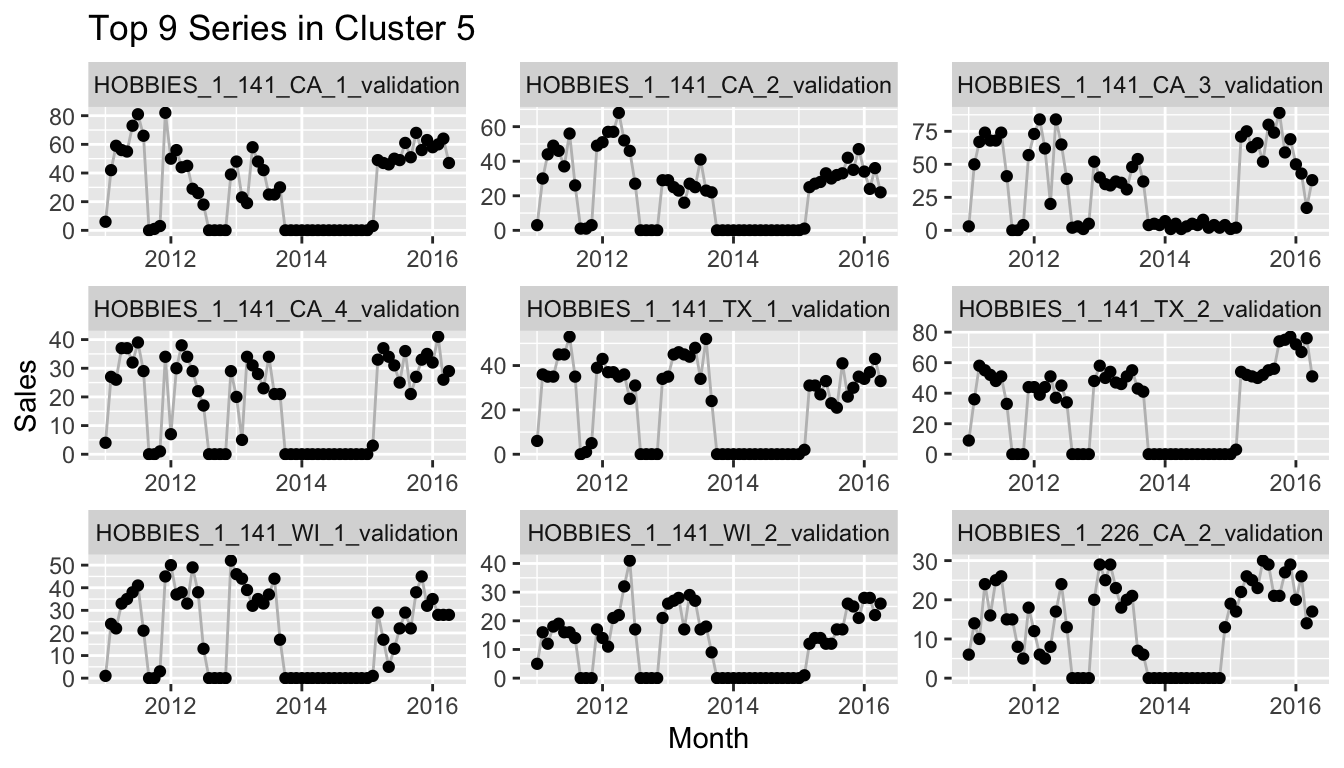
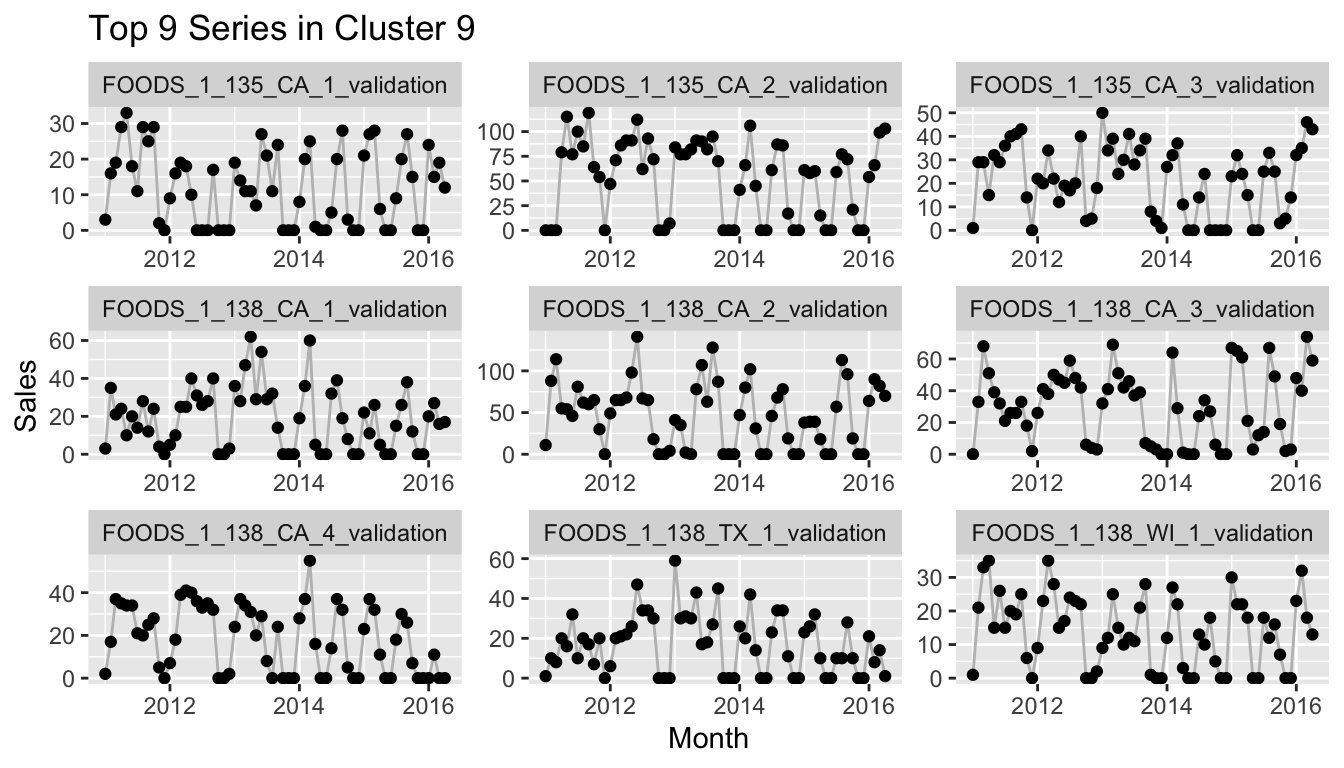
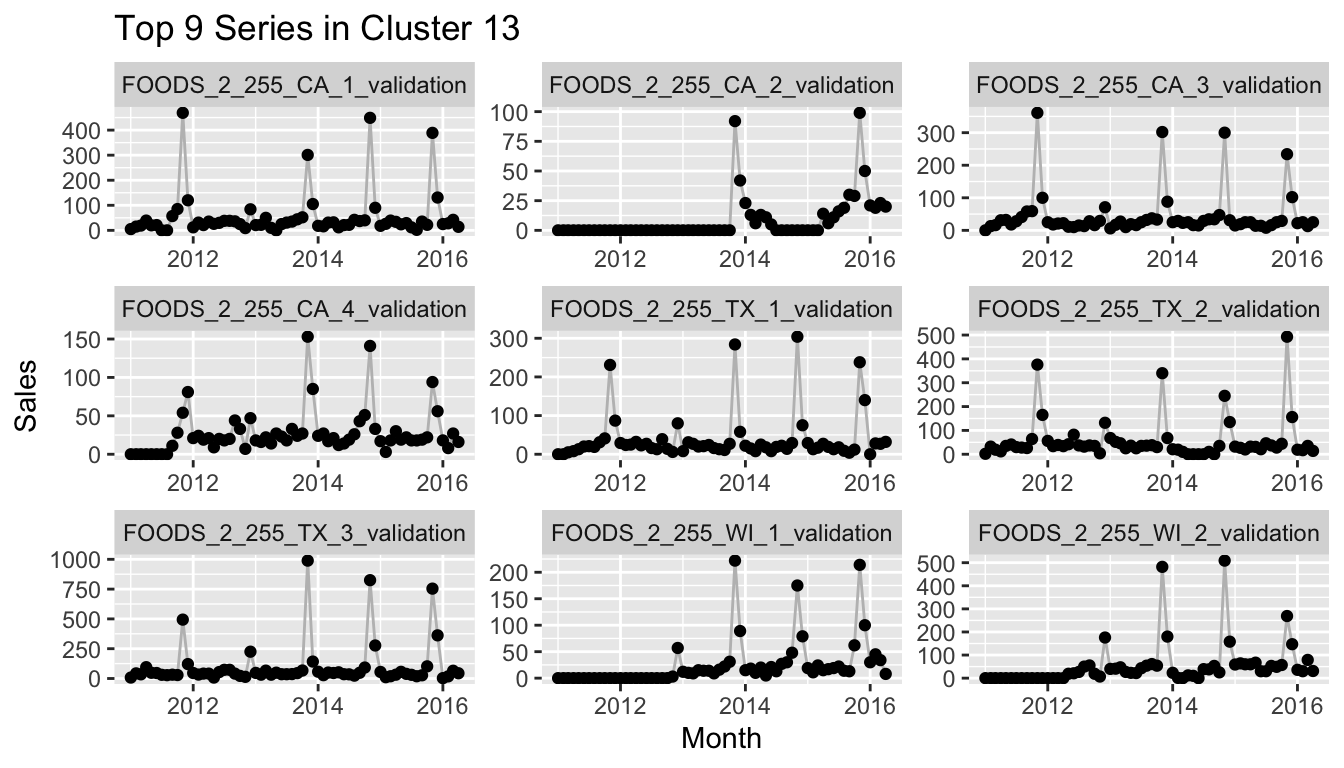
If you would reproduce this at home and check more of the clusters, you would notice that many of the clusters consist of a set of time series that starts after the earliest possible start date and thus has 0 sales for the first months. This can mean, of course, that a quarter or half or more of the values of the series are exactly equal to other series with the same start date, while at the same time the importance of the differences between the actual observations is lessened by the min-max scaling. One example of this is the following cluster.
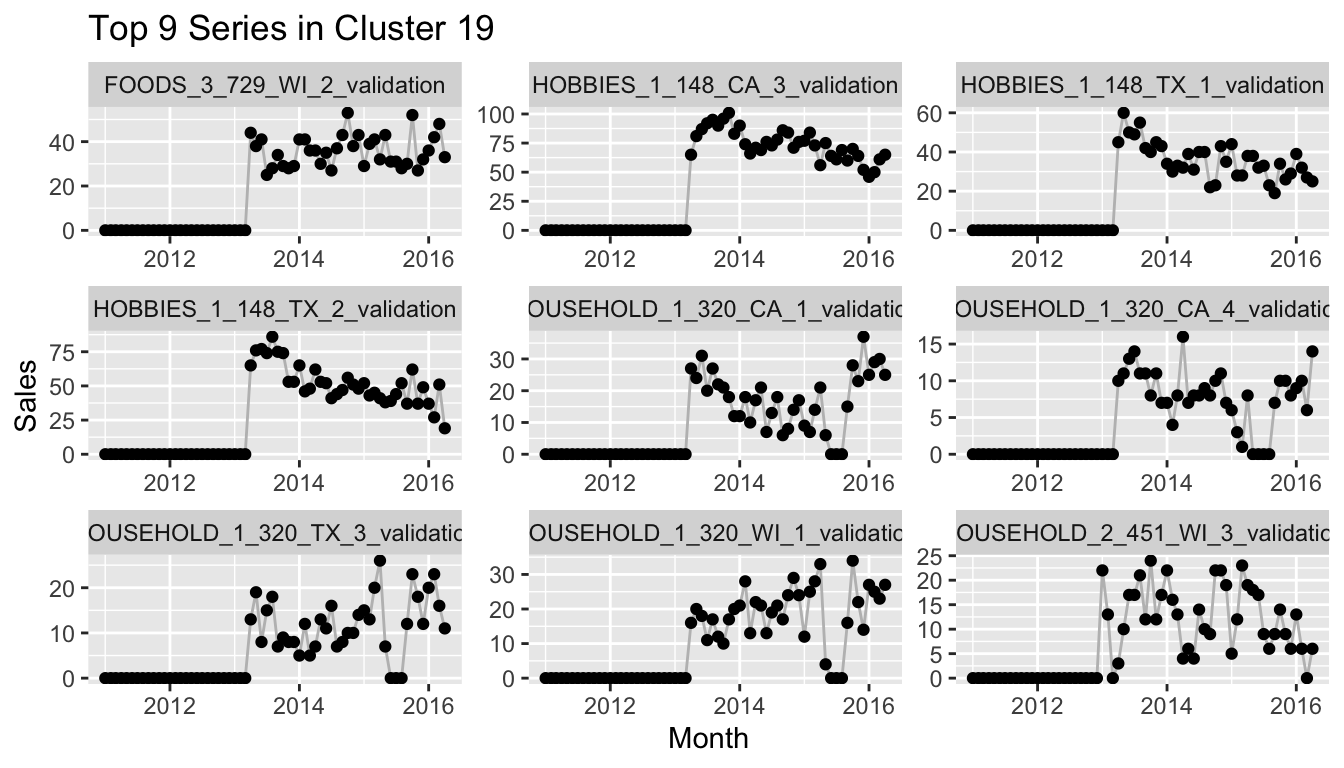
So the method is certainly not perfect. But this drawback can also help to check your assumptions on whether the data is clean or not. It can also identify groups of time series that need a different modeling approach than others.
UMAP and Recurrence Plots for Citi Bike Rides
We can now apply the same methods to the Citi Bike data. An interesting differentiation to the Walmart data is that most time series here have a strong yearly seasonality. This, for example, is what the recurrence plot of Citi Bike station 360 looks like:
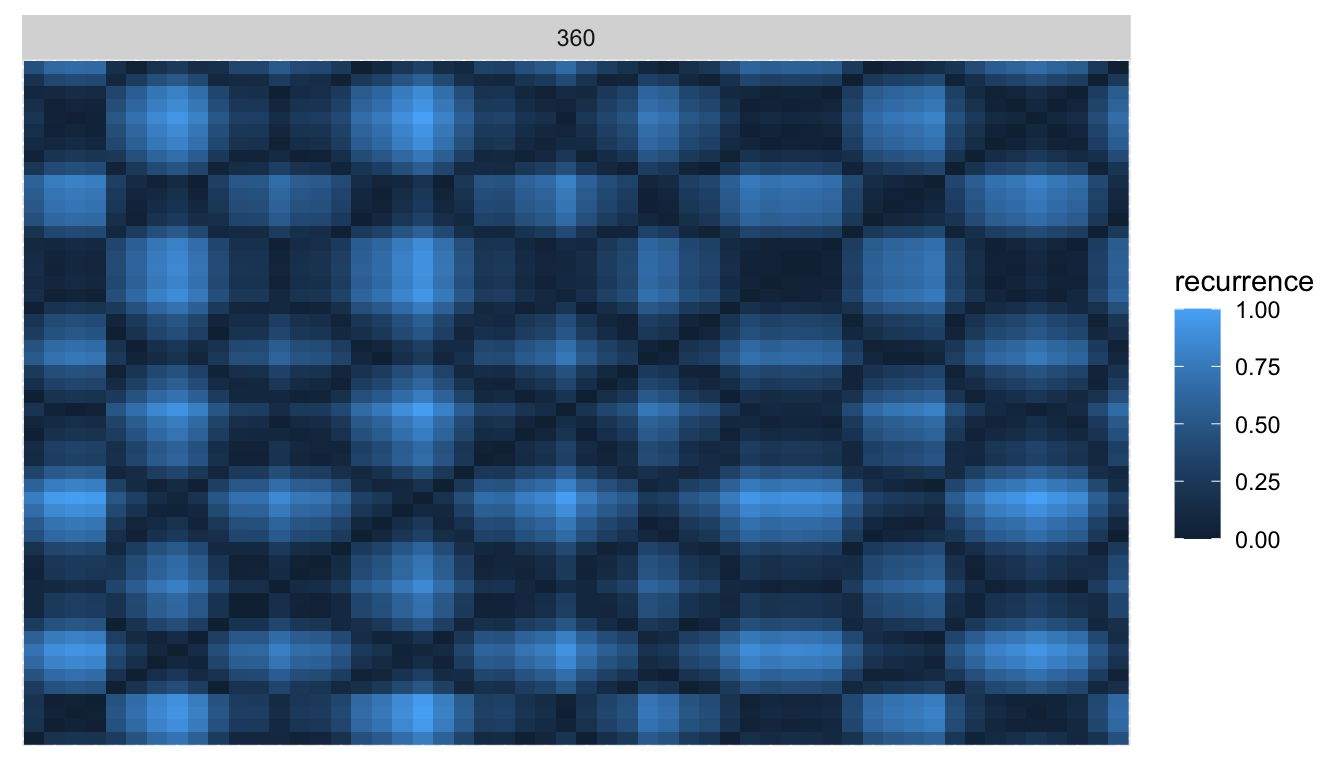
Compared to the plot of the Walmart product above, this is much closer to the idealized sine curve recurrence pattern!
To analyze the entire dataset, we take the monthly observations of Citi Bike rides, compute the recurrence plots and pass them to UMAP and HDBSCAN, just as before.
citibike_embed <- recur::embed(data = citibike)
citibike_cluster <- recur::cluster(citibike_embed)
This time, the global dispersion in the UMAP embedding is not quite as extreme as for Walmart, and HDBSCAN is able to cluster the time series nicely.
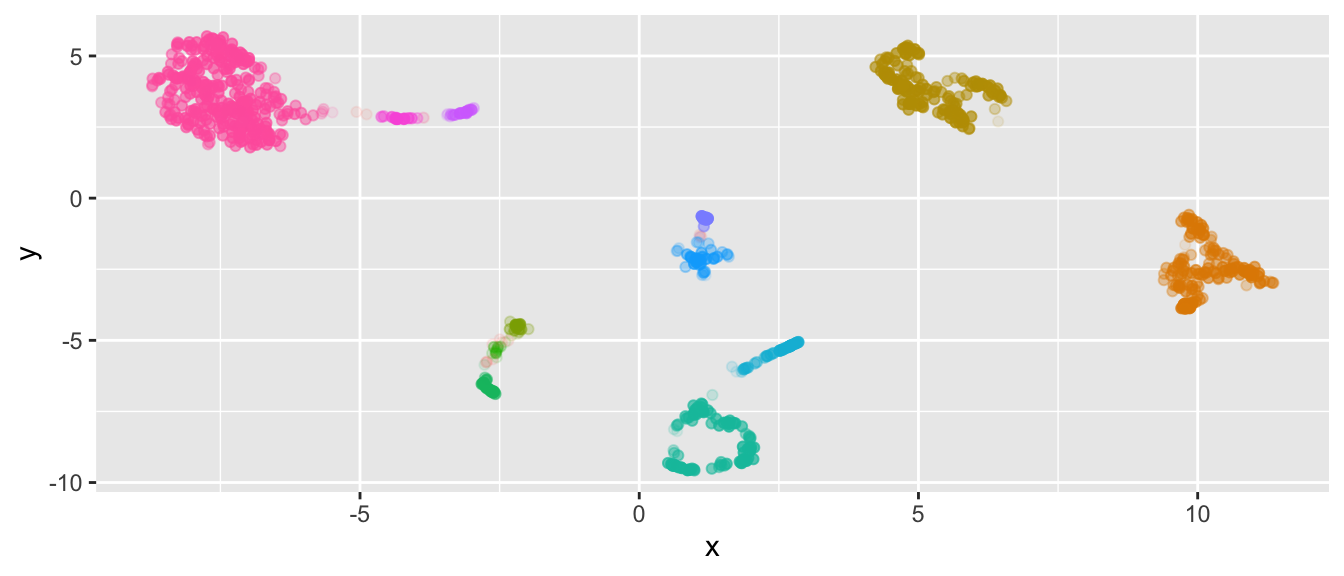
We peak into the clusters to reveal that yet again the clusters depend heavily on the dates at which the respective stations within the cluster were used for the first/last time, as this provides UMAP with the largest global variation.
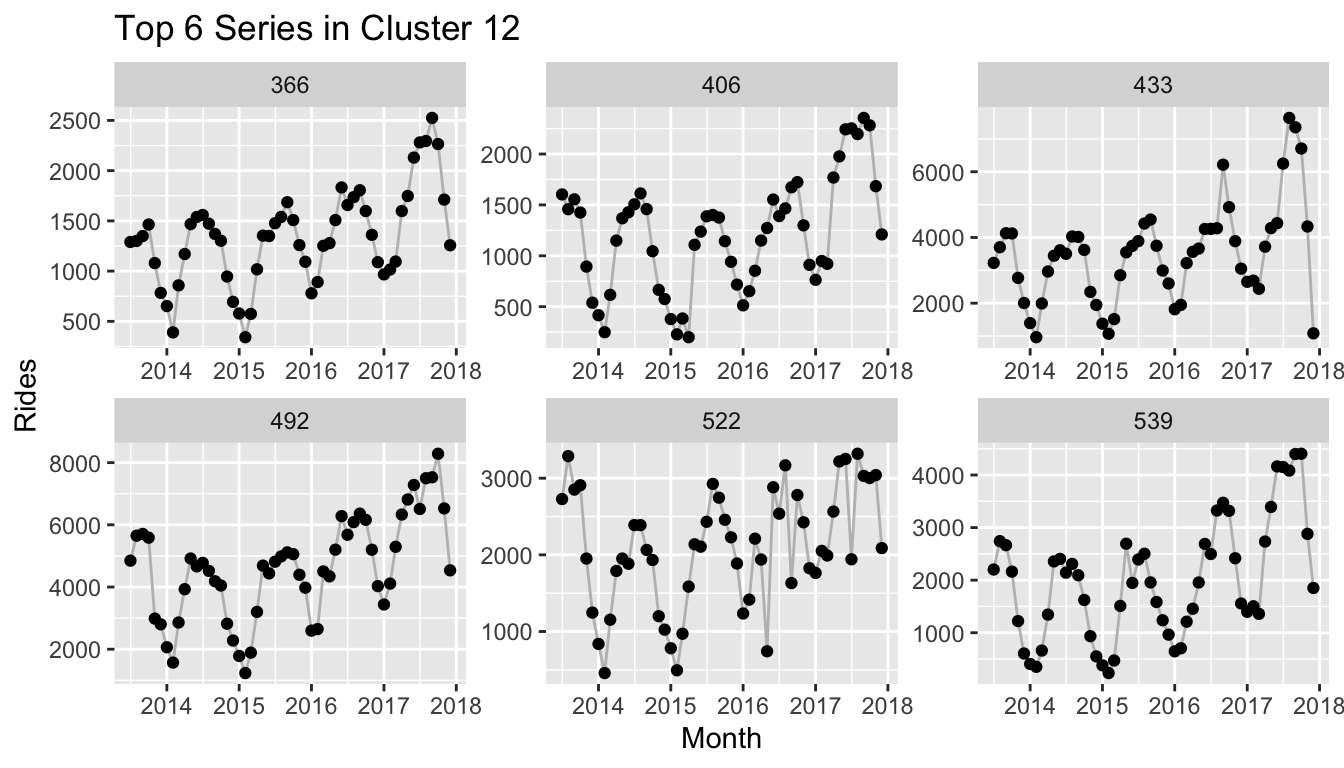
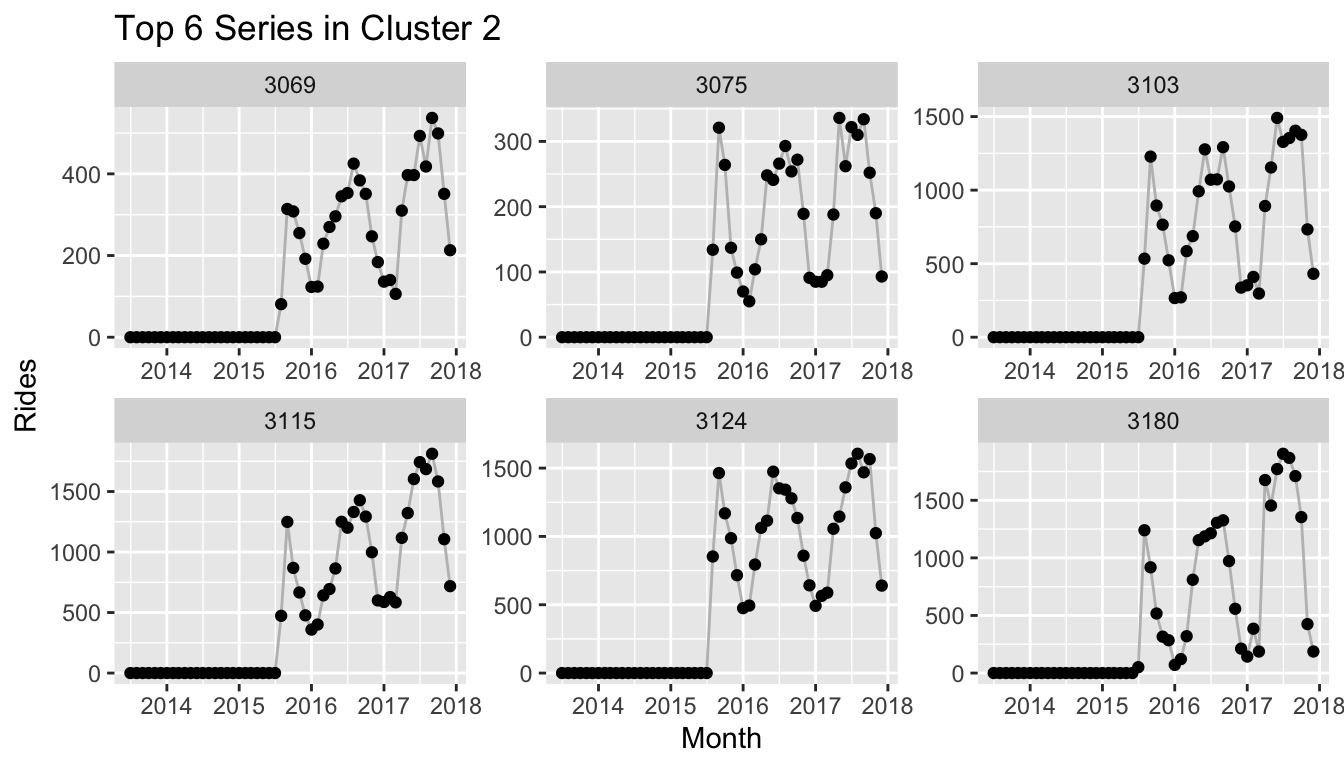
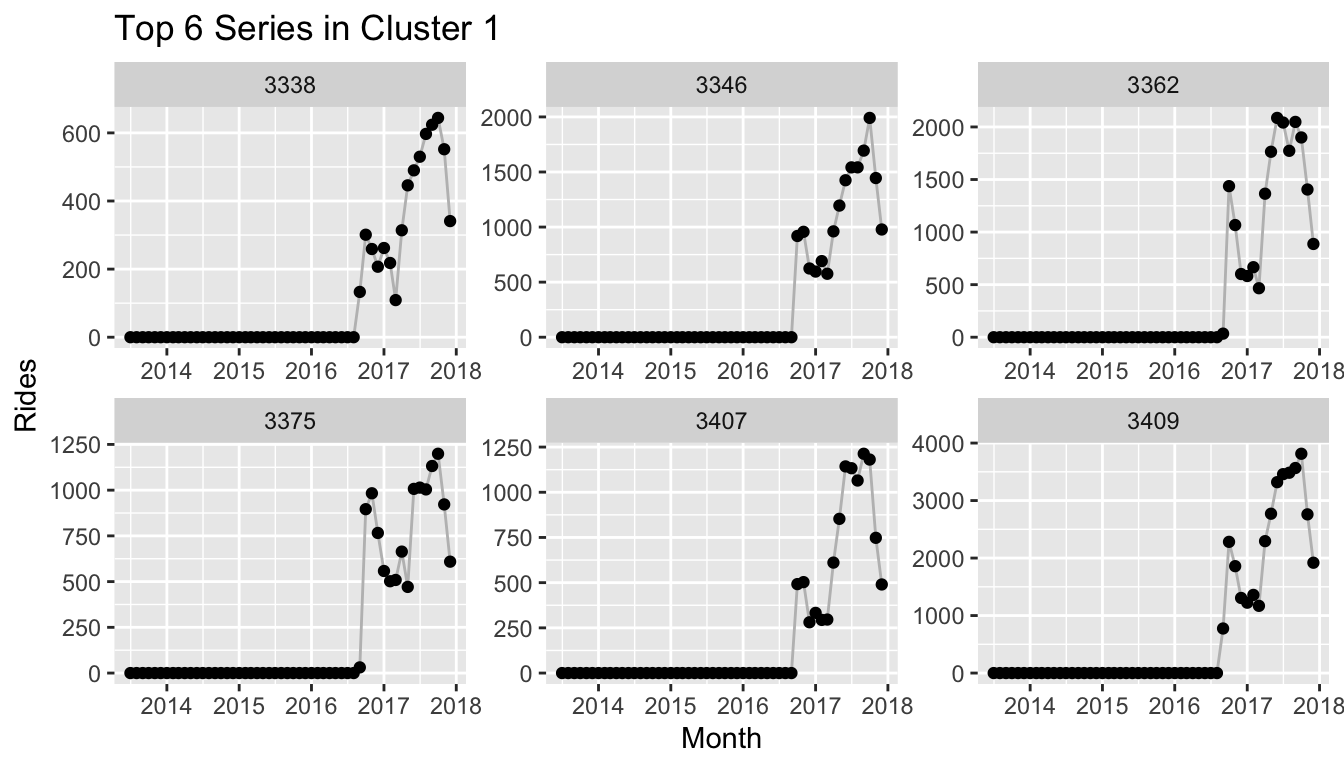
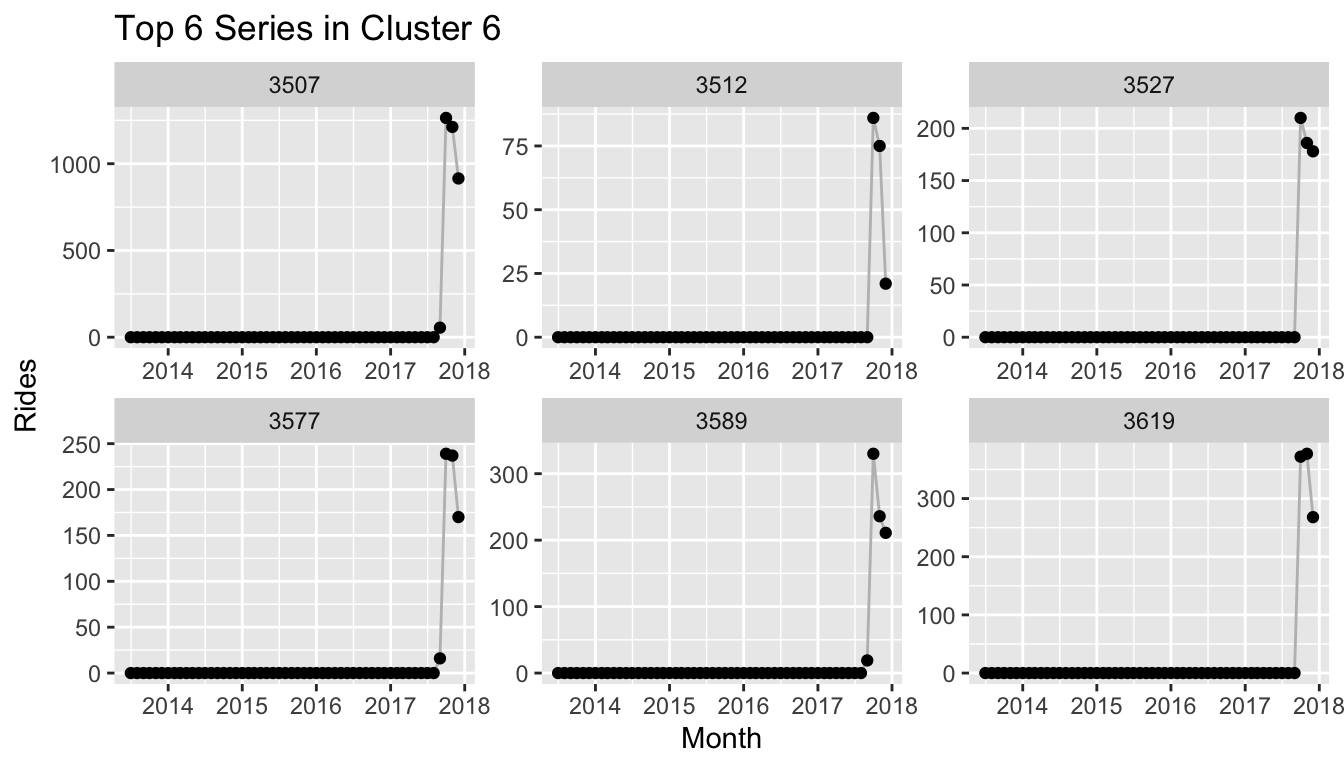
Citi Bike Recurrence Plots and Location Data
A unique feature of the Citi Bike data is that each time series corresponds to a location in New York since the rides are counted for each station at which a ride starts. The coordinates of Citi Bike stations are also available with the ride data which let’s us make use of this information.
We can take the cluster information that we used in the plot of the embedding above and project the stations with the cluster information onto their respective coordinate. The resulting plot reveals that Citi Bike rolled out its stations by distinct areas in New York. The largest cluster (pink) corresponds to the stations available from the start, which are located in Manhattan south of Central Park, as well as the parts of Brooklyn that connect to Manhattan via the Williamsburg Bridge, Brooklyn Bridge and Manhattan Bridge.
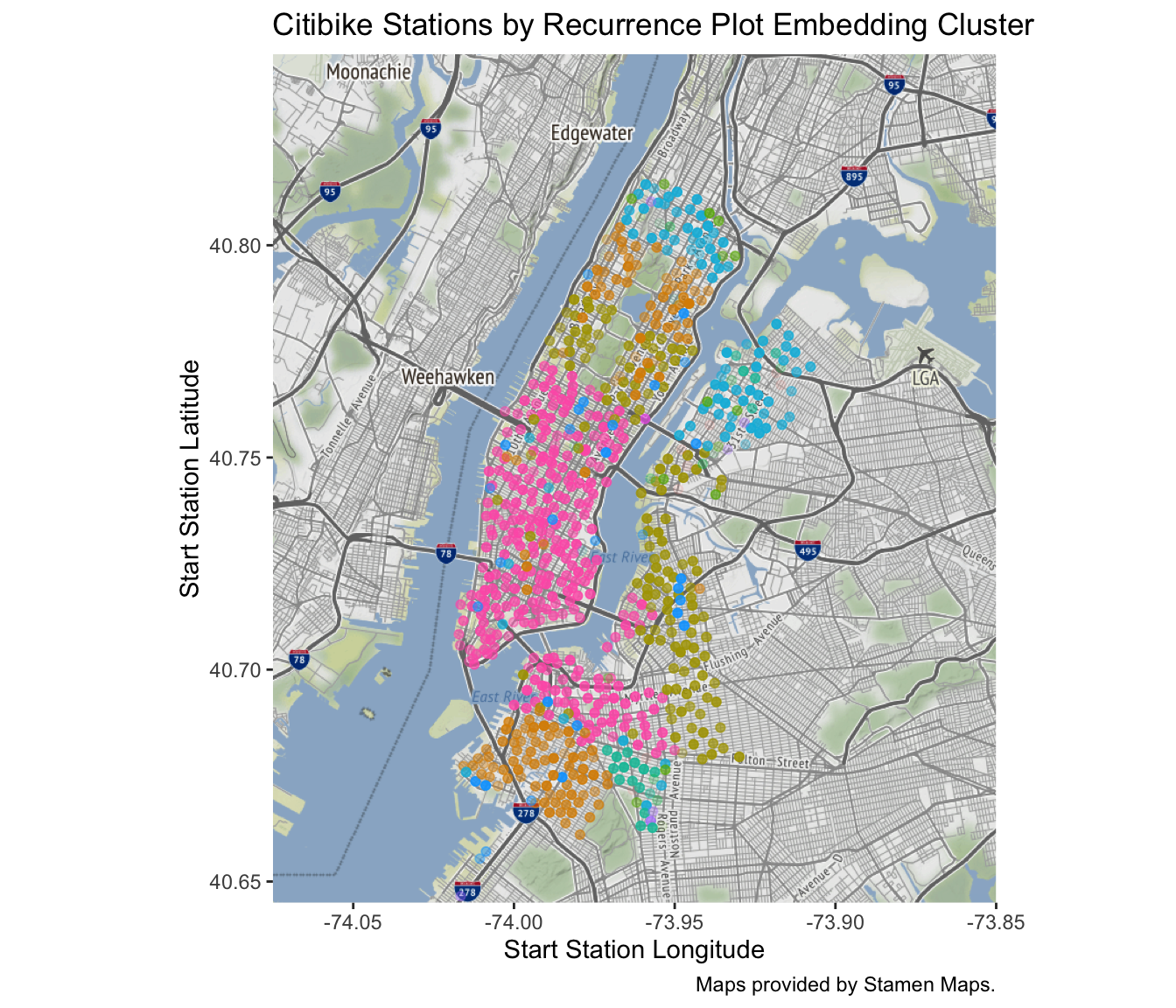
References
Citi Bike data available at https://s3.amazonaws.com/tripdata/index.html. See also https://www.citibikenyc.com/system-data.
The Walmart data set is part of the M5 competition hosted on Kaggle, see https://www.kaggle.com/c/m5-forecasting-accuracy.
Xixi Lia, Yanfei Kanga, Feng Li (2020). Forecasting with Time Series Imaging, ArXiv e-prints 1802.03426.
J.-P. Eckmann, S. Oliffson Kamphorst, D. Ruelle (1987). Recurrence Plots of Dynamical Systems, EPL (Europhysics Letters), Vol. 4, 9.
L. McInnes, J. Healy, J. Melville (2018). UMAP: Uniform Manifold Approximation and Projection for Dimension Reduction, ArXiv e-prints 1802.03426.
L. McInnes, J. Healy, S. Astels. The hdbscan Clustering Library.
R. J.G.B. Campello, D. Moulavi, J. Sander (2013). Density-Based Clustering Based on Hierarchical Density Estimates, PAKDD 2013, Part II, LNAI 7819, pp. 160-172.
Rediscovering Bayesian Structural Time Series
Posts / 7 June, 2020
This article derives the Local-Linear Trend specification of the Bayesian Structural Time Series model family from scratch, implements it in Stan and visualizes its components via tidybayes. To provide context, links to GAMs and the prophet package are highlighted. The code is available here.
I tried to come up with a simple way to detect “outliers” in time series. Nothing special, no anomaly detection via variational auto-encoders, just finding values of low probability in a univariate time series. The week before, I had been toying with generalized additive models (GAMs). So it seemed like a good idea to fit a GAM with a spline-based smooth term to model the trend flexibly while other features take care of everything else (seasonality, …). But really the flexible trend is nice and simple and you don’t even need to think too much:
set.seed(573)

n <- 48
x <- 1:n
y <- rnorm(n, tanh(x / 6 - 4), 0.25 )

gam_fit <- mgcv::gam(y ~ 1 + s(x))
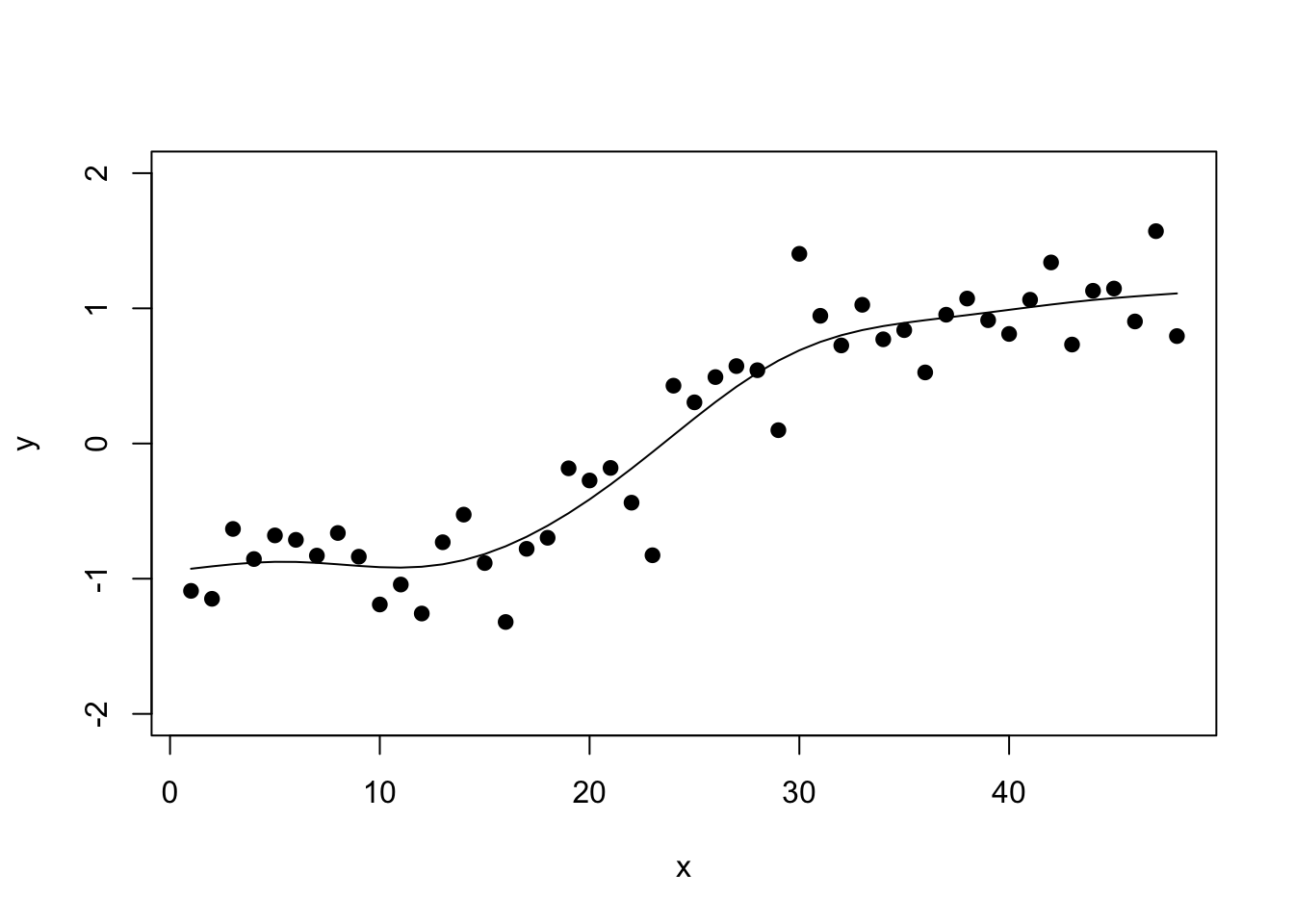
This is all fine and well to get a nice in-sample fit which is all you need for standard outlier detection. For example, the forecast package’s tsoutliers() function relies on the non-parametric stats::supsmu() function to fit a flexible trend.
But then I went one step too far: “Wouldn’t it be nice to use a GAM to forecast my time series as well?”
If you’re familiar with spline functions you know this isn’t a question I should have asked myself: When using splines, you are limited to predicting new data that falls into the domain of your training data, i.e. the domain on which the splines were fitted. Once you leave this domain, there are no fitted splines and so your model can’t predict. You can always make assumptions, of course: A linear continuation, using the last value, or similar. But what about your prediction interval?
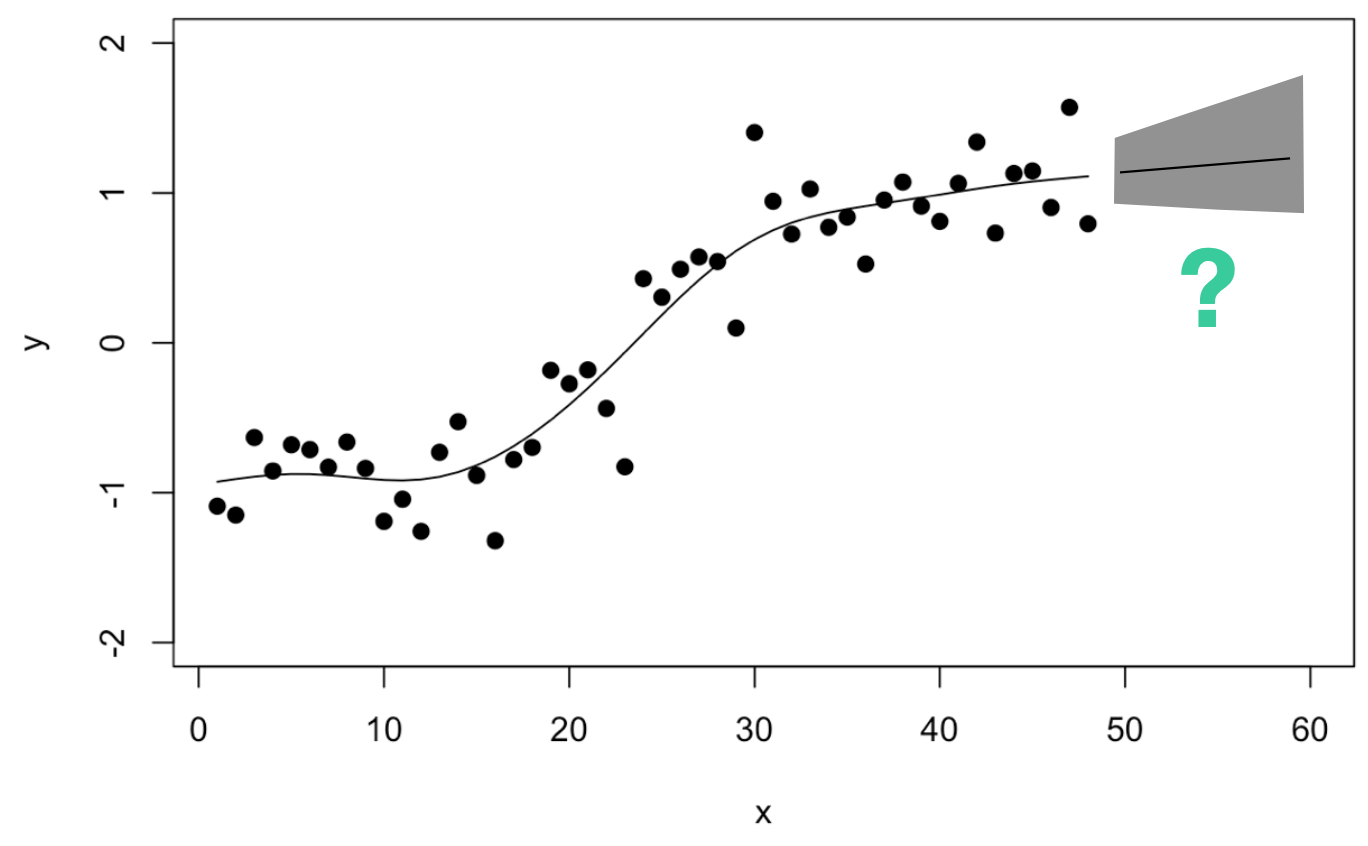
So I continued thinking: Maybe one could estimate how often the trend has adjusted in the past and use this to derive the prediction interval?
Trend Uncertainty in the prophet Package
In their prophet package, Sean J. Taylor and Benjamin Letham specify their model “similar to a generalized additive model” (Taylor and Letham, 2018) as
If we disregard the seasonal $s(t)$ and holiday components $h(t)$ for the moment, then this corresponds to the GAM formulation used above. A crucial addition of the prophet package is how Taylor and Letham manage to incorporate uncertainty due to historical trend changes in the model’s prediction intervals (see chapter 3.1 in their paper): In their trend specification,
$k$ corresponds to the linear growth rate but can be adjusted at changepoints $a(t)$ by different rate adjustments stored in the vector $\delta$. In their model specification for Bayesian inference, they pick $\delta_j \sim \text{Laplace}(0,\tau)$ as prior distribution for the amount by which the rate may change at a changepoint. This implies changes are generally more likely close to zero but can be large from time to time.
It also suggests a convenient approach to forecast the trend uncertainty: They use this generative model to sample new changepoints in the future, as well as new changes in the growth rate via the above prior distribution: Take the estimated rate changes $\hat{\delta}_j$ and use them to get a maximum likelihood estimate of the Laplace distribution’s scale parameter: $\hat{\tau} = \frac{1}{S} \sum_{j = 1}^S |\hat{\delta}_j|$.
This provides a way to forecast (the uncertainty of) the piece-wise constant growth rate: Sample new changepoints with linear trend changes according to the distribution fitted to historical growth rate changes.
Could one go a step further and model a continously changing trend as well as its forecast uncertainty? Would this in particular be possible for the spline-based smooth term in the original GAM specified above?
Roughly, this is the direction I went during a late evening whiteboard drawing session:
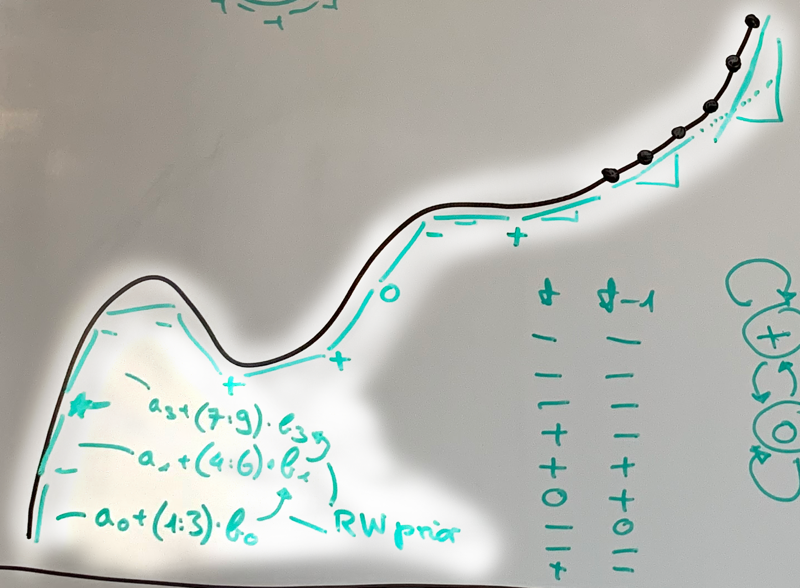
Don’t judge my drawing skills. I believe what I was trying to derive was some sort of local linear approximation to the smooth trend (you see the straight lines for every three observations). Each of the lines would be described by their own coefficients (see $a_0, b_0, a_1, b_1, ...$ in the lower left corner). And to be fancy, I wrote Random Walk prior to describe how much a coefficient may change from one time point to the next. This is actually not much different from the formulation used in the prophet package: In my drawing, we have a potential changepoint every third observation and instead of changes drawn from a Normal distribution (random walk prior), prophet assumes the Laplace.
A little later that evening it hit me: I already know this! The model I was sketching is equivalent to the local-linear trend Bayesian structural time series model (Scott and Varian 2014)—which itself is equivalent to a dynamic linear model or a state-space model formulation. For the close cousin of the local-level model, look no further than me using it here.
Let’s have a closer look at this model that promises to be sufficiently flexible for many trends, can incorporate other features, is interpretable, and propagates the uncertainty from trend changes into the forecasts.
Bayesian Structural Time Series
We are looking for a flexible way of describing the trend $\mu_t$ of a time series. Assume that the observations of the time series are the sum of potentially several components: the trend, seasonality, regressors and noise:
$$ Y_t \sim \text{Normal}(\lambda_t, \sigma_Y), \quad \lambda_t = \mu_t + \tau_t + \beta^Tx_t $$While the seasonal and regressor components are certainly interesting, we’ll focus on the trend for now.
Following my sketch above, what we expect to have is a trend $\mu_t$ that is a linear function of time, something along the lines of $\mu_t = \delta_t \cdot t$. This is equivalent to $\mu_t = \mu_{t-1} + \delta_t$ given that we only consider equal time steps of size 1. So we expect that the trend at the next step is the previous trend plus a smoothly changing difference $\delta_t$. Adding some additional noise to this relationship, we get
$$ \mu_t = \mu_{t-1} + \delta_t + \epsilon_{\mu,t}, \quad \epsilon_{\mu,t} \sim \text{Normal}(0, \sigma_\mu). $$If the change $\delta_t$ at each time would be constant at $\delta$, then the trend would be equal to a linear regression against time. If we let $\delta_t$ change over time, however, the trend can become a rather flexible function of time—while being locally linear in time.
How do we let $\delta_t$ change over time? This is where the random walk prior from the whiteboard sketch comes in:
$$ \delta_t = \delta_{t-1} + \epsilon_{\delta,t}, \quad \epsilon_{\delta,t} \sim \text{Normal}(0, \sigma_\delta) $$Note that this model encompasses a few special cases. First, if $\delta_t$ was fixed at 0, then the trend $\mu_t$ would adjust according to a random walk and we would be looking at the local-level model (as used here). Second, if $\sigma_\delta$ was 0 and thus $\epsilon_{\delta,t}$ was 0, the trend $\mu_t$ would be changing according to the linear model—either with some noise or in a straight line if $\sigma_{\mu}$ was 0.
Generating a Time Series
Given this model, we can generate a time series that follows this model exactly. This provides us with additional intuition with regard to how the different parameters interact.
Here, we generate $T=40$ observations. We draw $\sigma_{\mu}, \sigma_{\delta}$ and $\sigma_Y$ from Half-Normal prior distributions with different scale.
set.seed(4539)

T <- 40
y <- rep(NA, T)

# Draw standard normal errors which will be
# multiplied by the scale later
mu_err <- rnorm(T, 0, 1)
delta_err <- rnorm(T, 0, 1)

s_obs <- abs(rnorm(1, 0, 10))
s_slope <- abs(rnorm(1, 0, 0.5))
s_level <- abs(rnorm(1, 0, 0.5))
## [1] "Scale of Observation Noise: 10.33"
## [1] "Scale of Trend Noise: 0.06"
## [1] "Scale of Slope Noise: 0.68"
Note how the scale of the trend noise is quite small which means that we will not see a strong random walk behavior on the trend.
Also note how we were able to sample the different noise values independently for each time step. We can add them up according to our model by iterating over the time steps. In the final step, we draw the observations from the Normal distribution with mean equal to the trend.
mu <- rep(NA, T)
delta <- rep(NA, T)

mu[1] <- mu_err[1]
delta[1] <- delta_err[1]

for (t in 2:T) {
  mu[t] <- mu[t-1] + delta[t-1] + s_level * mu_err[t]
  delta[t] <- delta[t-1] + s_slope * delta_err[t]
}

y <- rnorm(T, mu, s_obs)
The time series looks as follows:
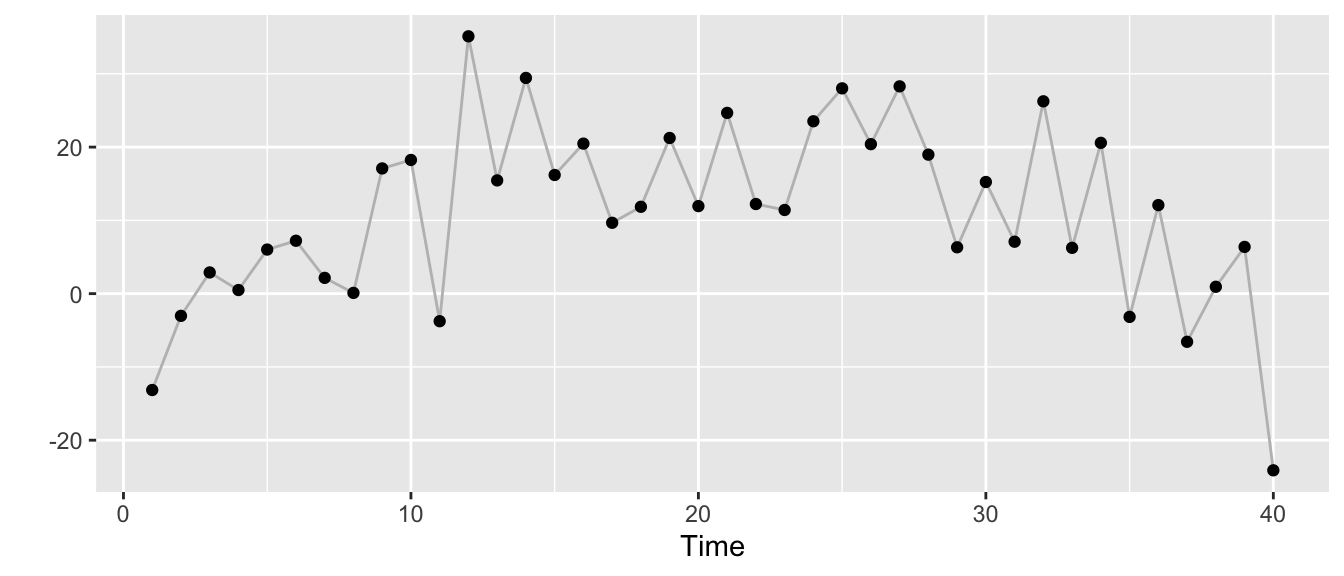
But we can also stylize it differently. The next plot shows the trend $\mu_t$ as the grey line, the observations $y_t$ as dots with size scaled according to the size of the change $\delta_t$ in trend at time $t$.
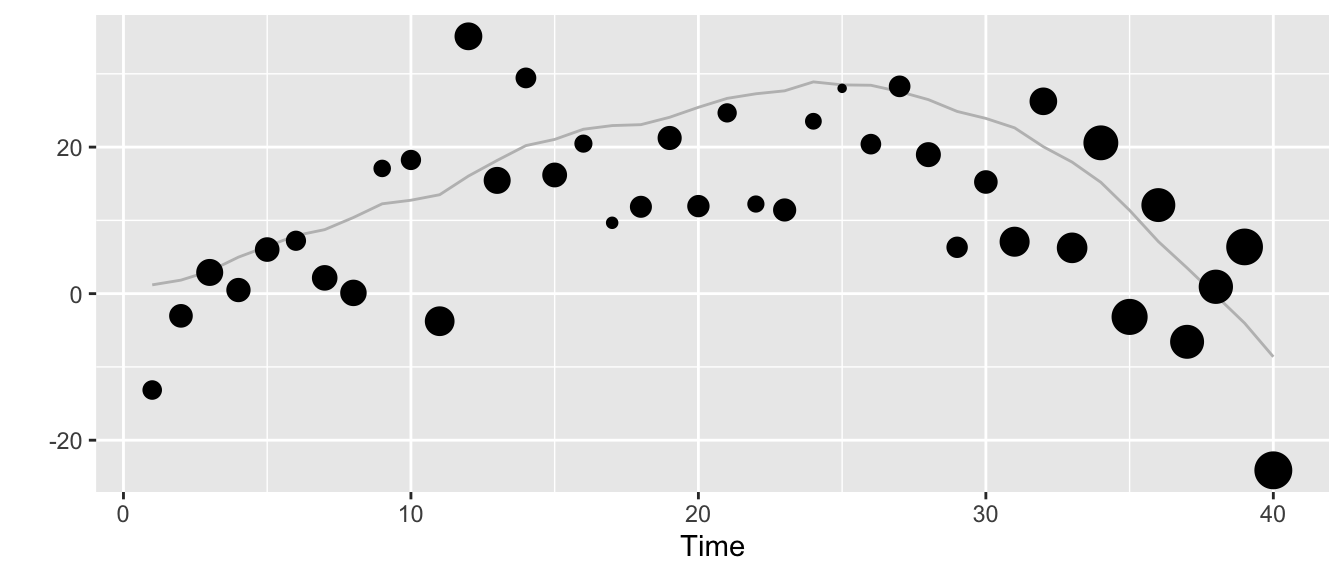
Estimating the Model
While there may be more efficient inference methods for this model (Kalman filter) and the ready-to-use bsts package, we can take the specification above to define a Stan model and run Bayesian inference via Hamiltonian Monte-Carlo.
A simple implementation of the local-linear trend model in Stan code looks quite similar to the R code we used to generate the example time series:
library(rstan)
rstan_options(auto_write = TRUE)
options(mc.cores = parallel::detectCores())

llt_model <- stan_model("local_linear_trend.stan",
						model_name = "local_linear_trend")
## S4 class stanmodel 'local_linear_trend' coded as follows:
## // https://discourse.mc-stan.org/t/bayesian-structural-time-series-modeling/2256/2
##
## data {
##   int <lower=0> T;
##   vector[T] y;
## }
## parameters {
##   vector[T] mu_err;
##   vector[T] delta_err;
##   real <lower=0> s_obs;
##   real <lower=0> s_slope;
##   real <lower=0> s_level;
## }
## transformed parameters {
##   vector[T] mu;
##   vector[T] delta;
##   mu[1] = mu_err[1];
##   delta[1] = delta_err[1];
##   for (t in 2:T) {
##     mu[t] = mu[t-1] + delta[t-1] + s_level * mu_err[t];
##     delta[t] = delta[t-1] + s_slope * delta_err[t];
##   }
## }
## model {
##   s_obs ~ normal(5,10);
##   s_slope ~ normal(0,1);
##   s_level ~ normal(0,1);
##
##   mu_err ~ normal(0,1);
##   delta_err ~ normal(0,1);
##
##   y ~ normal(mu, s_obs);
## }
In the next step, we fit the model to the data generated above.
llt_fit <- sampling(object = llt_model,
					data = list(T = T, y = y),
					chains = 4,
					iter = 4000,
					seed = 357,
					verbose = TRUE,
					control = list(adapt_delta = 0.95))
For the three scale parameters, we get the following summary statistics of the samples from their posterior distributions:
print(llt_fit, pars = c("s_obs", "s_level", "s_slope"))
## Inference for Stan model: local_linear_trend.
## 4 chains, each with iter=4000; warmup=2000; thin=1;
## post-warmup draws per chain=2000, total post-warmup draws=8000.
##
##         mean se_mean   sd 2.5%  25%  50%  75% 97.5% n_eff Rhat
## s_obs   9.20    0.01 1.13 7.27 8.41 9.10 9.89 11.64  7350    1
## s_level 0.74    0.01 0.57 0.03 0.29 0.63 1.06  2.12  6384    1
## s_slope 0.67    0.00 0.30 0.24 0.45 0.62 0.83  1.37  3830    1
##
## Samples were drawn using NUTS(diag_e) at Fri May  8 20:42:10 2020.
## For each parameter, n_eff is a crude measure of effective sample size,
## and Rhat is the potential scale reduction factor on split chains (at
## convergence, Rhat=1).
Visualizing the Fitted Model
We can use the excellent tidybayes model by Matthew Kay to visualize the fitted model. First off, let’s look at the posterior distributions for the scale parameters for each of the four Markov chains:
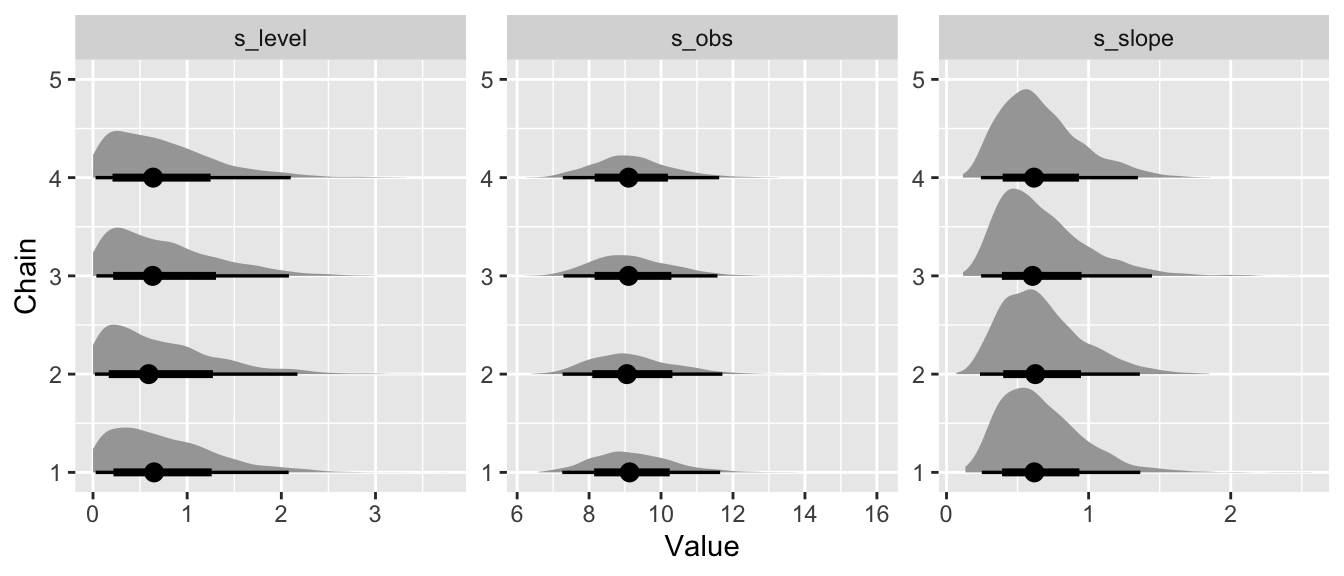
While this is nice, wait until you see the following.
We can visualize the estimated posterior distributions of the slope of the trend, $\delta_t$, over time. Larger values in absolute terms correspond to period where the overall level of the time series will change more rapidly, while positive values correspond to periods of increasing trend and a negative slope corresponds to periods of decreasing trend.
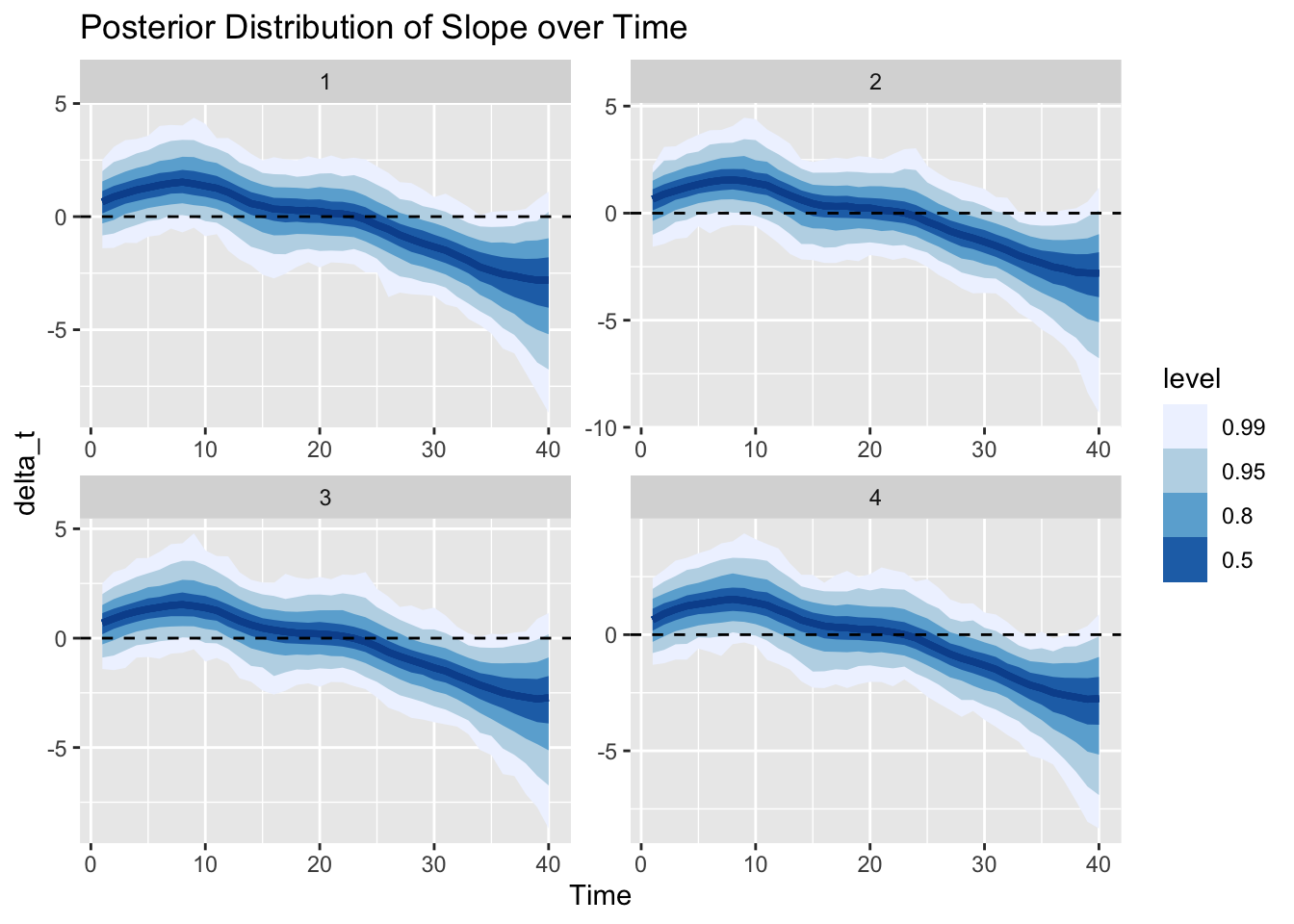
In just the same way, we can also visualize the posterior distribution of the trend $\mu_t$ over time. The trend increases as the slope above has positive values, then becomes constant as the slope hovers around 0, and changes to decreasing as the slope drops below 0.
Given the posterior of the trend, we can also sample from our model (i.e., our data generating process) to get samples from the posterior predictive distribution. That is, we now look at the uncertainty of the observations instead of parameters. Note that the y-axis has the same scale as in the graph of the trend before. The different scale of the uncertainty is the result of the additional observation noise $\epsilon_{Y,t}$. We can say, for example, that the trend is larger than 0 with probability larger than 99% at time step 20. However, observations are still expected to be below 0 with about 10%.
Additionally, we plot the actual observations again with size according to the median of $\delta_t$’s posterior distribution.
Finally, we can generate and graph the forecast of the time series from the estimated model for the next 10 time steps. Note that all the uncertainty from the parameters’ posterior distributions has been propagated into this forecast distribution.
We can generate new observations that continue the original time series according to the random sampling scheme above and compare against the forecast:
These realized values are of course only one of many possible future outcomes: Had I chosen a different seed, we would have sampled different observations from the same model.
To illustrate the point that there are many different legitimate future outcomes, we can sample paths from our model and visualize those instead of the intervals.
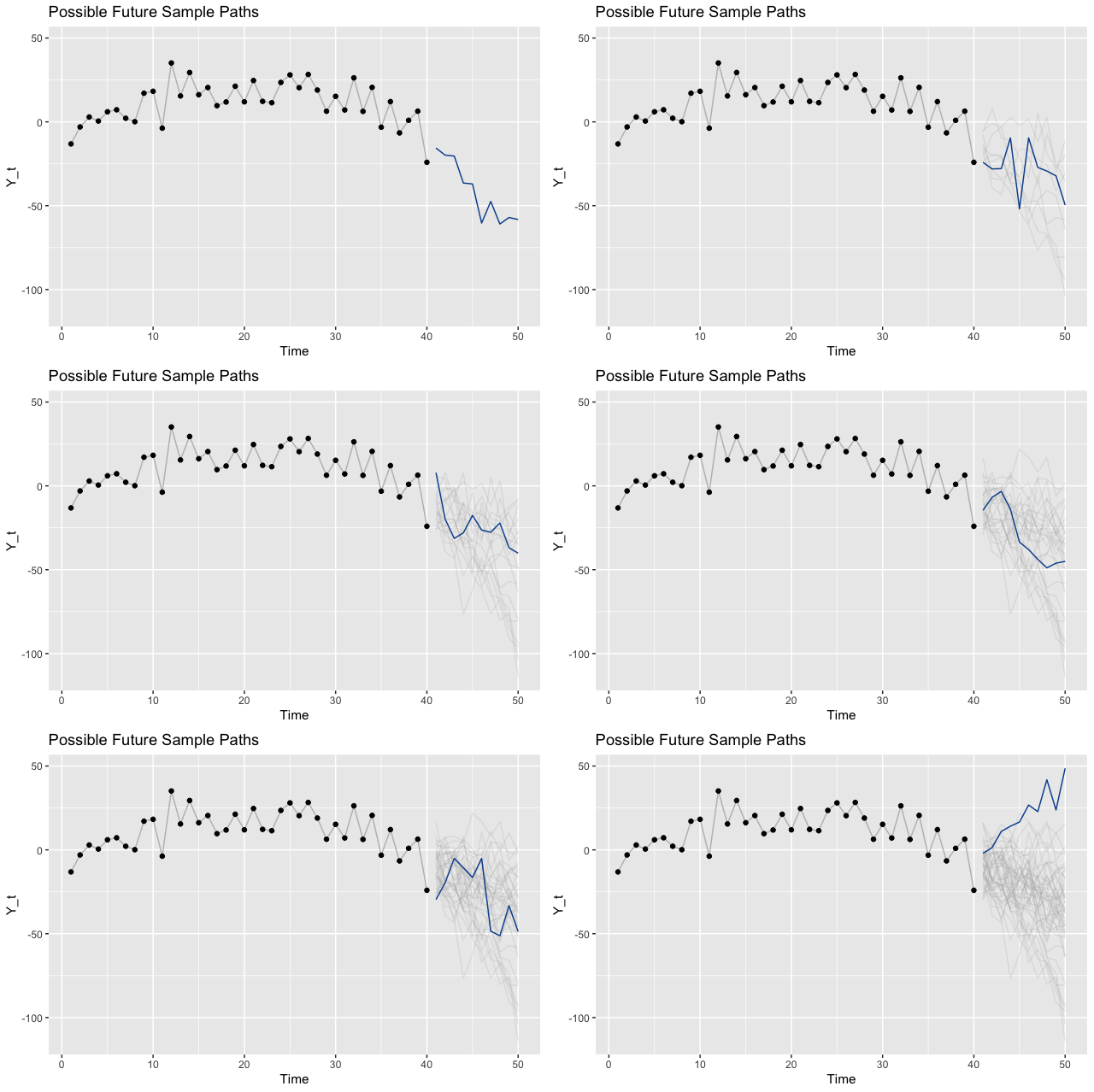
Where to Go From Here
So far I’ve only touched the surface of what’s possible with (Bayesian) structural time series models. But the derivation above has helped me to really come to grips with the idea and sold me on this way of phrasing the time series problem. As described in the information on Andrew Harvey’s book on the topic:
Unlike the traditional ARIMA models, structural time series models consist explicitly of unobserved components, such as trends and seasonals, which have a direct interpretation.
Building on these first steps, we can go further. We could, for example, make use of the interpretability of this model family to automatically provide explanations of the estimated models and their forecasts. This might support conversations with stakeholders.
Another favorite of mine are prior-predictive checks. Combined with Bayesian structural time series models, we would check for a given specification of model and prior distributions which kind of time series that model generates—similar to how we generated a single time series above. Based on this we could adjust the prior distributions to build models that correspond to our prior belief.
An obvious next step would be the implementation of further variants of structural time series models: For example, models with different trend specifications, models that include seasonal components, or with distributions different from the Normal distribution used above. The bsts package and Steven L. Scott’s blog post on the topic are a great place to start on this.
Lastly, the code to reproduce the examples above is available on Github.
References
Steven L. Scott and Hal R. Varian (2014). Predicting the present with Bayesian structural time series. International Journal of Mathematical Modelling and Numerical Optimisation, vol. 5 (2014), pp. 4-23, https://research.google/pubs/pub41335.
Kim Larsen (2016). Sorry ARIMA, but I’m Going Bayesian. Stitch Fix MultiThreaded blog, https://multithreaded.stitchfix.com/blog/2016/04/21/forget-arima/.
Steven L. Scott (2017). Fitting Bayesian Structural Time Series with the bsts R Package. The Unofficial Google Data Science blog, http://www.unofficialgoogledatascience.com/2017/07/fitting-bayesian-structural-time-series.html.
Sean J. Taylor and Benjamin Letham (2018). Forecasting at Scale, The American Statistician 72(1):37-45, https://peerj.com/preprints/3190.pdf.
Andrew C. Harvey (1990). Forecasting, Structural Time Series Models and the Kalman Filter. Cambridge University Press, https://doi.org/10.1017/CBO9781107049994.
Bob Carpenter, Andrew Gelman, Matthew D. Hoffman, Daniel Lee, Ben Goodrich, Michael Betancourt, Marcus Brubaker, Jiqiang Guo, Peter Li, and Allen Riddell (2017). Stan: A probabilistic programming language. Journal of Statistical Software 76(1). doi: 10.18637/jss.v076.i01.
Stan Development Team (2018). RStan: the R interface to Stan. R package version 2.17.3. http://mc-stan.org.
Matthew Kay (2020). tidybayes: Tidy Data and Geoms for Bayesian Models. doi: 10.5281/zenodo.1308151, R package version 2.0.3.9000, http://mjskay.github.io/tidybayes/.
Steven L. Scott (2020). bsts: Bayesian Structural Time Series, R Package version 0.9.5, https://cran.r-project.org/web/packages/bsts/index.html.
Giovanni Petris (2020). dlm: Bayesian and Likelihood Analysis of Dynamic Linear Models, R Package version 1.1-5, https://cran.r-project.org/web/packages/dlm/index.html.
Stan Prior Choice Recommendations. https://github.com/stan-dev/stan/wiki/Prior-Choice-Recommendations.
Notes by Ben Goodrich on implementing latent time series models in Stan on the Stan Discourse. https://discourse.mc-stan.org/t/bayesian-structural-time-series-modeling/2256/2.
Marko Laine (2019). Introduction to Dynamic Linear Models for Time Series Analysis. arXiv Preprint, https://arxiv.org/pdf/1903.11309.pdf.
Tim Radtke (2020). The Causal Effect of New Year’s Resolutions. Minimize Regret blog, https://minimizeregret.com/post/2020/01/18/the-causal-effect-of-new-years-resolutions/.
The Causal Effect of New Year's Resolutions
Posts / 18 January, 2020
We treat the turn of the year as an intervention to infer the causal effect of New Year’s resolutions on McFit’s Google Trend index. By comparing the observed values from the treatment period against predicted values from a counterfactual model, we are able to derive the overall lift induced by the intervention.
Throughout the year, people’s interest in a McFit gym membership appears quite stable.1 The following graph shows the Google Trend for the search term “McFit” in Germany for April 2017 to until the week of December 17, 2017. Fluctuating somewhere around 40, the “McFit” search term is right in the middle of the 0 to 100 scale used for Google Trends.
But as in many other countries, joining a gym is a typical New Year’s resolution in Germany. So we would expect to observe a jump in interest around the turn of the year, as people promise themselves to add a habit to their lives and to burn the calories they consumed during the holidays.
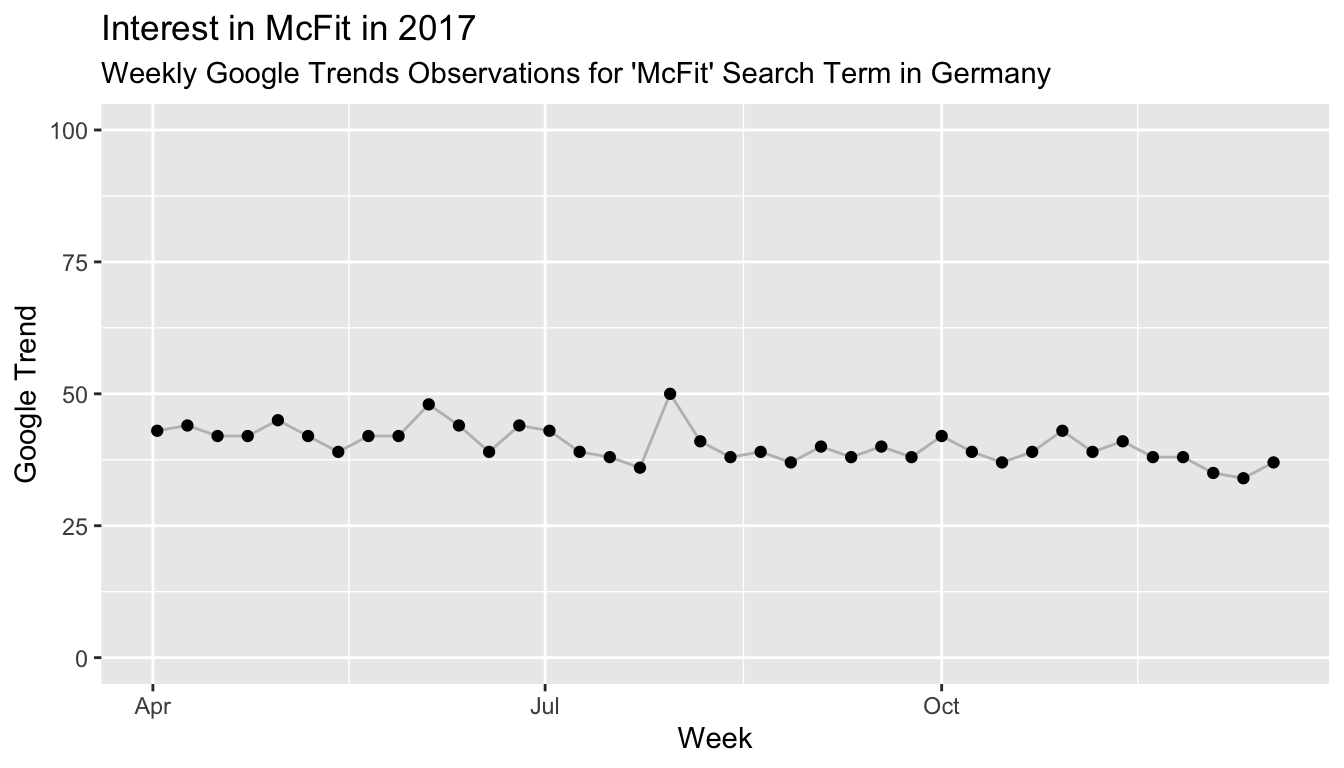
To estimate the effect that New Year’s resolutions have on the interest in McFit, we will consider the turn of the year as an intervention. The intervention is followed by a period which we will call treatment period. Since we observe a “treated” environment, we would expect to observe different behavior than in the “untreated” region before the intervention and thus a change in the Google Trend index. To estimate the change induced by the treatment, we not only need the actual observations from the treatment period, but also the counterfactual: What would we expect to happen in the absence of the intervention posed by New Year’s? Given that the time series appears to be reasonably forecast-able, a simple approach might be to take this time series’ forecast as counterfactual. This approach and the discussion here is motivated by the paper Inferring causal impact using Bayesian structural time-series models by Brodersen et al. from 2015.
To derive the counterfactual forecast, we thus fit a Bayesian structural time series model—in this case we might use a local level model, in which the observations are generated by a Normal distribution with a mean that changes according to a random walk:2
$$ Y_t \sim N(\mu_t, \sigma) $$$$ \mu_{t+1} \sim N(\mu_t, \tau) $$
Before we use this model to generate a counterfactual on which we base our causal effect inferences, we should ensure that we can actually rely on the model’s prediction.
Evaluation of Forecast Model in Untreated Period
How well can this simple model predict the time series up to this point? To evaluate this, we train it on the first 26 observations in our time series and predict the remaining 12 from October until right before the actual intervention near the end of December. We can fit the above model quickly using the bsts package in R:
range(mcfit_2017_short$week)
## [1] "2017-04-02" "2017-09-24"
library(bsts)

state_spec_short <- AddLocalLevel(list(), y = mcfit_2017_short$trend)
model_short <- bsts(mcfit_2017_short$trend,
					state.specification = state_spec_short,
					niter = 11000, ping = 0)
pred_short <- predict(model_short, horizon = 12, burn = 1000)
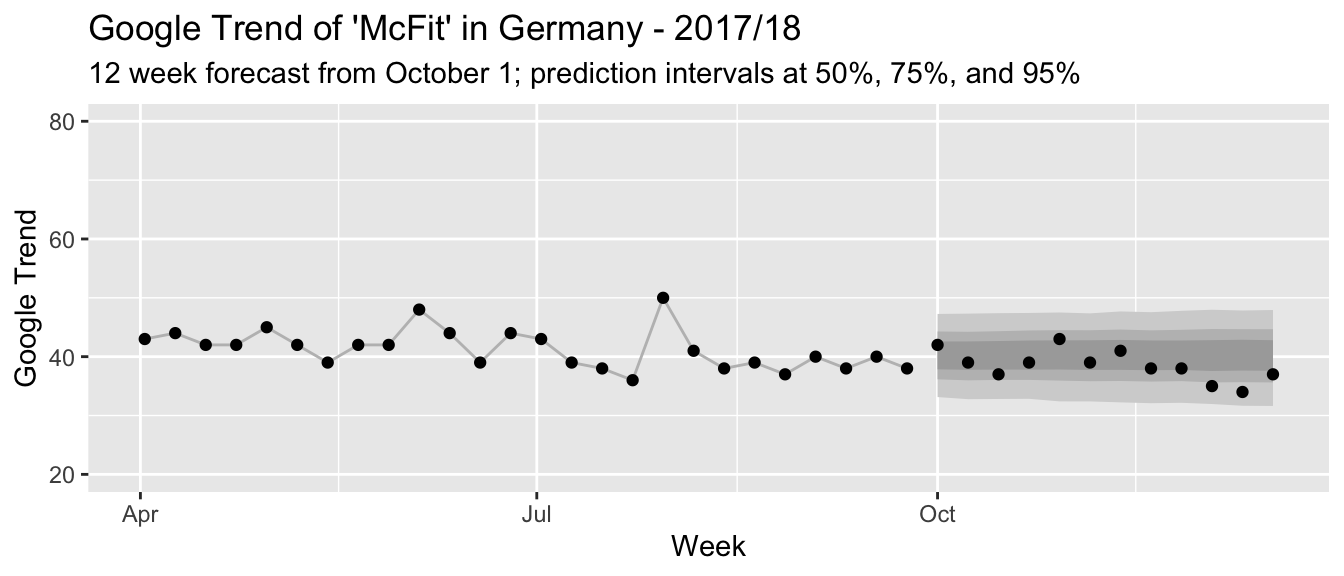
Given how fairly well the prediction intervals describe the actual observations (and since this here is just a blog post), we can be quite confident in the model’s predictions going forward.3
Causal Effect of a Hypothetical Intervention
Since we already have a forecast for the untreated region, we can use this forecast, too, as counterfactual: We can pretend that October 1 also has been an intervention date after which we might observe a treatment effect. Would our model conclude that there has not been any significant change? If it did find a significant change, then this might tell us that our model does not yet account for all behaviors of the time series besides the impact of New Year’s resolutions. In that case, we could not rely on it to provide a accurate counterfactual estimate for our period of interest.
To derive the treatment effect on the untreated region, we subtract the observed trend values from the posterior predictive samples of our forecast model. This provides us not only with a point estimate but the uncertainty in our prediction is propagated as well. Since we are estimating a causal effect on an untreated region, we expect to observe no large evidence for an effect different from zero. Indeed, as the graphs show below, we observe a posterior expectation of a total -20.4 additional Google Trend percentage points over the 12 weeks following October 1. With a 97.5% credible interval at [-64.3, 41.7] percentage points, there is a lot of probability on both sides of zero. This change in percentage points corresponds to an expected lift of -4.4% compared to the counterfactual estimate, with a [-13.9%, 9%] credible interval.
We can thus be fairly confident in using this model to provide a counterfactual estimate when we move to the analysis of the actual intervention around New Year’s.
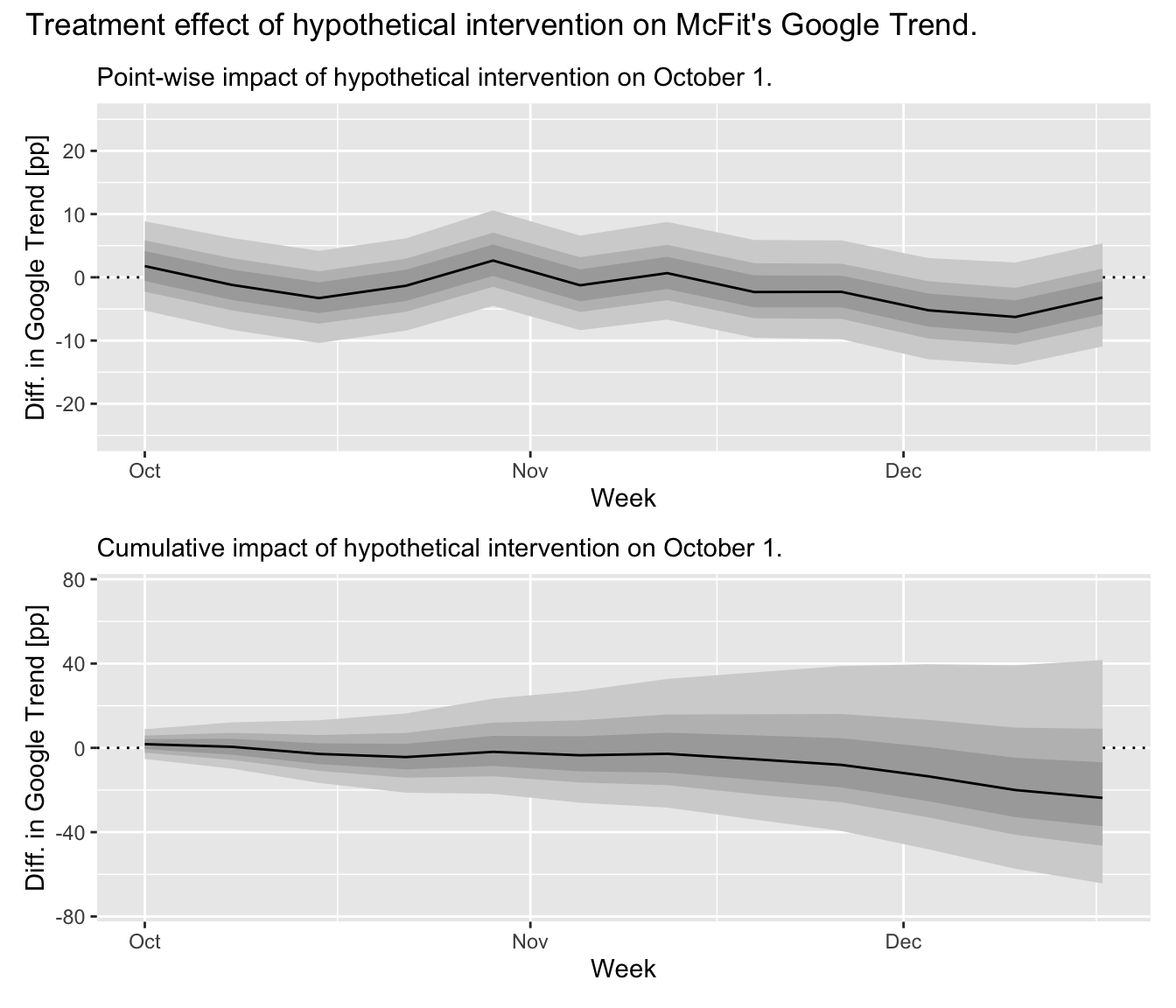
Causal Effect of Turn-of-the-Year Intervention
With the above analysis in hand, all we need is to take the time series up until the date of the intervention and to re-fit our model. It will provide us with the counterfactual estimate for the treated period. After that, we can observe the actual Google Trend for the treated period and compare against our counterfactual to derive the treatment effect in the same way as we did above.
range(mcfit_2017$week)
## [1] "2017-04-02" "2017-12-17"
ss <- AddLocalLevel(list(), y = mcfit_2017$trend)
mcfit_model <- bsts(mcfit_2017$trend,
					state.specification = ss,
					niter = 11000, ping = 0)
pred <- predict(mcfit_model, horizon = 12, burn = 1000)
The model provides us with the following counterfactual forecast for the beginning of 2018:
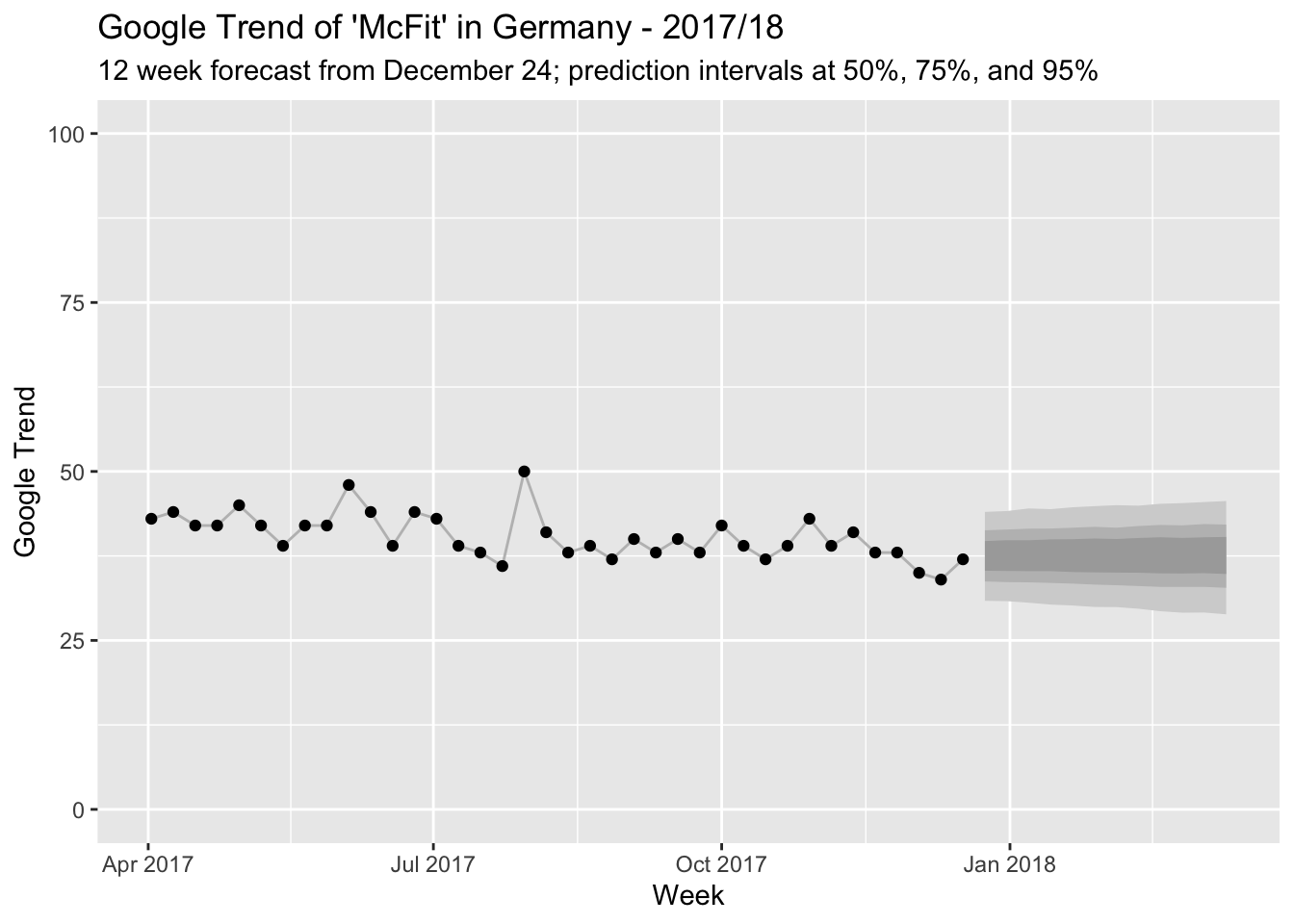
And this is how the counterfactual compares to the observed Google Trend index for McFit:
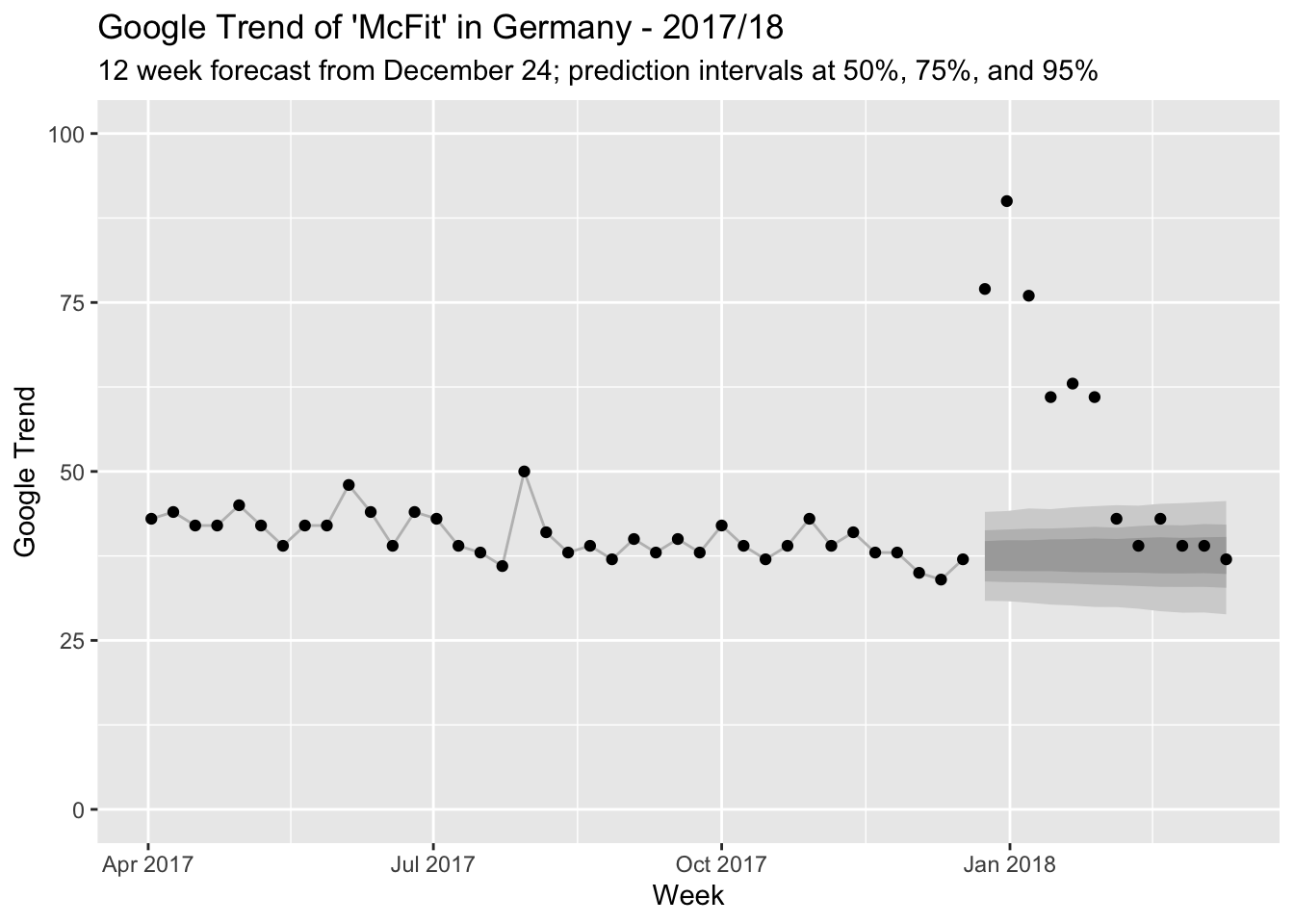
Wow, people really do like to make New Year’s resolutions! There is probably little discussion about whether something changes after the intervention. But since we have a model at hand, let’s still quantify just how much changes.
To estimate the treatment effect, we proceed as in our dry run above: We subtract the posterior predictive samples from the observed trend values. This let’s us make probabilistic statements about the size of the treatment effect. You can see the result in the graphs below. We observe a posterior expectation of 217.7 additional Google Trend percentage points over the 12 weeks following Christmas. This is a significant effect with a 97.5% credible interval at [165.7, 279] percentage points—far, far away from zero.
What becomes clear from the graph, however, is that this effect is mainly generated within the first 6 weeks after the intervention. After that, the actuals are again somewhat in line with our model (though all lie jointly above the expectation which is an event with somewhat small probability). After 6 weeks, we already have a posterior expectation of 202.8 additional Google Trend percentage points with a 97.5% credible interval at [177.5, 231.6] percentage points. This corresponds to an expected lift of 47.4% compared to the predicted trend, with a [41.5%, 54.1%] credible interval.
In contrast, the pointwise treatment effect estimated in week 12 after the intervention is a difference of -0.5 [-8.6, 8.1] percentage points, corresponding to a tiny lift of -1.4% [-23.3%, 22%]s and thus no change compared to the counterfactual scenario.
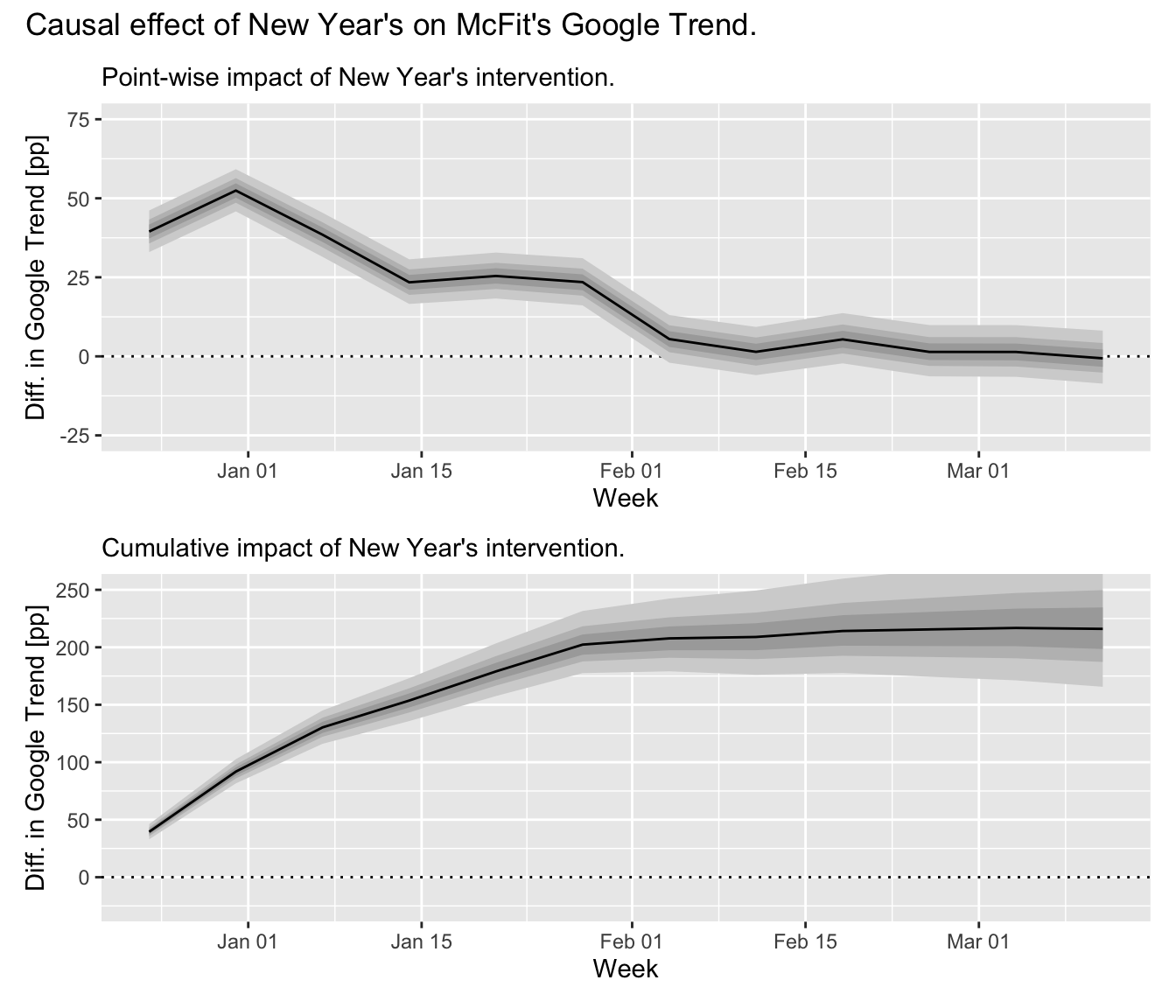
This has shown us that people’s interest in McFit increases suddenly around New Year’s as they make New Year’s resolutions—and that this interest drops rapidly and disappears from February onwards as everyone has either signed up to McFit or lost sight of their resolutions.
Or is there something else in play that could have an effect on people’s behavior?
Causal Effect Entanglement
Alas, the turn of the year is not the only intervention: McFit builds on people’s good intentions with membership fee discounts and marketing campaigns.

The above image shows a large billboard advertising a McFit membership for only €4.90 per month if you subscribe until January 31, 2020.4 With the slogan “Für mehr wow!” (“For more wow!”), the marketing campaign makes it difficult to understand just how much of the Google Trend peak is caused by the turn of the year—and how much should be attributed to the marketing.5
This is a problem for us since with price discounts and marketing campaigns in place, we can no longer claim confidently that people increasingly search for “McFit” only because of New Year’s resolutions. Instead, the total number of increased searches will have multiple, entangled causes: Some people plan to become fit and think of the McFit brand. Others see a billboard with an enticing offer and want to subscribe online. Again others are comparing gyms to put their New Year’s resolutions in place and search for McFit because they were reminded of it by the marketing campaign. In a sense, New Year’s resolutions are no longer exogenous: They will exist in part because of the contemporaneous McFit marketing, which exists due to New Year’s resolutions and their effect.
Consequently, we cannot conclude which effect is caused by the New Year’s intervention, which by the marketing campaign’s intervention, and which effect by the interaction of the previous two.
What we need is an approach that let’s us disentangle these effects. Surely McFit as a business would be interested in disentangling them to estimate the return on their marketing investment! Maybe all their new customers would have subscribed even without a discount but solely due to their resolutions?
Geographic Experiments
One approach to entangle the effects could be the implementation of a geographic experiment in which certain regions are exposed to a marketing campaign while others are not. For out-of-home and online advertising, this might be feasible, though customers in areas without a campaign could still learn in other ways about the price reduction—and the price reduction potentially has to hold for at least an entire country. McFit, however, is located in multiple countries. If these countries have a similar predisposition for New Year’s resolutions, it might be possible to compare effects across countries by introducing neither price reductions nor marketing campaigns in some of them.
The following papers outline approaches along this line:
- Alberto Abadie, Alexis Diamond, Jens Hainmueller (2009). Synthetic Control Methods for Comparative Case Studies: Estimating the Effect of California’s Tobacco Control Program
- Alberto Abadie (2019). Using Synthetic Controls: Feasibility, Data Requirements, and Methodological Aspects.
- Kay H. Brodersen, Fabian Gallusser, Jim Koehler, Nicolas Remy, Steven L. Scott (2015). Inferring causal impact using Bayesian structural time-series models.
- Jon Waver, Jim Koehler (2011). Measuring Ad Effectiveness Using Geo Experiments.
- Jon Waver, Jim Koehler (2012). Periodic Measurement of Advertising Effectiveness Using Multiple-Test-Period Geo Experiments.
At least the current marketing campaign appears to be active in all countries, though, going from the McFit websites for different countries.
Time-Varying Covariates as Synthetic Controls
Instead of the simple time series model used above, one could consider including time-varying covariates in the model that are able to predict the behavior of the McFit trend. Since we could train the model before the intervention period, but compute the forecast after the intervention period (when we want to infer the treatment effect based on observed values), we could even use features that are observed at the same time as the McFit trend. For example, one could consider using the Google Trend of other gym brands: We would expect them to have some New Year’s resolutions effect as well. Therefore, their combination could also predict the effect on McFit’s. The difference between the observed Google Trend index and this counterfactual could then be attributed to the fact that a marketing campaign was put in place at the same time (while we could still use the previous model as counterfactual for the new model and infer the impact of resolutions).
This approach has been developed in: Kay H. Brodersen, Fabian Gallusser, Jim Koehler, Nicolas Remy, Steven L. Scott (2015). Inferring causal impact using Bayesian structural time-series models.
The problem with this line of argument is that the Google Trend of other gym brands might or might not be impacted by McFit’s marketing campaign: Before they subscribe to McFit’s offer online, people might have a look at the website of FitX or John Reed.6 If that’s the case, then our covariate-based counterfactual estimate of the trend including the New Year’s resolution effect would be impacted by the treatment effect we try to infer.
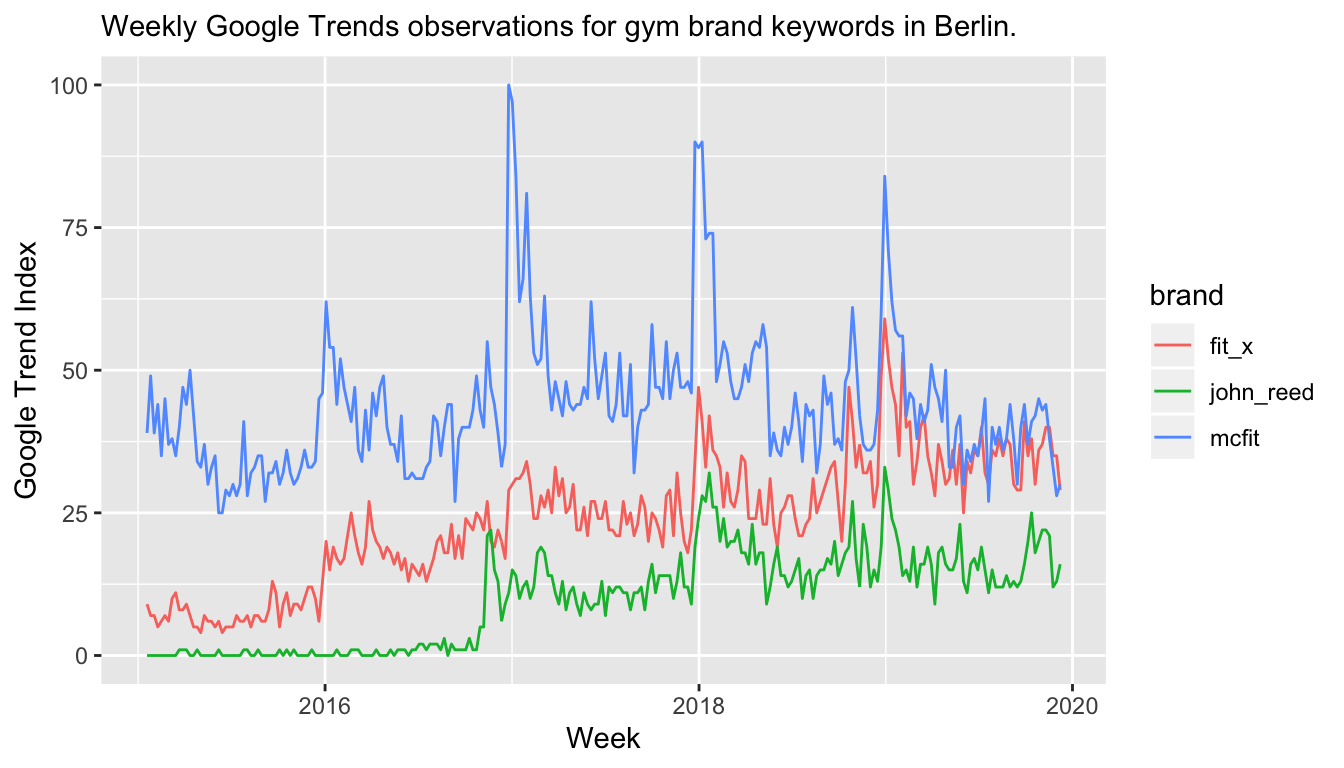
In a way, New Year’s resolutions create a similar environment for marketers as Google does with search engine marketing on brand name keywords: Companies pay the “Google tax” to show their SEM advertisement at the top of the search results even though the user was searching for their brand already—just so that other companies don’t attract the user away with their SEM advertisement. Similarly, gym brands could simply take the increased demand due to New Year’s resolutions without even having to advertise. But because someone will advertise, all of them have to create a special offer. Especially when they’re not able to properly estimate the causal impact of their marketing, the situation might end up in a tragedy of the commons (with the increased market demand as common resource).
Forecast Model with Yearly Seasonality
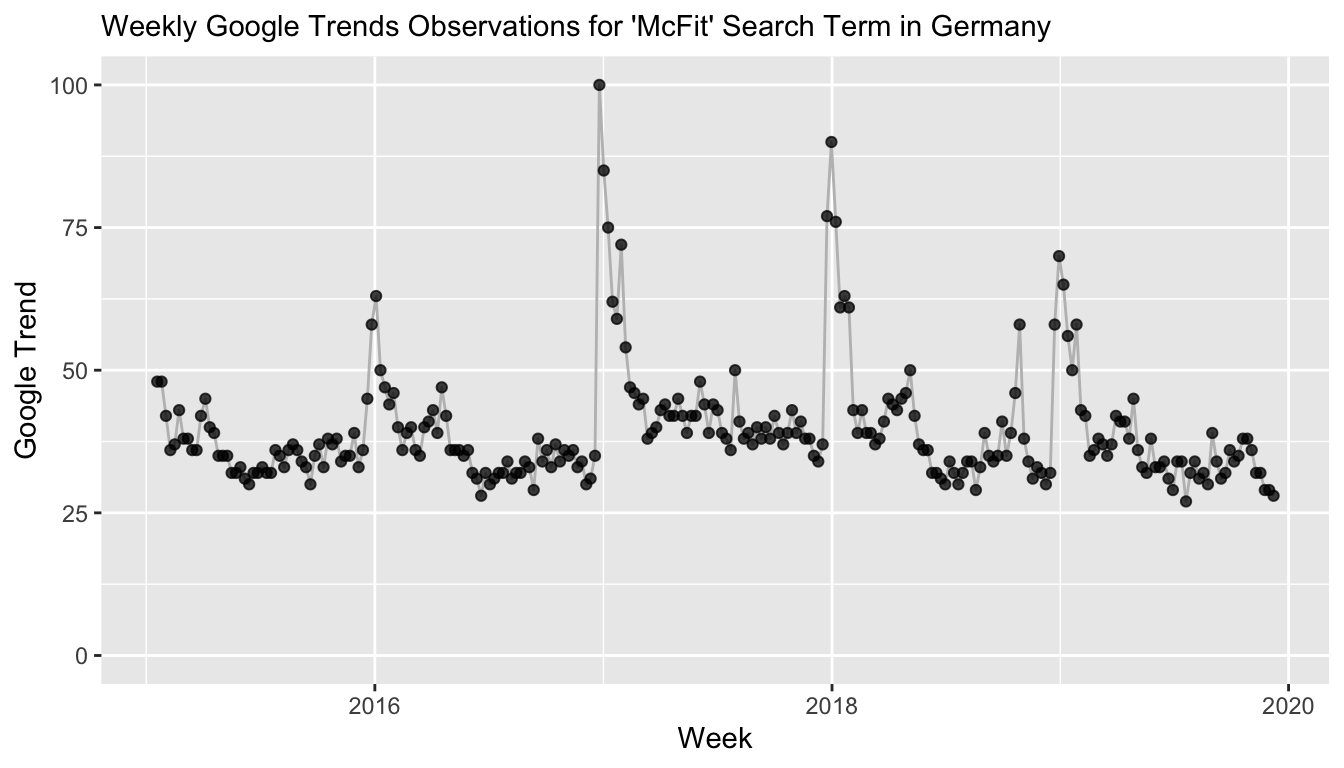
In reality, we have access to more than just one year of data. If we knew that McFit did not run any advertising in the past years around New Year’s, we could estimate a time series model with seasonality in order to properly model the New Year’s resolutions counterfactual effect for the current year—a marketing campaign in the current year would then be evaluated by the difference between the counterfactual forecast and the actuals. In our case however, I would assume that McFit has a marketing campaign every year around New Year’s.
Additionally, we would need to assume that marketing campaigns from other companies are negligiable.
Conclusion
The Google Trend data for McFit offers a natural intervention posed by the turn of the year which provides the opportunity to estimate a causal effect of New Year’s resolutions on human behavior. We observe a large increase in the index that subsequently reverts back to the counterfactual forecast within a few weeks. While we can estimate the effect after the intervention, we can not differentiate between New Year’s resolutions and the change due to a contemporaneous marketing campaign.
Causal inference is hard, even when the observed effects are huge.
The original data is available on Google Trends for the German “McFit” index and for the comparison of three gym brands in Berlin.
-
For those unfamiliar with German gym brands, according to Wikipedia, “[t]he McFIT GmbH is the largest fitness center chain in Germany”. ↩︎
-
Note that this corresponds to an Exponential Smoothing model as long as $\sigma > 0$ and $\tau > 0$. See this blog post by Steven L. Scott. ↩︎
-
Note that the last three observations from December show a bit of a dip potentially due to the Advent season. This could be accounted for if we used data from several years to account for seasonality. However, due to the way we consider the data for causal estimation, we act as if there is only this year—else we would know about last year’s New Year effect, too. ↩︎
-
Of course, the reduced fee applies for the first 6 months after which the contract continues with a fee of at least €19.90 for another 14 months. ↩︎
-
Note that I actually don’t know whether there has been a marketing campaign in 2017/18, but let’s just assume that there has been. ↩︎
-
John Reed being owned by the same group as McFit. ↩︎
satRday Berlin Presentation
Posts / 16 June, 2019
My satRday Berlin slides on “Modeling Short Time Series” are available here.
This saturday, June 15, Berlin had its first satRday conference. I eagerly followed the hashtags of satRday Amsterdam last year and satRday Capetown the year before that on Twitter. Thanks to Noa Tamir, Jakob Graff, Steve Cunningham, and many others, we got a conference in Berlin as well.
When I saw the call for papers, I jumped at the opportunity to present, trying what it feels like to be on the other side of the microphone; being in the hashtag instead of following it. Thanks again to the organizers for having me, it has been a fantastic experience. The conference format is accessible and a lot of fun.
You can find my slides from yesterday on “Modeling Short Time Series” as PDF here. The slides are based on this blog post which provides more context.
Modeling Short Time Series with Prior Knowledge
Posts / 16 April, 2019
I just published a longer case study, Modeling Short Time Series with Prior Knowledge: What ‘Including Prior Information’ really looks like.
It is generally difficult to model time series when there is insuffient data to model a (suspected) long seasonality. We show how this difficulty can be overcome by learning a seasonality on a different, long related time series and transferring the posterior as a prior distribution to the model of the short time series. The result is a forecast that is believable and can be used for decisions in a business context. In contrast to traditional methods that are not able to incorporate the long seasonality, we observe a drastic increase in common evaluation metrics. Default models in the forecast and prophet R packages fail to produce good forecasts on this example.
Find the case study here, and the data and code on Github.
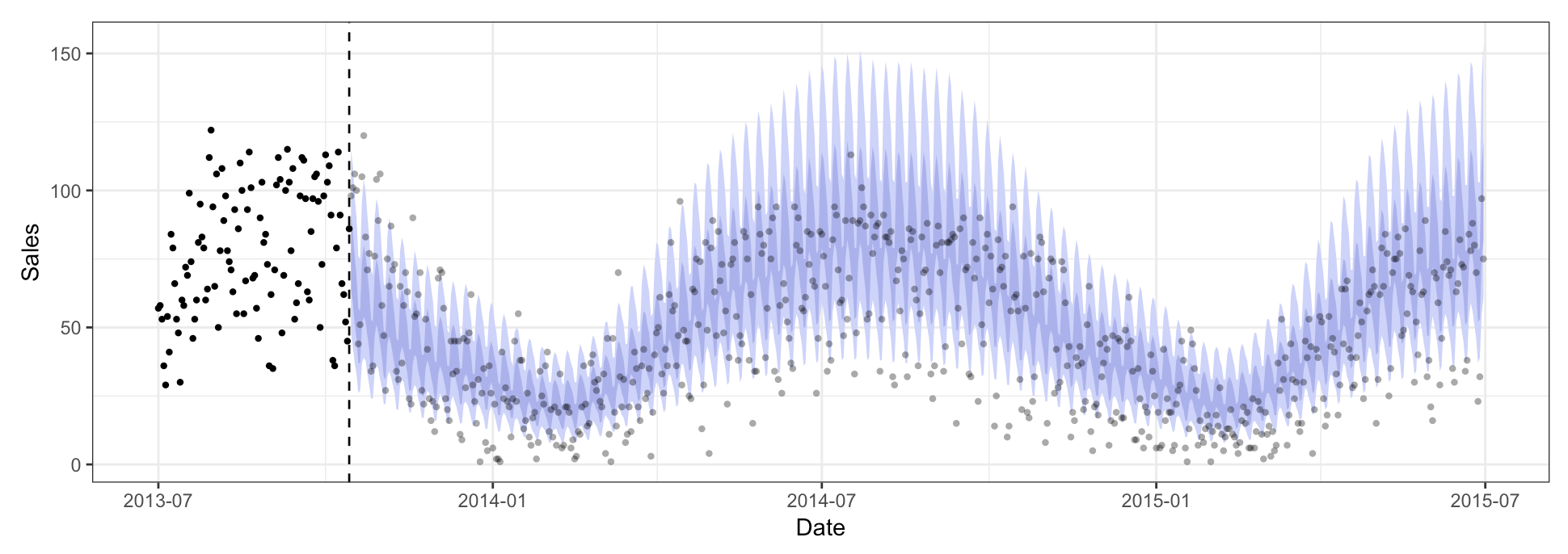
Problem Representations and Model-Based Machine Learning
Posts / 24 February, 2019
Back in 2003, Paul Graham, of Viaweb and Y Combinator fame, published an article entitled “Better Bayesian Filtering”. I was scrolling chronologically through his essays archive the other day when this article stuck out to me (well, the “Bayesian” keyword). After reading the first few paragraphs, I was a little disappointed to realize the topic was Naive Bayes rather than Bayesian methods. But it turned out to be a tale of implementing a machine learning solution for a real world application before anyone dared to mention AI in the same sentence.
Graham explains how he achieved much better results in filtering spam mail than the academic results published previously at AAAI 1998.1 Besides his access to more data, he attributes his results to how he prepared the data. He refrained from stemming words, using “mailing” and “mailed” instead of “mail”. He preserves case when tokenizing the text, treats exclamation points as part of words (“FREE!”) and keeps periods and commas between digits to get IP adresses and prices.
There is a lesson here for filter writers: don’t ignore data. You’d think this lesson would be too obvious to mention, but I’ve had to learn it several times.
What Graham believes to be the most significant difference, however, is that he included the information available in the e-mails’ message headers (e.g., sender, recipient, date and subject line). E-mails are not just text, there is more structure to an e-mail than that. Structure that humans use to work more efficiently with the text, structure that we recognize as important when scrolling through our inbox and identifying the messages we do need to respond to. We shouldn’t keep the machine from using this information.
I don’t think it’s a good idea to treat spam filtering as a straight text classification problem. You can use text classification techniques, but solutions can and should reflect the fact that the text is email, and spam in particular. Email is not just text; it has structure.
I believe that there are many application specific cases in which simple solutions (such as Naive Bayes) can get you incredibly far if you can make the data accessible to the algorithm such that the algorithm can find the important bits that humans would pay attention to (if humans could browse through data quickly enough). I’m trying to think about this as more than just feature engineering. Architecture engineering belongs here just as much—there is a reason that convolutions work well in image classification. By using convolutions, we provide prior (human) information and structure to the machine2 without which it would be even tougher to find reliable patterns. We don’t need to rely on a universal approximation theorem and pray that we’re able to search through an infinite function space if we can provide assumptions about the real world to our model (either through data preparation or architecture).
François Chollet provides an example of feature engineering in his book “Deep Learning with Python” that I think is an example of making a problem accessible to models by translating human structure into mathematical or machine structure. In his example, we’re “trying to develop a model that can take as input an image of a clock and can output the time of day”. Yes, you could (probably) use a CNN to solve this problem, but this would be wasteful of computational resources. Chollet continues:
But if you already understand the problem at a high level (you understand how humans read time on a clock face), then you can come up with much better input features for a machine-learning algorithm: for instance, it’s easy to write a short Python script to follow the black pixels of the clock hands and output the (x, y) coordinates of the tip of each hand. Then a simple machine-learning algorithm can learn to associate these coordinates with the appropriate time of day.
While this is much better than using a CNN, the beauty of this example problem is that it does not require any machine learning whatsoever. Doing a coordinate change from (x, y) coordinates to polar coordinates, you get the angle of each clock hand. From here, “a simple rounding operation and dictionary lookup are enough to recover the approximate time of day.”
In a way, this is nothing else than using the perfect kernel in a support vector machine, or doing the representation learning for your neural network.3 If you can represent your problem well, it will be much simpler to solve it.
In a different chapter, Chollet discusses a 1-day ahead temperature forecasting problem. As a simple baseline method, he uses the current temperature to predict the temperature 24 hours from now, given that there is a strong daily seasonality in the data.4 He then applies a very simple feed-forward neural network which fails to achieve a better performance. Chollet argues:
This goes to show the merit of having this baseline in the first place: it turns out to be not easy to outperform. Your common sense contains a lot of valuable information that a machine-learning model doesn’t have access to.
You may wonder, if a simple, well-performing model exists to go from the data to the targets (the common-sense baseline), why doesn’t the model you’re training find it and improve on it? Because this simple solution isn’t what your training setup is looking for. The space of models in which you’re searching for a solution–that is, your hypothesis space–is the space of all possible two-layer networks with the configuration you defined. These networks are already fairly complicated. When you’re looking for a solution with a space of complicated models, the simple, well-performing baseline may be unlearnable, even if it’s technically part of the hypothesis space. That is a pretty significant limitation of machine learning in general: unless the learning algorithm is hardcoded to look for a specific kind of simple model, parameter learning can sometimes fail to find a simple solution to a simple problem.
He then goes on and achieves a mean absolute error of 2.35°C with an LSTM architecture compared to 2.57°C of the seasonal random walk model.
In a similar manner, Gers, Eck and Schmidhuber (2003) note that MLPs can be advantageous over LSTM architectures when time series can be forecasted based on direct access to a few past observations (similarly to ARIMA models):
A time window based MLP outperformed the LSTM pure-AR approach on certain time series prediction benchmarks solvable by looking at a few recent inputs only. Thus LSTM’s special strength, namely, to learn to remember single events for very long, unknown time periods, was not necessary here.
I highlight this result as it implies that simpler solutions can suffice when the problem is represented well. Here, a forecast is possible at every time step based on a few lagged previous time steps. This representation can be difficult to find for potentially more powerful models, while constrained models may represent exactly this knowledge about the problem space.
You need to find the right tool for your application. If you have knowledge about your problem, and you are able to put this knowledge into structure, then a model that can pick up this structure may be superior compared to the latest models from ICML, NeurIPS or ICLR.5
If we accept that there is structure in the real world that we would like to incorporate into our models before we let them adjust their predictions to those that are in agreement with the data we observe from the real world; then it is easy to recognize advantages of model-based machine learning as described by Winn and Bishop in their same-titled book:
[…] the model-based approach seeks to create a bespoke solution tailored to each new application. Instead of having to transform your problem to fit some standard algorithm, in model-based machine learning you design the algorithm precisely to fit your problem.
The core idea at the heart of model-based machine learning is that all the assumptions about the problem domain are made explicit in the form of a model. In fact, a model is just made up of this set of assumptions, expressed in a precise mathematical form.
See also a presentation in which Christopher Bishop introduces the concept of model-based machine learning.
-
Pantel and Lin (1998). SpamCop. A Spam Classification & Organization Program. Sahami, Dumais, Heckerman, and Horvitz (1998). A Bayesian Approach to Filtering Junk E-Mail. ↩︎
-
Goodfellow, Bengio, Courville (2016). Deep Learning. Chapter 9, Convolutional Networks. ↩︎
-
Christopher Olah’s article on Neural Networks, Manifolds and Topology makes it very clear what I mean by representation learning. ↩︎
-
That is, he uses a seasonal random walk model. ↩︎
-
Add some additional metaphor containing screws and a hammer. ↩︎
SVD for a Low-Dimensional Embedding of Instacart Products
Posts / 25 July, 2018
Building on the Instacart product recommendations based on Pointwise Mutual Information (PMI) in the previous article, we use Singular Value Decomposition to factorize the PMI matrix into a matrix of lower dimension (“embedding”). This allows us to identify groups of related products easily.
We finished the previous article with a long table where every row measured how surprisingly often two products were bought together according to the Instacart Online Grocery Shopping dataset. The main point being that recommendations based on pointwise mutual information (PMI) are a strong first solution despite their simplicity. You can explore the results in a Shiny app.
While the previous result could be implemented entirely in SQL, we will move beyond what is feasible in SQL very soon.
Goal: A word2vec-style Representation of Products
Using word2vec is all the rage to derive numeric vector representations of words in natural language processing. The result is be a $N\times K$ matrix of $N$ words represented by $K$ vectors. Since $K \ll N$, such a low-dimensional representation is extremely useful as input for subsequent tasks such as classification, or to perform word2vec’s hallmark word vector operations such as zuckerberg - facebook + microsoft ~ nadella.
In our case, we deal with $N=8979$ products, which is manageable. Still, by using a small $K = 64$ we are able to go from a $N \times N$ pointwise mutual information matrix to a small-ish set of vectors summarizing the information. And since we will be using singular value decomposition to do so, (hopefully most) vectors will even highlight different groups of related products! That’s a nice side effect when trying to derive higher level abstractions and patterns in the purchase data—compared to individual product-to-product relations—and comparable to topics derived from topic models like Latent Dirichlet Allocation.
This blog post is inspired by Chris Moody’s Stop Using word2vec on StichFix’ MultiThreaded blog, in which Chris applied SVD in combination with PMI on the more typical NLP task of embedding words from the Hacker News corpus. In the following, we will see that one can use the exact same method to derive a representation of items sold on Instacart.
From PMI Matrix to SVD
The previous blog post introduced the Pointwise Mutual Information and how it can be applied to derive product recommendations for products that have been purchased in the same order. We finished with a long table called pp_rec_smooth in which every row represented an observed combination of two products that have been purchased together a couple of times, as well as their corresponding pointwise mutual information.
| product_name.x | product_name.y | pmi |
|---|---|---|
| Birthday Candles | Classic Lighters | 2.69 |
| Birthday Candles | Super Moist Chocolate Fudge Cake Mix | 2.63 |
| Birthday Candles | Creamy Classic Vanilla Frosting | 2.55 |
| Birthday Candles | Rich and Creamy Milk Chocolate Frosting | 2.51 |
| Birthday Candles | Funfetti Premium Cake Mix With Candy Bits | 2.48 |
Consequently, the table is quite long with r dim(pp_rec_smooth)[1] rows. This is still smaller than the $8979\cdot 8979 = 80622441$ row table for all combinations of products. The latter, however, is exactly what we need for the matrix factorization through singular value decomposition: A $N \times N$ item-by-item pointwise mutual information matrix. We create this matrix by widening the long table; it’s not beautiful, but it does the job.
pmi_matrix <- pp_rec_smooth %>%
  select(product_id.x, product_id.y, pmi) %>%
  tidyr::spread(product_id.y, pmi)
pmi_matrix_product_ids <- pmi_matrix[,1]
pmi_matrix <- pmi_matrix[,-1]

pmi_matrix[1:5,1:5]
## # A tibble: 5 x 5
##     `1`    `10`   `23`    `25`  `28`
##   <dbl>   <dbl>  <dbl>   <dbl> <dbl>
## 1  5.59  NA      NA     NA     NA
## 2 NA      5.29  - 1.71 - 0.548 NA
## 3 NA    - 1.51    5.89 - 1.36  NA
## 4 NA    - 0.498 - 1.51   5.44  NA
## 5 NA     NA      NA     NA      6.14
All NAs in this table represent product combinations that have not been observed in the data and for which we consequently do not have a PMI value.
The problem with the NAs is that we cannot perform singular value decomposition on a matrix with missing entries. But assigning those entries any other value would give them meaning: A very negative value would convey a negative relationship, while setting all of them to zero implies no relationship. Neither is something we would like to simply assume in the following.
A good alternative described in Jurafsky and Martin is to set not only the NAs to zero, but also the negative PMI values. This can furthermore be justified by the observation that it is generally more difficult to observe a negative relationship using PMI—as described in the previous blog post and by Jurafsky and Martin. Thus we proceed by replacing both NAs and negative values by zero.
pmi_matrix[is.na(pmi_matrix)] <- 0
pmi_matrix[pmi_matrix < 0] <- 0
pmi_matrix[1:5,1:5]
## # A tibble: 5 x 5
##     `1`  `10`  `23`  `25`  `28`
##   <dbl> <dbl> <dbl> <dbl> <dbl>
## 1  5.59  0     0     0     0
## 2  0     5.29  0     0     0
## 3  0     0     5.89  0     0
## 4  0     0     0     5.44  0
## 5  0     0     0     0     6.14
colSums(pmi_matrix)[1:5] # not only the diagonal is positive
##        1       10       23       25       28
## 281.6510 126.0473 162.0798 265.7752 323.0297
The $N \times N$ matrix is now prepared for singular value decomposition. Though, it’s not actually a matrix yet. So let’s change that, and let’s use the fact that the matrix has become really sparse by converting the object into a sparse matrix.
pmi_matrix <- as.matrix(pmi_matrix)
row.names(pmi_matrix) <- pmi_matrix_product_ids$product_id.x
colnames(pmi_matrix) <- pmi_matrix_product_ids$product_id.x

library(Matrix)
pmi_sparse_matrix <- Matrix(pmi_matrix, sparse = TRUE)
pmi_sparse_matrix[1:5,1:5]
## 5 x 5 sparse Matrix of class "dgCMatrix"
##           1       10       23       25       28
## 1  5.587646 .        .        .        .
## 10 .        5.291013 .        .        .
## 23 .        .        5.891188 .        .
## 25 .        .        .        5.442685 .
## 28 .        .        .        .        6.135897
To make use of the sparsity when performing singular value decomposition, we can for example use the sparsesvd package. Here, we choose to find a representation of rank 64. This means in particular that we will have 64 vectors representing what was previously represented by 8979 vectors. Using the singular value decomposition, we arrange the available information in a more compact way; we lose some information, but hopefully retain most of it. Feel free to experiment with different values for the rank $K$. Problematic is that there is no good quantitative way of finding a good $K$. One could examine the eigenvalues, or check whether the vectors corresponding to the smallest eigenvalue for a given value of $K$ make some sense, and, if not, choose a smaller $K$ instead.
library(sparsesvd)
set.seed(80495)
pmi_svd <- sparsesvd(pmi_sparse_matrix,
					 rank = 64)
The result looks as follows. We have the $N \times K$ matrix, pmi_svd$u, as well as the corresponding $K$ singular values. If we plot them, we can see how much information is contained in just the first couple of dimensions.
dim(pmi_svd$u)
## [1] 8979 64
Working with the SVD
Before we start using the result of the singular value decomposition, we add the product names to the rows of the left-singular vectors.
products <- readr::read_csv("products.csv")
departments <- readr::read_csv("departments.csv")

id_name_dict <- data.frame(product_id = as.numeric(row.names(pmi_sparse_matrix))) %>%
  inner_join(select(products, product_id,
					product_name, aisle_id, department_id)) %>%
  left_join(departments)

product_vectors <- pmi_svd$u
row.names(product_vectors) <- id_name_dict$product_name
With the row names added, we can easily search for specific products as well as the products that are closest in the $K$-dimensional space as measured by a measure as simple as the dot product. That is, we’re starting to apply the typical techniques from word embeddings on our product matrix!
# first a function to find the actual product names
search_product <- function(products, name) {
  products[grepl(name, products, fixed = TRUE)]
}

# then the function that finds similar products by dot product
search_synonyms <- function(word_vectors, selected_vector) {
  # https://juliasilge.com/blog/tidy-word-vectors/
  require(broom)

  similarities <- word_vectors %*% selected_vector %>%
	tidy() %>%
	as_tibble() %>%
	rename(product = .rownames,
		   similarity = unrowname.x.)

  similarities %>%
	arrange(-similarity)
}
We search for products containing the word Ketchup and then look for similar products, where the similarity is based on the dot product on a singular value decomposition of commonly bought together items.
search_product(row.names(product_vectors), "Ketchup")
##  [1] "Reduced Sugar Tomato Ketchup" "Tomato Ketchup"
##  [3] "Organic Ketchup Gluten Free"  "Organic Ketchup"
##  [5] "Simply Heinz Tomato Ketchup"  "Organic Unsweetened Ketchup"
##  [7] "Classic Ketchup"              "Squeeze Tomato Ketchup"
##  [9] "Ketchup"                      "Organic Tomato Ketchup"
search_synonyms(product_vectors,
				product_vectors["Tomato Ketchup",]) %>%
  head(10) %>%
  knitr::kable(digits = 4)
| product | similarity |
|---|---|
| Classic Hamburger Buns | 0.0025 |
| Dill Relish | 0.0025 |
| Bun Length Skinless Beef Franks | 0.0022 |
| Sweet Relish | 0.0021 |
| Celery Salt | 0.0019 |
| Jumbo Beef Franks | 0.0018 |
| Hot Dog Buns | 0.0017 |
| Classic Yellow Mustard | 0.0017 |
| Thousand Island Dressing | 0.0016 |
| Golden Crinkles French Fried Potatoes | 0.0016 |
search_product(row.names(product_vectors), "Smoothie") %>% tail()
## [1] "Blueberry B Fruit Smoothie"
## [2] "Organic Original Acai Berry + Guarana Smoothie Packs"
## [3] "Protein Smoothie Choc-a-lot Flavor"
## [4] "Power C Machine All Natural Fruit + Boost Juice Smoothie"
## [5] "Danimals Strawberry Explosion Flavored Smoothie"
## [6] "Green Machine Juice Smoothie"
search_synonyms(product_vectors,
				product_vectors["Green Machine Juice Smoothie",]) %>%
  head(10) %>%
  knitr::kable(digits = 4)
| product | similarity |
|---|---|
| Berry Veggie Juice Smoothie | 0.0289 |
| Power C Machine All Natural Fruit + Boost Juice Smoothie | 0.0271 |
| All Natural Berry Blast 100% Juice Smoothie | 0.0266 |
| Red Machine Juice Smoothie | 0.0263 |
| Blue Machine 100% Juice Smoothie | 0.0263 |
| Orange Mango Juice | 0.0260 |
| Protein Zone Protein Juice Smoothie | 0.0259 |
| Protein Zone Double Berry Juice Smoothie | 0.0258 |
| Strawberry Banana Juice | 0.0235 |
| Kale Blazer Juice | 0.0228 |
These results look quite good! But also similar to what we have been able to do based on the PMI alone.
Exploring Groups of Products via Dimensions
Something that the PMI values did not provide us with were groups of similar/frequently purchased together products. Similarly to how we would derive topics when applying Latent Dirichlet Allocation on news articles, it would be super nice to build entire groups of bought-together products. In the case of Instacart, we might even deduct entire recipes. While no one gave singular value decomposition a metaphor as good as the topic model one, the individual singular vectors still allow us to find groups of related products. This is the case because related products should have similar values in certain dimensions. In the extreme, SVD compresses the information about a group of related products onto a single dimension in which these products have particularly high values.
Thus we can find “important” groups of products by exploring for a given vector the products with the largest loading on that vector.
The graph below contrasts singular vectors 7 and 8 from the product_vectors matrix. We see that most observations are very close to 0 on both vectors, while comparatively few products are loaded in absolute terms on just one of the two vectors. This already indicates how the vectors split the work of representing the information that was previously spread across all 8979 vectors: By focusing on a few products per vector, we can more easily store the overall patterns in the data. If a single vector can contain information on about 140 products, then $64 \cdot 140 = 8979$ products can be represented in 64 dimensions.
Sorry, this plot has been lost to time and blog moves.
If the model works well, related products will load similarly on a given vector. Let’s check for example what kind of information vector 8 stores about products. To get an idea, let’s just look at the 20 most negatively loaded products on vector 8. You see the list of the products below. Given the many “vegan”, “beefless”, “dairy free”, “fishless” mentions in product names, it should be safe to say that vegan products tend to load negatively on vector 8. To hype it up a notch: Our model has learned the concept of a vegan lifestyle from products that were bought together!
| product_name | department | X8 |
|---|---|---|
| Home Style Beefless Tips | frozen | -0.0939 |
| Golden Fishless Filet | frozen | -0.0893 |
| Mini Crispy Crabless Cakes | frozen | -0.0892 |
| Vegan Egg | dairy eggs | -0.0876 |
| Alfredo Cheezy Mac | frozen | -0.0854 |
| Vegan White Cheddar Mac & Cheese | dry goods pasta | -0.0847 |
| Chao, Vegan, Tomato Cayenne, Slices | dairy eggs | -0.0833 |
| Vegan Cheddar Mac & Cheese | dry goods pasta | -0.0824 |
| Lightly Seasoned Chick’n Scallopini | frozen | -0.0817 |
| Dairy Free New York Style Cheezecake | frozen | -0.0806 |
| Vegan Cheddar Flavor Squares | snacks | -0.0802 |
| Vegan Chao Creamy Original Cheese Slices | dairy eggs | -0.0791 |
| Veggie Loaf Mashed Potatoes and Vegetables | frozen | -0.0791 |
| Vegan Hickory & Sage Benevolent Bacon | deli | -0.0784 |
| Cheese Alternative, American Style, Slices | dairy eggs | -0.0782 |
| Milk Free Better Than Sour Cream | dairy eggs | -0.0770 |
| The Ultimate Beefless Burger | frozen | -0.0764 |
| Vegan Shells & Creamy Sauce Mac & Cheese Macaroni & Cheese Organic | dry goods pasta | -0.0763 |
| Dairy Free Grated Parmesan Style Topping | dairy eggs | -0.0762 |
| Vegan Margherita Pizza With Daiya Cheeze | frozen | -0.0759 |
We can also look at the other end of vector 8, by considering products that loaded positively. Here we find a selection of snacks. But not just any snacks; we have a selection of high protein snacks ranging from nut bars to turkey jerkey.
| product_name | department | X8 |
|---|---|---|
| Organic Almond Butter With Carob Macrobar | snacks | 0.0294 |
| Blueberry Pecan Plus Fiber Fruit & Nut Bar | snacks | 0.0299 |
| Macrobar Prolonged Powder Banana + Almond Butter | snacks | 0.0303 |
| Potato Chips Sea Salt & Vinegar | snacks | 0.0304 |
| Cranberry Almond Plus Fruit & Nut Bars | snacks | 0.0306 |
| Fruit & Nut Bar Blueberry Vanilla & Cashew | snacks | 0.0310 |
| Lightly Salted Chips | snacks | 0.0318 |
| Original Turkey Jerky | snacks | 0.0319 |
| Organic Coriander Seeds | pantry | 0.0320 |
| Dark Chocolate Cinnamon Pecan Bar | snacks | 0.0321 |
| Sweet Rejuvenation Cashew Butter Macrobar | snacks | 0.0333 |
| Green Dragon with Passion Fruit Tea | beverages | 0.0335 |
| Healthy Grains Granola Bar, Vanilla Blueberry | snacks | 0.0338 |
| Apple Cinnamon & Pecan Fruit & Nut Bar | snacks | 0.0345 |
| Organic Ground Cloves | pantry | 0.0359 |
| Dark Chocolate Chili Almond Nuts & Spices | snacks | 0.0360 |
| Turkey Bar, Almond + Cranberry | snacks | 0.0363 |
| Teriyaki Turkey Jerky | snacks | 0.0379 |
| Almond Walnut Macadamia Plus Bar | snacks | 0.0381 |
| Fruit & Nut Delight Bar | snacks | 0.0391 |
Parallel Coordinates Plot
Sorry, this plot has been lost to time and blog moves.
To take the previous plot to the next level—or rather to the next dimension—one can try to display several dimensions in a parallel coordinates plot like the one below. This plot is not ideal on a number of dimensions; it’s obviously prone to overplotting. And not being interactive, it’s difficult to find out whether there are items that load on two neighboring dimensions.
But by adding a color for every department, one gets a sense of the fact that some dimensions load only on products from one or very few departments (e.g., dimensions 2, 3, or 6), while other dimensions (e.g., 7) bring together products from several departments. In the case of dimensions 2 and 3, we even have the lucky case that the same products load on neighboring dimensions. This should generally not happen too often, since it implies that similar information is stored twice. It does happen when the products in question carry a lot of information about the dataset, i.e., explain a lot of the variance. In this case, it creates a very explicit delineation of one category from all others: the babies department.
Sorry, this plot has been lost to time and blog moves.
| product_name | department | X2 | X3 |
|---|---|---|---|
| Apple and Carrot Stage 2 Baby Food | babies | 0.06 | 0.04 |
| Berry & Barley Organic Baby Food | babies | 0.07 | 0.05 |
| Baby Food Pouch - Butternut Squash, Carrot & Chickpea babies | 0.06 | 0.04 | |
| Squash & Sweet Peas Stage 2 | babies | 0.09 | 0.06 |
| Stage 2 Spinach, Apple & Kale | babies | 0.08 | 0.05 |
While this effect is particularly drastic for the baby food, it is also observable in later dimensions for different product groups. For example, we could consider dimensions 13 and 14. They are not able to separate products quite as clearly, but some clusters are still visible. The products indicated in blue, for example, are a cluster of frozen and foremost Indian meals. The orange cluster, on the other hand, groups different items used for baking. Note how the rug lines of dimension 13 show that this dimension alone is not able to separate blue from orange observations. It takes the second dimension to successfully perform a separation.
Sorry, this plot has been lost to time and blog moves.
Frozen meals, Indian dishes for the most part:
| product_name | department | X13 | X14 |
|---|---|---|---|
| Harvest Casserole Bowls | frozen | -0.07 | 0.06 |
| Roasted Vegetable Tamale | frozen | -0.07 | 0.06 |
| Gluten Free & Dairy Free Thai Red Curry With Organic Jasmin Rice & Vegetables | frozen | -0.07 | 0.06 |
| Indian Vegetable Korma Entrée | frozen | -0.07 | 0.06 |
| Light & Lean Sweet & Sour Asian Noodle Pasta | frozen -0.07 | 0.06 | |
| Light and Lean Meatless Swedish Meatballs With Broccoli And Pasta | frozen | -0.07 | 0.06 |
| Thai Green Curry | frozen | -0.07 | 0.06 |
| Indian Mattar Tofu | frozen | -0.07 | 0.06 |
| Teriyaki Meal Bowls | frozen | -0.07 | 0.06 |
| Black Bean Tamale Verde | frozen | -0.07 | 0.06 |
Advanced baking ingredients:
| product_name | department | X13 | X14 |
|---|---|---|---|
| Angel Flake Sweetened Coconut | pantry | -0.06 | 0.01 |
| Nestle Toll House Premier White Chocolate Morsels | pantry | -0.07 | 0.02 |
| Pure Granulated Sugar | pantry | -0.06 | -0.01 |
| Light Corn Syrup with Real Vanilla | pantry | -0.08 | 0.03 |
| Powdered Confectioners Sugar | pantry | -0.08 | 0.01 |
Since this post would become even longer if I walked you through every interesting dimension, I instead put the results in a small Shiny app. You can use it to explore more customer behavior patterns that this simple model was able to learn. For example, find a dimension for all-things burrito, as well as dairy free yogurts and milk in dimension 42.
Closing Thoughts
In this post we have derived a low dimensional representation of products sold through Instacart. Even though a singular value decomposition is a simple model, the derived vector representation seems useful upon inspection. In this post, we have focused our attention on exploring the resulting vectors and showing how they compress and represent information about certain groups of products that are purchased together by customers.
We have seen that the singular vectors can be interpreted similarly to LDA’s topics given that a given group of products loads on a one or a few vectors. What is still to be explored in future blog posts is the ability to perform vector operations, i.e., operations such as Hamburger Buns - Beef + Wiener ~ Hot Dog Buns. We have quickly shown how one can similar products to a given product through the dot product, but we have not used the cosine similarity yet. A future blog post will use the two dimensional graphs above to show how the dot product and cosine similarity can be used to explore the space of products.
Until then, check out the product dimensions in the Shiny app to find more than just the group of vegan products.
References
The Instacart Online Grocery Shopping Dataset 2017. Accessed from https://www.instacart.com/datasets/grocery-shopping-2017 on May 2, 2018.
Chris Moody. Stop Using word2vec. Blog post on Stitchfix’ MultiThreaded blog, October 18, 2017.
Julia Silge. Word Vectors with Tidy Data Principles. Blog post, October 30, 2017.
Daniel Jurafsky and James H. Martin. Vector Semantics. Book chapter in Speech and Language Processing. Draft of August 7, 2017.
Omer Levy and Yoav Goldberg. Neural Word Embedding as Implicit Matrix Factorization. In Advances in Neural Information Processing Systems 27 (NIPS 2014).
Omer Levy, Yoav Goldberg and Ido Dagan. Improving Distributional Similarity with Lessons Learned from Word Embeddings. Transactions of the Association for Computational Linguistics, vol. 3, pp. 211–225, 2015.
Tomas Mikolov, Ilya Sutskever, Kai Chen, Greg Corrado and Jeffrey Dean. Distributed Representations of Words and Phrases and their Compositionality.
Pointwise Mutual Information for Instacart Product Recommendations
Posts / 17 June, 2018
Using pointwise mutual information, we create highly efficient “customers who bought this item also bought” style product recommendations for more than 8000 Instacart products. The method can be implemented in a few lines of SQL yet produces high quality product suggestions. Check them out in this Shiny app.
Back in school, I was a big fan of the Detective Conan anime. For whatever reason, one of the episodes stuck with me. In that episode, the protagonists “pick up receipts in a convenience store to guess what the people are buying for dinner.” While this leads them inadvertently to a crime they need to solve, we will rather stick with the idea of finding out which products appear together in customers’ baskets.
Based on the Instacart Online Grocery Shopping dataset released a year ago, we analyze about 3 million orders of about 200,000 Instacart users. Similarly to how the detective boys used bought-together patterns to identify what customers were going to cook that evening, we’re going to find products that are bought together in order to create an effective, yet simple recommendation algorithm. So simple in fact, that the entire analysis could be productionized in plain SQL.
Instacart Data Set
From Wikipedia:
Instacart is an American company that operates as a same-day grocery delivery service. Customers select groceries through a web application from various retailers and delivered by a personal shopper.
The Instacart Online Grocery Shopping Dataset 2017 was made public by Instacart and can be downloaded here and offers a unique ability to try out recommendation algorithms on customer basket data. Then Instacart’s VP Data Science, Jeremy Kun introduced the data set in a Medium post. The dataset contains information on the products contained in about 3 million orders made by 200,000 Instacart customers. It thus lends itself as a testbed for machine learning methods that one would tend to apply at ecommerce companies–in particular those with a large variety of products, large basket sizes and returning customers.
Expected Result

In his blog post, Jeremy Kun highlights how Instacart uses the data for example to sort their Buy It Again listings, or to model the Frequently Bought With recommendations. Here I will restrict myself to recommendations in the style of the latter. The results of the algorithm should be able to run under a “Frequently Bought Together” or “Customers Who Bought This Item Also Bought” headline. Much like Amazon’s famous recommendations, or the ones that Instacart employs itself.


Take for example this Whole Foods pita bread offered on Instacart. Its page features recommendations for hummus and baba ghannouj under an “Often Bought With” headline, offering them as common complements. This style of recommendation is the goal, where we find items that go well together based on past purchases made by all customers. Those recommendations serve as a simple way for customers to fill their baskets with items that increase the value of the items they have already added to their baskets. It also ensures that customers don’t forget to buy items they really ought to buy.
This stands in contrast to “Similar Items” or “Related Items” recommendations that are often found on the same product detail pages. These recommendations usually aim at direct substitutes to the product on the current detail page. On Instacart’s page for Whole Foods Market Organic Whole Wheat Pita Bread, I got served recommendations for a couple of other pita varieties, for example.
Methodology
So how exactly are we going to find the products that are often bought with pita bread? How do we know what customers who bought this item also bought?
The naive approach would be to count the pure item co-occurrence in orders: For every item, count how often it has been in an order with the pita bread, then recommend the item with the highest count. While this might surface a good recommendation from time to time, it will mostly surface bananas and toilet paper. Bananas and toilet paper are examples of a few very common items which appear in a large share of orders without being related to any product in particular. They would dominate any raw co-occurrence count just by their own purchase probability.
To account for this difficulty, we will make use of a simple trick from natural language processing: Pointwise Mutual Information.
Pointwise Mutual Information
Pointwise Mutual Information is a measure of association from information theory and has found a popular application in natural language processing. There, it measures the association between a word and the word’s context, e.g. close words in a sentence (bi-grams, n-grams, etc.). It does so by comparing how often the word and the context appear together against how often they would appear together were they independent events.
Following Wikipedia, we have for the outcomes $x$ and $c$ of two discrete random variables $X$ and $C$:
$$ pmi(x;c) = \log \frac{p(x,c)}{p(x)p(c)} $$Here, the numerator describes the joint probability, while the denominator describes the joint probability under independence. Thus, were the two events independent, we would have $pmi(x;c) = \log(1) = 0$. Consequently, positive PMI values imply positive association between the events (e.g., the word and its context, or between two products).
Similarly, negative PMI values should indicate negative relationships—but it’s generally not as easy to think in terms of words that do not appear together. While it’s easy to come up with co-occuring words (Google & Facebook, Scrum & Agile, Obama & Merkel), I failed to quickly come up with examples for the opposite. It’s not how we’re tuned to think. Also, the necessary corpus to correctly measure the PMI of words that do not appear together is very, very large—because they don’t appear together (see this book chapter by Daniel Jurafsky and James H. Martin).
Implementation
Data Preparation
We’ll now prepare the Instacart data and apply the PMI measure on the observed orders to find products that have been bought together.
To follow along, download the csv files from Instacart. First, we load some libraries and read the csv files. Note that these are the only packages we’ll need. This goes to show that we can do the same analysis in SQL, even though what follows is written in R.
library(dplyr)
library(readr)

# this is on order level
orders <- read_csv("orders.csv")
# this is on product level
products <- read_csv("products.csv")
# this is on order-product level
order_products <- read_csv("order_products__prior.csv")
Note that we only read one of the available order_products tables, since we will not perform an evaluation based on a test set. The orders table, however, contains information on more orders than those contained in order_products, so we slim it down:
# number of all orders
length(unique(orders$order_id))
## [1] 3421083
# number of orders in our subset
length(unique(order_products$order_id))
## [1] 3214874
# we focus on the "prior" evaluation set for now
orders <- orders %>%
  filter(eval_set == "prior") %>%
  select(-eval_set)
In the next few steps, we trim down the set of considered customers and products to only include those for which we have enough observations.
# first, get for every user his number of orders
users <- orders %>%
  group_by(user_id) %>%
  summarize(orders = n())
summary(users$orders)
##    Min. 1st Qu.  Median    Mean 3rd Qu.    Max.
##    3.00    5.00    9.00   15.59   19.00   99.00
# drop all users who had a single order or a very large number of orders
# (customers who only made one order might have bought "trial baskets")
good_users <- users %>%
  filter(orders <= 50, orders >= 1) %>%
  pull(user_id)
# filter for the corresponding orders
good_orders <- orders %>%
  filter(user_id %in% good_users)

# count for every user the number of different items he bought
product_by_customer_count <- order_products %>%
  inner_join(select(good_orders, order_id, user_id)) %>%
  distinct(user_id, product_id) %>%
  count(product_id)

# A considered product should have been bought by
# at least 0.1% of the customers
product_threshold <- length(unique(good_orders$user_id)) * 0.001

good_products <- product_by_customer_count %>%
  filter(n >= product_threshold) %>%
  pull(product_id)

op <- order_products %>%
  select(order_id, product_id) %>%
  inner_join(select(good_orders, order_id, user_id)) %>%
  filter(product_id %in% good_products)

# as last step, exclude all orders with a basket size of 1
op_size_one <- op %>%
  group_by(order_id) %>%
  summarize(basket_size = n()) %>%
  ungroup %>%
  filter(basket_size == 1) %>%
  pull(order_id)

op <- op %>%
  filter(!(order_id %in% op_size_one))
After this initial data cleaning, let’s see how many orders, users, and products we are dealing here:
length(unique(op$order_id))
## [1] 2315386
length(unique(op$user_id))
## [1] 194760
length(unique(op$product_id))
## [1] 8979
So after dropping some customers and orders, we are left with about 200k users who bought about 9000 different products across 2.3 million orders. That should more than suffice to compute some PMI values.
Pointwise Mutual Information for Instacart Products
To compute the PMI value for every product, we first of all need to count how often products appear together. For the dataset at hand, the following expansion of the order_products table works fine (you should have quite some RAM though…); for every order, we join every product against every product in the order. This makes our table much longer, so depending on the average basket size and number of orders in another dataset, it might be a prohibitively expensive computation. We then immediately count how often products appear together:
op_pp <- inner_join(op, op,
					by = c(order_id = "order_id")) %>%
  count(product_id.x, product_id.y)

dim(op_pp)
## [1] 31708163 3
Next, we need to count how often every product appears in orders, generally. This is used to compute the probabilities $p(x)$ and $p(c)$. We add these counts to the co-occurrence counts, and add the number of total orders in the total_n column. At this point we have all ingredients to compute the empirical probabilities and the PMIs.
product_count_train <- op %>%
  count(product_id)

pp_common_count <- op_pp %>%
  inner_join(product_count_train, by = c(product_id.x = "product_id")) %>%
  inner_join(product_count_train, by = c(product_id.y = "product_id")) %>%
  rename(common_n = n.x, x_n = n.y, y_n = n) %>%
  # total number of orders considered
  mutate(total_n = length(unique(op$order_id)))
Computing the PMI is now as simple as dividing columns and taking the logarithm. We add the corresponding product names to analyze the results afterwards.
pp_pmi <- pp_common_count %>%
  mutate(common_freq = log(common_n / total_n),
		 x_freq = log(x_n / total_n),
		 y_freq = log((y_n / total_n)),
		 pmi = common_freq - x_freq - y_freq)

pp_rec <- pp_pmi %>%
  select(product_id.x, product_id.y, total_n, common_n, x_n, y_n, pmi) %>%
  left_join(select(products, product_id, product_name),
			by = c(product_id.x = "product_id")) %>%
  left_join(select(products, product_id, product_name),
			by = c(product_id.y = "product_id"))
Detailed Look at Recommendations
Given that we have not exactly fitted a model here, it’s not clear how to evaluate the results. We’re not explicitly optimizing for anything, so the following evaluation will be restricted to looking at some recommendations and judging whether the recommendations “make sense”.1
Given the large sortiment, I had to pick some products at random to evaluate the recommendations. Also, I had to pick products that I actually know–I’m not living in the U.S., so what is Glacier Freeze Frost?
For a start, let’s act as if we are about to add Spicy Avocado Hummus to the cart. What could I buy with hummus? Apparently a lot of other hummus, yogurt, as well as crackers or chips:
pp_rec %>%
  filter(product_id.x == 5973, product_id.x != product_id.y) %>%
  arrange(-pmi) %>%
  top_n(10, pmi) %>%
  select(product_name.x, product_name.y, pmi, common_n, x_n, y_n) %>%
  knitr::kable(digits = 2)
| product_name.x | product_name.y | pmi | common_n | x_n | y_n |
|---|---|---|---|---|---|
| Spicy Avocado Hummus | Organic Jalapeno Cilantro Hummus | 4.70 | 118 | 2541 | 982 |
| Spicy Avocado Hummus | Organic Kale Pesto Hummus | 4.47 | 97 | 2541 | 1015 |
| Spicy Avocado Hummus | Organic Thai Coconut Curry Hummus | 4.32 | 78 | 2541 | 945 |
| Spicy Avocado Hummus | Organic Sriracha Hummus | 4.31 | 144 | 2541 | 1762 |
| Spicy Avocado Hummus | Hummus, Hope, Original Recipe | 3.71 | 206 | 2541 | 4572 |
| Spicy Avocado Hummus | Total 2% Lowfat Greek Yogurt with Honey | 3.12 | 12 | 2541 | 481 |
| Spicy Avocado Hummus | Organic Jalapeno Crackers | 3.11 | 12 | 2541 | 489 |
| Spicy Avocado Hummus | Chomperz Original Crunchy Seaweed Chips | 3.09 | 17 | 2541 | 707 |
| Spicy Avocado Hummus | Teriyaki Turkey Jerky | 3.06 | 11 | 2541 | 472 |
| Spicy Avocado Hummus | Soft Toothbrush | 3.03 | 9 | 2541 | 397 |
Observe how we don’t have the Hummus, Hope, Original Recipe as the top recommended product even though the avocado hummus was bought most often with it. That is because the PMI takes into account how often the two products appear in orders independently. We see that the Hummus, Hope, Original Recipe is quite popular, which is why the 206 common orders are not as impactful as the 118 orders together with Organic Jalapeno Cilantro Hummus for the PMI. And so we want to rank the jalapeno hummus higher.
Notice also how some recommendations are based on just 9, 11, 12, or 17 common orders. If we think about how many customers we have, 12 orders can be noise. The toothbrush, for example, does not look like a good recommendation. We will address this with a smoothing method in a minute.
If we pick a different hummus, Garlic Hummus, we get very different results. There is no other hummus recommended, and instead the recommendations focus on pita bread. But notice again how the PMI favors products with a small number of common orders.
| product_name.x | product_name.y | pmi | common_n | x_n | y_n |
|---|---|---|---|---|---|
| Garlic Hummus | Whole Wheat Pita | 2.76 | 23 | 6893 | 489 |
| Garlic Hummus | White Pita | 2.75 | 71 | 6893 | 1518 |
| Garlic Hummus | Peanut Butter Dark Chocolate Fruit & Nut Protein Bars | 2.62 | 15 | 6893 | 368 |
| Garlic Hummus | Gluten Free Black Bean and Quinoa Burrito | 2.53 | 18 | 6893 | 480 |
| Garlic Hummus | Organic Spinach & Potatoes 2, 6 Months+ | 2.50 | 18 | 6893 | 495 |
| Garlic Hummus | Turkey Meatball Bites | 2.50 | 13 | 6893 | 358 |
| Garlic Hummus | 100% Whole Wheat Hot Dog Buns | 2.46 | 23 | 6893 | 659 |
| Garlic Hummus | Organic White Pita Bread | 2.42 | 37 | 6893 | 1102 |
| Garlic Hummus | Lotus Forbidden Rice Ramen | 2.38 | 10 | 6893 | 312 |
| Garlic Hummus | Gochujang Fermented Garlic Chile Paste | 2.20 | 7 | 6893 | 260 |
Similarly, here are recommendations for products that go well with Granny Smith Apples.
| product_name.x | product_name.y | pmi | common_n | x_n | y_n |
|---|---|---|---|---|---|
| Granny Smith Apples | Royal Gala Apples | 2.24 | 238 | 27712 | 2127 |
| Granny Smith Apples | Bag of Red Delicious Apples | 2.00 | 74 | 27712 | 835 |
| Granny Smith Apples | Seedless Grapes Green | 1.98 | 34 | 27712 | 392 |
| Granny Smith Apples | Dark Chocolate Chili Almond Nuts & Spices | 1.96 | 34 | 27712 | 399 |
| Granny Smith Apples | Outshine Lime Fruit Bars | 1.95 | 55 | 27712 | 651 |
| Granny Smith Apples | Golden Delicious Apple | 1.95 | 359 | 27712 | 4258 |
| Granny Smith Apples | Braeburn Apple | 1.93 | 126 | 27712 | 1523 |
| Granny Smith Apples | Garlic Parmesan Deli Style Pretzel Crisps | 1.91 | 49 | 27712 | 606 |
| Granny Smith Apples | Bag of Oranges | 1.89 | 131 | 27712 | 1657 |
| Granny Smith Apples | Whole Frozen Strawberries | 1.88 | 35 | 27712 | 445 |
When you work yourself through a couple of examples, it might stand out to you that the PMI tends to favor products with a small probability, that is, rare products tend to be recommended more. This is not necessarily desired, in particular not from the standpoint of a business.
Context Distribution Smoothing
As explained in Jurafsky and Martin (2017) citing Levy at al. (2015), a simple way to address this bias is context distribution smoothing, where the context probability is raised to the power of $\alpha$, where $\alpha \in (0,1)$. Since, for example, $0.1^{0.75} \approx 0.1778$, doing so increases the probability of the context, and consequently decreases the PMI.
While there is also an impact on events with larger probability, the effect on events with small probability can be more extreme as for example here, leading to a larger absolute discount of their PMI values:
$$ \log(0.25) - \log(0.5) - \log(0.3) \approx 0.511 $$$$ \log(0.01) - \log(0.5) - \log(0.01) \approx 0.693 $$
$$ \log(0.25) - \log(0.5) - \log(0.3^{0.75}) \approx 0.210 $$
$$ \log(0.01) - \log(0.5) - \log(0.01^{0.75}) \approx -0.458 $$
It also implies that everything that would have been perfectly independent previously does now become negatively associated:
$$ \log(0.25) - \log(0.5) - \log(0.5) = 0 $$$$ \log(0.25) - \log(0.5) - \log(0.5^{0.75}) \approx -0.173 $$
Setting this aside, the context distribution smoothing can help in many cases to make the top ranks more sensible by returning more mainstream results. We can add the exponent (here 0.75) and compare the results:
context_exponent <- 0.75
pp_pmi_smooth <- pp_common_count %>%
  # smooth using the prior
  mutate(common_freq = log(common_n / total_n),
		 x_freq = log(x_n / total_n),
		 y_freq = log((y_n / total_n)^context_exponent),
		 pmi = common_freq - x_freq - y_freq)

pp_rec_smooth <- pp_pmi_smooth %>%
  select(product_id.x, product_id.y, total_n, common_n, x_n, y_n, pmi) %>%
  left_join(select(products, product_id, product_name),
			by = c(product_id.x = "product_id")) %>%
  left_join(select(products, product_id, product_name),
			by = c(product_id.y = "product_id"))
For the apples we can observe that the seedless grapes, the Dark Chocolate Chili Almond Nuts & Spices, as well as Outshine Lime Fruit Bars have all been replaced by more apples, and the most frequently purchased item of them all: bananas.
pp_rec_smooth %>%
  filter(product_id.x == 9387, product_id.x != product_id.y) %>%
  arrange(-pmi) %>%
  select(product_name.x, product_name.y, pmi, common_n, x_n, y_n) %>%
  head(10) %>%
  knitr::kable(digits = 2)
| product_name.x | product_name.y | pmi | common_n | x_n | y_n |
|---|---|---|---|---|---|
| Granny Smith Apples | Royal Gala Apples | 0.49 | 238 | 27712 | 2127 |
| Granny Smith Apples | Golden Delicious Apple | 0.38 | 359 | 27712 | 4258 |
| Granny Smith Apples | Gala Apples | 0.37 | 1061 | 27712 | 18335 |
| Granny Smith Apples | Banana | 0.25 | 8919 | 27712 | 365728 |
| Granny Smith Apples | Red Delicious Apple | 0.21 | 236 | 27712 | 3062 |
| Granny Smith Apples | Mandarins Bag | 0.20 | 295 | 27712 | 4175 |
| Granny Smith Apples | Bosc Pear | 0.15 | 301 | 27712 | 4578 |
| Granny Smith Apples | Braeburn Apple | 0.10 | 126 | 27712 | 1523 |
| Granny Smith Apples | Bag of Oranges | 0.08 | 131 | 27712 | 1657 |
| Granny Smith Apples | Organic Fuji Apple | 0.08 | 2156 | 27712 | 69495 |
We see a similar effect for the garlic hummus. Compared to the previous recommendations, we also observe that more of the recommended items now have larger common_n values, i.e., by introducing the smoothing, we have implicitly ensured that the ranking relies more on common purchases.
| product_name.x | product_name.y | pmi | common_n | x_n | y_n |
|---|---|---|---|---|---|
| Garlic Hummus | White Pita | 0.92 | 71 | 6893 | 1518 |
| Garlic Hummus | Sea Salt Pita Chips | 0.90 | 351 | 6893 | 13135 |
| Garlic Hummus | Jalapeno Hummus | 0.65 | 157 | 6893 | 6310 |
| Garlic Hummus | Whole Wheat Pita | 0.64 | 23 | 6893 | 489 |
| Garlic Hummus | Lemon Hummus | 0.59 | 250 | 6893 | 12625 |
| Garlic Hummus | Organic White Pita Bread | 0.51 | 37 | 6893 1102 | |
| Garlic Hummus | Pita Chips Simply Naked | 0.48 | 175 | 6893 | 9110 |
| Garlic Hummus | Organic Peeled Whole Baby Carrots | 0.44 | 532 | 6893 | 42519 |
| Garlic Hummus | Peanut Butter Dark Chocolate Fruit & Nut Protein Bars | 0.43 | 15 | 6893 | 368 |
| Garlic Hummus | 100% Whole Wheat Hot Dog Buns | 0.42 | 23 | 6893 | 659 |
Why PMI and not Common Order Count?
To quickly show the impact of using pointwise mutual information to rank the recommendations instead of the raw count of common orders, consider the following example. If we use the pointwise mutual information to get products that are bought together with Birthday Candles, we will get the following items as the top recommendations. The lighter is a natural complement, and everything else is to prepare the cake on which the candles are placed:
| product_name.x | product_name.y | pmi | common_n | x_n | y_n |
|---|---|---|---|---|---|
| Birthday Candles | Classic Lighters | 2.69 | 4 | 208 | 331 |
| Birthday Candles | Super Moist Chocolate Fudge Cake Mix | 2.63 | 4 | 208 | 360 |
| Birthday Candles | Creamy Classic Vanilla Frosting | 2.55 | 3 | 208 | 273 |
| Birthday Candles | Rich and Creamy Milk Chocolate Frosting | 2.51 | 3 | 208 | 285 |
| Birthday Candles | Funfetti Premium Cake Mix With Candy Bits | 2.48 | 5 | 208 | 587 |
If we instead rank by the absolute count of common purchases, the recommended products would be the generally frequently purchased bananas, strawberries, etc., just as I alluded to in the beginning. This just goes to show that the raw count is not an alternative to come up with product recommendations.
| product_name.x | product_name.y | pmi | common_n | x_n | y_n |
|---|---|---|---|---|---|
| Birthday Candles | Banana | -0.78 | 24 | 208 | 365728 |
| Birthday Candles | Organic Strawberries | -0.69 | 16 | 208 | 189410 |
| Birthday Candles | Large Lemon | -0.74 | 11 | 208 122928 | |
| Birthday Candles | Bag of Organic Bananas | -1.66 | 8 | 208 | 274515 |
| Birthday Candles | Strawberries | -1.00 | 8 | 208 | 113606 |
Closing Thoughts
Recommendations based on pointwise mutual information alone are of course not perfect. It’s easy to find cases in which seemingly random products are recommended based on a few common orders. It’s difficult to filter these cases out by setting some threshold on the common orders; three common orders can produce good recommendations depending on the product (just consider the Birthday Candles example above).
More, since we’re not training a model and optimizing a metric, there is no scalable way of evaluating the result. Without picking a few example products and comparing recommendations, it’s difficult to, for example, pick the optimal smoothing exponent.
But the PMI ranking serves as excellent baseline solution. Given that only four columns have to be counted, the above recommendations can be written in a couple of lines of SQL. It doesn’t take more than a morning to go from no recommendations to a good solution. The PMI gives a lot of bang for the buck.
Not only that, but the PMI is also a natural starting point for word embedding models. As indicated in the references below, one could for example extend the ranking here to a full product-product PMI matrix. This high dimensional matrix could then be reduced into a lower dimensional embedding using something as simple as singular value decomposition (see Chris Moody’s “Stop Using word2vec” post on the Stitchfix blog). A word embedding makes it easy to train other models, as for example a clustering to find groups of related products.
In any case, take a look at the recommendations from the PMI ranking. I have published an interactive Shiny app which lets you select different products to simulate what could be presented on product display pages. The context smoothing parameter is adjustable as well. Try it out here. And next time your company needs product recommendations, try this as a cheap and good baseline.
References
The Instacart Online Grocery Shopping Dataset 2017. Accessed from https://www.instacart.com/datasets/grocery-shopping-2017 on May 2, 2018.
Daniel Jurafsky and James H. Martin. Vector Semantics. Book chapter in Speech and Language Processing. Draft of August 7, 2017.
Omer Levy and Yoav Goldberg. Neural Word Embedding as Implicit Matrix Factorization. In Advances in Neural Information Processing Systems 27 (NIPS 2014).
Omer Levy, Yoav Goldberg and Ido Dagan. Improving Distributional Similarity with Lessons Learned from Word Embeddings. Transactions of the Association for Computational Linguistics, vol. 3, pp. 211–225, 2015.
Chris Moody. Stop Using word2vec. Blog post in Stitchfix’ MultiThreaded blog.
Tomas Mikolov, Ilya Sutskever, Kai Chen, Greg Corrado and Jeffrey Dean. Distributed Representations of Words and Phrases and their Compositionality.
-
An first alternative would be to compare recommendations we derive from this “training” against the product combinations that appear in a test set. ↩︎
Pokémon Recommendation Engine
Posts / 1 July, 2017
Using t-SNE, I wrote a Shiny app that recommends similar Pokémon. Try it out here.
Needless to say, I was and still am a big fan of the Pokémon games. So I was very excited to see that a lot of the meta data used in Pokémon games is available on Github due to the Pokémon API project. Data on Pokémon’s names, types, moves, special abilities, strengths and weaknesses is all cleanly organized in a few dozen csv files.
And so a few lines of dplyr action later, I had imported all data relevant to me into R and organized into a neat data set with a little more than one hundred features for every Pokémon of the first six generations (721 to be exact).
If you give a data set like this to a Pokémon nerd like me, what happens? Well, one of the big frustrations in the game can happen when for what ever reason you would like to use a specific Pokémon in your team, but you cannot catch it. Imagine that a Butterfree would be a great addition to your team because you want to have one team member with a lot of status type moves. But you’re playing the Black edition in which Butterfree cannot be caught. So what Pokémon would be good alternatives?
Here is where the Pokémon Recommendation Engine comes in. Just like Amazon recommends you similar products when you’re visiting a product page, and similar to how Spotify can recommend you music you’d might like, the Pokémon Recommendation Engine will suggest you good alternatives to a given Pokémon.
How the Recommendation Engine is Built
My goal was to get a measure of similarity between Pokémon based on which the recommendations can be made. Ideally, the recommendations would not only be based on straightforward characteristics like the evolution of the Pokémon or the type of the Pokémon; instead, it would be more interesting to get Pokémon recommended that would have similar characteristics in a Pokémon battle (sorry if I go too deep into the game here). Thus I made sure to include primarily battle related information like information on moves. Since moves have types as well, a lot of information about the Pokémon types would make its way into the data set anyway.
I then used t-distributed Stochastic Neighbor Embedding (t-SNE) to embed the data into a two-dimensional space. Now, t-SNE is meant for visualization purposes. It is not meant to calculate distances between observations. Indeed, it can take a distance matrix as input. Furthermore, one should in general not try to interpret the distance between groups of observations in the resulting t-SNE plane.
That said, I still went ahead and calculated the Euclidean distance between the Pokémon in the resulting 2D plane. I had chosen a low perplexity value for the t-SNE which led to a result in which many clusters of a few Pokémon were generated. This means that if I want to find the six nearest neighbors of a given Pokémon, chances are that those are found within one of these groups. Based on this effect, t-SNE leads to a very efficient way to get recommendations – at least for this small data set. Additionally, since the data is inherently interpretable, it was very easy to judge the result by the resulting t-SNE visualization. Indeed, for this minimum viable product, I restrained from using statistical measures. Instead, I plotted the Pokémon sprites, which are also included in the Pokémon API repository, and judged the groups through my years and years of experience as a PokeTrainer. After I played around with the perplexity value, I decided that the current solution was good enough for a first version.
And so it was time to built a small Shiny app in which one can select a Pokémon and get six recommendations. The app is online, so head over there and try for example the recommendations for Snorlax (#143).
Here is a screenshot:

Look At All These Links
Posts / 25 January, 2017
By now, some time has passed since NIPS 2016. Consequently, several recaps can be found on blogs. One of them is this one by Eric Jang.
If you want to make your first steps in putting some of the theory presented at NIPS into practice, why not take a look at this slide deck about reinforcement learning in R?
The RStudio Conference also took place, and apparently has been a blast. You can find recaps here and here.
One presentation held at the RStudio conference was by Yihui Xie, about using R Markdown to create blogs and websites using the new blogdown package. You can find his slides here.
Another presentation at RStudio Conf was given by Hilary Parker of Stitchfix. The last time I wrote this kind of link collection, I linked to a presentation she gave at the New York R Conference. This time around, the topic is similar: Opinionated Analysis Development, which is mindset towards data analysis that could help to scale the work of a growing data science team.
Intro to Bayesian hyper-parameter optimization using Gaussian Process priors in scikit-learn:
Bayesian optimization falls in a class of optimization algorithms called sequential model-based optimization (SMBO) algorithms. These algorithms use previous observations of the loss f, to determine the next (optimal) point to sample f for.
The Data Science Lab at Johns Hopkins University has started a newsletter. Subscribe here.
Yanir Seroussi has built a Bayesian A/B Test calculator which is available here. Read his corresponding blog post for more information.
Justin O’Beirne, who led the development of cartography at Apple, writes extremely detailed essays on Apple and Google Maps, which are beautiful to look at. I always found map apps to be such incredibly useful and magical technology. It’s fun to read opinions from someone who creates them and obsesses about their design. Also, if you’re into data visualization, make sure to check out his cartography reading list (O’Beirne: “One thing you’ll likely notice: almost none of the books are ‘cartography’ books.”).
Look At All These Links
Posts / 6 November, 2016
At Airbnb, the data science team has written their own R packages to scale with the company’s growth. The most basic achievement of the packages is the standardization of the work (ggplot and RMarkdown templates) and reduction of duplicate effort (importing data). New employees are introduced to the infrastructure with extensive workshops.
This reminded me of a presentation by Hilary Parker in April at the New York R Conference on Scaling Analysis Responsibly.
Speaking of education within a company, here is Patrick Riley’s most popular advice within Google on the analysis of large, complex data sets:
To answer those questions, I put together a document shared Google-wide which I optimistically and simply titled “Good Data Analysis.” To my surprise, this document has been read more than anything else I’ve done at Google over the last eleven years. Even four years after the last major update, I find that there are multiple Googlers with the document open any time I check.
Ten ways your data project is going to fail.
Given the Twitter thread by John Myles White that I linked to earlier this week, in which he recommends using “aggressive confidence intervals with nominal coverage that’s >= 99.9%”, this short post by Andrew Gelman on 50% uncertainty intervals is even better than it is on its own. Assuming that many humans think of a toin coss whenever they’re talking about uncertainty/chance, this might be the way to go.
Three Types of Cluster Reproducibility
Posts / 14 June, 2016
Christian Hennig provides a function called clusterboot() in his R package fpc which I mentioned before when talking about assessing the quality of a clustering. The function runs the same cluster algorithm on several bootstrapped samples of the data to make sure that clusters are reproduced in different samples; it validates the cluster stability.
In a similar vein, the reproducibility of clusterings with subsequent use for marketing segmentation is discussed in this paper by Dolnicar and Leisch. They describe three types of cluster solutions distinguished by their level of reproducibility. The authors argue that this kind of assessment is necessary so as to communicate the correct value of the results to the management. The marketing team is then able to work with the results to create an appropriate customer segmentation.
Natural Clustering
The first and optimal type of clustering is what the authors call natural clustering/segmentation. There exist (obvious) groups (“density clusters”) that are easily picked up by algorithms and persist over different samples. Basically, there exists some natural cause segmenting the observations. Imagine a 2D-plot where two very clearly different groups of observations are shown.
Reproducible Clustering
The second type of clustering they call reproducible clustering/segmentation:
Typically, consumer data contain some structure, but not density clusters. … In such situations true density clusters cannot be revealed but data structure can be used to derive stable, reproducible market segments.
I’d describe the natural clustering as an idealized type of solution that usually doesn’t occur, and so a strongly reproducible clustering is the outcome one is looking for. There does not necessarily exist a natural distinction of segments, but the data may still be very structured. Alas, this is not always the case and leads to the third type.
Constructive Clustering
Constructive clustering/segmentation is what the authors call cluster solutions which are not reproducible due to unstructured data, but which may inform market segmentation in a valuable manner anyways. The authors argue that an artificial segmentation can still be better than no segmentation, and so “while the cluster algorithm cannot reveal true groups of consumers, it can still help to create managerially useful subgroups of customers”.
Working with this scaffolding, Dolnicar and Leisch go on to show how two questions about clusters can be examined. First, “Does the data set contain natural clusters?” and second, “Does the data set allow reproduction of similar segmentation solutions?”. To perform the explanatory analysis on articificial and real data sets, they have used the packages flexmix and flexclust by Leisch himself. The function bootFlexclust() they use is similar to clusterboot() in that it implements a repeated clustering on bootstrapped data.
With regard to the bootstrapping for stability assessment, the authors seem to overlap with Christian Hennig’s recommendations. But I draw value from the way in which they interpret cluster solutions and prepare them for management (in their theoretical examples). This is something I don’t come across in my courses but as time goes on it will become increasingly important for me. Take for example this paragraph (which is sadly based on their aritificial data; also, they never explicitly go through a thought experiment in which they present a constructive clustering/segmentation, the weakest type, to management):
To continue the marketing management interpretation of the artificial example, we would suggest the following consequences for the two data sets: the square data would be classified as stable segmentation case with four market segments. In addition to the two segments mentioned above, this data set would include also highly price-elastic techno buffs and – every manager’s dream segment – the modest price-inelastic mobile phone users in the top right-hand corner who seemingly do not mind to pay a lot of money for a basic mobile phone with few features only. In the case of the circular data set, management has to be informed that natural segments do not exist and that the data set does not enable the researcher to determine stable segments of consumers. In this constructive segmentation case a number of solutions have to be computed, visualized, described and presented to management for comparative evaluation.
Assessing the Quality of a Clustering Solution
Posts / 30 May, 2016

During one of the talks at PyData Berlin, a presenter quickly mentioned a k-means clustering used to group similar clothing brands. She commented that it wasn’t perfect, but good enough and the result you would expect from a k-means clustering.
There remains the question, however, how one can assess whether a clustering is “good enough”. In above case, the number of brands is rather small, and simply by looking at the groups one is able to assess whether the combination of Tommy Hilfiger and Marc O’Polo is sensible. This becomes more difficult, though, if you cluster hundreds or thousands of observations. Additionally, consider several clustering methods besides k-means from which to choose. In supervised learning, you always have labels to tell you the truth (for your training data), but in clustering, there is no objectively correct solution. How can we assess a cluster’s quality?
In his notebooks, Cosma Shalizi shares the frustration with assessing clustering quality:
This [clustering] is an important subject, but one of the topics I most dislike teaching in data mining, because the students’ natural question is always “how do I know when my clustering algorithm is giving me a good solution?”, and it’s very hard to give them a reasonable answer. I think this is because most other data-mining problems are basically predictive, and so one can ask how good the prediction is; what’s the best way to turn clustering into a prediction problem?
While Christian Hennig doesn’t answer how clustering can be turned into a prediction problem, he did propose methods for assessing the clustering quality in a recent talk at PyData London. His presentation is available on Youtube.
For me, the most important takeaway from Hennig’s presentation is the fact that due to the lack of a “true” clustering, the researcher has to choose from different clustering goals for which to optimize. For example, he might optimize for between-cluster separation, within-cluster homogeneity, or uniform cluster sizes. Since some of the goals may be in conflict with each other, the goals have to be scored by importance, and the different measures of quality have to be weighted. As usual, it is important to know the question you would like to answer; only then you can argue whether your clustering delivers a valuable solution.
In his presentation, Hennig refers to a paper he co-authored in which he describes diligently how he chooses between two different clustering methods in order to cluster individuals in a social stratification data set, and how he is able to compare the resulting clusters’ validity. The paper includes a chapter on the clustering philosophy he and Tim Liao applied in this specific case. They write:
In most applications including social stratification the researcher may not be able to justify all the required decisions in detail; sometimes different aspects of what the researcher is interested in are in conflict, and there is feedback between the desired cluster concept and the data (the researcher may want very homogeneous but not too small clusters, or may have unrealistic expectations about existing separation between clusters). Furthermore, it is hardly possible to anticipate the implications of all required tuning decisions for the given data. As mentioned before, researchers often want to check whether the found clusters carry more meaning than an optimal partition of homogeneous random data. Therefore it is not enough to specify a cluster concept and to select a method. Clustering results need to be validated further.
The highlighted sentence expresses the frustration that clustering will entail if you start out with unrealistic expextations (as is so often the case). For example, if you set out to perform a clustering on a given data set for your thesis, and your clustering doesn’t bring up important clusters, you want to be smart about the communication of the result. Why didn’t it happen, which goals can still be achieved, which goals were unreasonable given the data. On the other hand, if your straightforward k-means returned interesting groupings of observations, you’d better be sure to communicate results which are valid and generalize. Else, you might find yourself making business decisions based on random allocations of brands.
To that end, I recommend Hennig’s R package fpc in which he has prepared several measures to support you with cluster validation.
Taxi Pulse of New York City
Posts / 21 September, 2015
I don’t know about you, but I think taxi data is fascinating. There is a lot you can do with the data sets as they usually contain observations on geolocation as well as time stamps besides other information, which makes them unique. Geolocation and timestamps alone, as well as the large number of observations in cities like New York enable you to create stunning visualizations that aren’t possible with any other set of data.
For example, it is possible to visualize the streets of New York by simply plotting the locations at which taxis have picked up customers. You can find the version that I’ve created in R here, which is based on the ideas of two others who have written their visualizations in C and Python, respectively.
Earlier this year, there have been two competitions on Kaggle for which the organization of ECML/PKDD provided a data set on taxis in Porto, Portugal. For the first competition users were asked to predict the remaining travel time of a taxi after a customer had been picked up. The second competition challenged Kaggle users to build a predictive framework able to infer the final destination of taxi rides based on their partial trajectories.
The latest use case I’ve come across is a visual comparison of Uber usage in different cities created by Uber’s engineering team. You can find their graphics and the accompanying article on their blog. Each of their graphics shows the amount of Uber trips depending on weekday and hour. The number of trips is compared within weekdays with high levels of usage displayed in a bright blue color.
Of course, the data the engineering team used is private to Uber which restricts one from recreating the exact graphics. But since New York’s Taxi and Limousine Commission (TLC) has publicized their data on taxi usage, I’m able to create a corresponding graphic based on taxi cab usage.
To do so, I access the TLC’s data set through Google BigQuery. That way, I don’t have to work with .csv files that are several GB large. Instead, I can simply use a SQL query to extract the data in the format that I prefer. In this case, I’m especially interested in the timestamp describing the time at which the taxi rides occured. Since I only want to count each ride once, I don’t use both pickup and dropoff times but only pickup times. Furthermore, I would like to aggregate the rides on an hourly basis. Thus, I strip away the minutes and seconds from the timestamp using the HOUR() function in BigQuery. Seperately, I extract the date of the ride with DATE(). Using these two new columns, I can group the observations by date and hour in order to count the rides that occurred during an hour of a certain day. Additionally, I have restricted the observations I use on the area of New York City that I used for my previous graphics.
As last time, I don’t download the data directly through the BigQuery web interface but use the bigrquery package to access BigQuery through R instead. Proceeding this way, I can directly store the data in a data frame and continue to work with it.
library(bigrquery)
project <- "nyc-taxi-data-1048"
taxiTimes <- "SELECT DATE(pickup_datetime) AS pickupDay, HOUR(pickup_datetime) AS
			  pickupHour, COUNT(*) AS num_pickups FROM [nyc-tlc:yellow.trips_2015]
			  WHERE (pickup_latitude BETWEEN 40.61 AND 40.91)  AND
			  (pickup_longitude BETWEEN -74.06 AND -73.77) GROUP BY pickupDay,
			  pickupHour ORDER BY pickupDay, pickupHour;"

taxi_df <- query_exec(taxiTimes, project = project, max_pages = Inf)
dim(taxi_df)
# 4344 3
The resulting data frame has three variables and 4344 observations (one observation for every hour during the months from January to June of 2015).
A quick look into my calendar reveals that the first day of 2015 has been a Thursday. Therefore I can add the name of the days to the data frame with the following commands:
days_df <- data.frame(days = rep(rep(c("Thursday", "Friday", "Saturday",
									   "Sunday", "Monday", "Tuesday",
									   "Wednesday"),
									 each = 24), length.out = 4344))
taxi_df <- cbind(taxi_df,days_df)
Now I have all information in the data frame that I would like to display in my graphic. The last thing to do before creating the actual visualization is to group the observations a second time, this time by weekday. While doing so, I take the mean of rides that have occured on a certain day during a certain hour. In the end, my data frame should therefore have 168 observations: 24 observations for each of the 7 days of the week.
library(plyr)

meanRidesDay <- function (taxidf) {
  mean(taxidf$num_pickups)
}
ridesPerWeekdayUTC <- ddply(taxi_df, .(dayUTC, hourUTC), meanRidesDay)

# > head(ridesPerWeekdayUTC, 3)
#    dayUTC hourUTC              V1
# 1    Friday              0 17396.423
# 2    Friday              1  11161.115
# 3    Friday              2   7313.385
So far, so good. The data frame is ready to be plotted. It contains three variables: The weekday, the hour, and the average number of rides that occured during the day and hour. It’s easy to now plot weekdays on the horizontal axis, hours on the vertical axis, and to use the average rides to create a density plot.
The ggplot2 package provides the function to do so: geom_tile(). Given a data frame containing a row for each combination of the discrete value ranges on both axes (here, a combination of every day with every hour), it creates a rectangle for every observation so that the plotting area is filled with tiles, one tile per observation. The color of the tiles is determined by the third variable; here, the average number of rides. The more rides there are, the brighter the color appears.
ridesPerWeekdayUTC$hourUTC <- as.factor(ridesPerWeekdayUTC$hourUTC)
taxi_plot <- ggplot(data = ridesPerWeekdayUTC, aes(x = dayUTC, y = hourUTC))
taxi_plot + geom_tile(aes(fill=V1)) +
  scale_x_discrete(limits=c("Monday", "Tuesday", "Wednesday", "Thursday",
							"Friday", "Saturday", "Sunday")) +
  scale_y_discrete(limits = rev(levels(ridesPerWeekdayUTC$hourUTC))) +
  scale_fill_gradient(low="R #090A1C", high="#1FBAD6", guide=FALSE) +
  ggtitle("New York") +
  theme(axis.ticks = element_blank(),
		panel.background = element_rect(fill="#09091A", color="#09091A"),
		panel.grid.major = element_blank(),
		panel.grid.minor = element_blank(),
		axis.text.x = element_text(face="bold", size=12, color="#C0C0C8"),
		axis.text.y = element_text(face="bold", size=12, color="#C0C0C8"),
		plot.title = element_text(face="bold", size=40, color="#C0C0C8", vjust=1.1),
		axis.title.x = element_blank(),
		axis.title.y = element_blank(),
		legend.title=element_blank(),
		plot.background = element_rect(
		  fill = "#09091A",
		  colour = "#09091A"))
The remaining options I use in combination with ggplot() are simply needed to adjust the appearance of the plot to that of Uber’s template. Of course, I do not have Uber’s signature font. But there also isn’t an option in the ggplot2 package that allows me to move the x-axis labels to the top of the plot.
Looking at the result, the similiarity to Uber’s plot is obvious. Even though I use data on taxis for the first half of 2015, I am able to recreate the pattern that Uber has observed for New York with their 2014 data. Between 1am and 5am on Monday through Friday, the color is mostly black as even in New York most people are asleep. But there is a shift of this pattern on the weekend such that the number of taxis between 1am and 4am is noticeably higher. At the same time, people use the taxi regularly in the late evening except for on Sundays where they may prefer to stay at home. The same pattern is visible in Uber’s graphic for New York. Striking in my version might be the dark color for 4pm which is in contrast to 3pm and 5pm. This difference does not exist in Uber’s version.
Alas, I cannot create plots for different cities as Uber’s engineering team did. But I’m sure this hasn’t been the last time that I work with a taxi data set.
Analyzing Taxi Data to Create a Map of New York City
Posts / 26 August, 2015
Yet another day was spent working on the taxi data provided by the NYC Taxi and Limousine Commission (TLC).
My goal in working with the data was to create a plot that maps the streets of New York using the geolocation data that is provided for the taxis’ pickup and dropoff locations as longitude and latitude values. So far, I had only used the dataset for January of 2015 to plot the locations; also, I hadn’t used the more than 12 million observations in January alone but a smaller sample (100000 to 500000 observations). The problem then however was that the sample included not enough observations for most streets outside of Manhattan Island such that their structure did not become visible. At the same time, the overplotting on Manhattan Island made it impossible to observe any structure for that part of the city.
In order to change this, I had to move away from the csv file I was using so far. To get better results, I needed to include every observation in my analysis. Thereby, I were able to filter for every unique location registered during 2015. I would then plot every unique location once, instead of plotting every observation. This means, that I were able to include the rare observations for the outer parts of New York in the plot without having too many observations that would make plotting infeasible.
Exactly this is the approach that Daniel Forsyth took for his plot.
However, sticking with the monthly csv files, each 2GB in size, was infeasible. It wouldn’t be effective to import them all, to sort through them, and to extract the unique observations. Instead, I followed Forsyth’s lead and utilized the fact that the TLC provides their data through Google BigQuery as well. Yet, while he had used Python to access and plot the data, I wanted to use R.
To be clear, neither had I used Google BigQuery before, nor had I accessed it through R’s interface by using the API. Unsurprisingly though, I do have a Google account, so it was a breeze to log into Google BigQuery and to create my first project. Having a project in BigQuery is necessary to later access the data through R with the project ID as identifier. If you’re like me and using BigQuery for the first time, you might want to check whether the corresponding BigQuery API is turned on. To do so, click “API’s & Auth” on the left of your Google Developers Console, choose “BigQuery API” and click the button to switch it from “OFF” to “ON”.
Afterwards, you’re set to continue in R. The currently easiest way to access BigQuery seems to be the package bigrquery to be installed with install.packages("bigrquery"). Since you already have a project with project ID, the next step is as easy as the example given in the package’s documentation:
library(bigrquery)
project <- "fantastic-voyage-389" # put your project ID here
sql <- "SELECT year, month, day, weight_pounds FROM
		[publicdata:samples.natality] LIMIT 5"
query_exec(sql, project = project)
As you can see, one uses SQL queries to access data on BigQuery. You could also try to use the query stored in sql above directly through Google BigQuery and it’s “Compose Query” window. This provides an easy way to check your SQL query before using it in R.
In order to access not data on body weights but the taxi locations, you can leave the first two lines of code unchanged. Though you have to change the query itself, of course. Consequently, I was glad that I’m not unfamiliar with SQL. On the other hand, Forsyth had used an SQL query, too, to access the data; for my purposes, I didn’t have to change his query at all.
taxiQuery <- "SELECT ROUND(pickup_latitude, 4) as lat,
				ROUND(pickup_longitude, 4) as long, COUNT(*) as
				num_pickups FROM [nyc-tlc:yellow.trips_2015] WHERE
				(pickup_latitude BETWEEN 40.61 AND 40.91) AND
				(pickup_longitude BETWEEN -74.06 AND -73.77 ) GROUP
				BY lat, long"
taxi_df <- query_exec(taxiQuery, project = project, max_pages = Inf)
As I’m not only requesting 5 values of body weights but 740879 locations, I had to set the max_pages argument in query_exec to Inf so that the page limit of 10 with 10000 rows each (100000 observations overall) is lifted.
The query above rounds both latitude and longitude to four decimal PLACES and stores how often each combination appears in num_pickups. In order to zoom into downtown New York, the range of both latitude and longitude is limited to certain values which will be represented later in the plot. Due to the argument GROUP BY lat, long not all observations are stored in the data frame taxi_df but each pickup location only once. Instead of assigning a row to each of the millions and millions of taxi rides, the necessary information can be stored in less than 750000 rows. Also, if I do decide to incorporate the density of rides into my plot, I can use num_pickups to do so.
> dim(taxi_df)
[1] 740879      3
The final data frame contains three variables with 740879 observations each.
To create the map after the example of eck and Forsyth, I eventually chose to use the ggplot2 package, as it allows me to adjust certain settings as for example background color and transparency levels more easily or depending on num_pickups.

Some experimenting later, I ended up with the following code to plot the pickup locations.
require(ggplot2)
taxi_plot <- ggplot(data=taxi_df, aes(x = long, y = lat))
taxi_plot + geom_point(aes(alpha = as.factor(num_pickups)),
					   size=0.4, color="white") +
scale_alpha_discrete(range = c(0.1,1), guide = FALSE) +
theme(panel.background = element_rect(fill="black", color="black"),
	  panel.grid.major = element_blank(), panel.grid.minor = element_blank(),
	  axis.text = element_blank(), axis.line = element_blank(),
	  axis.title = element_blank(), axis.ticks = element_blank(),
	  panel.border = element_blank(),
	  plot.background = element_rect(fill="black", color="black"))
I created the first layer of the plot using the longitude and latitude; after all, I would like to create a map. Since the map covers exclusively New York, the distortion due to cartesian coordinates should be minimal. As a second layer I added the scatter plot layer of pickup locations. The size of 0.4 is small enough to preserve a clear representation of streets. Furthermore, the transparency of points that are added to the plot is adjusted by the alpha argument. Here, I did not set a fixed transparency for all locations. Instead, the transparency of each coordinate pair depends on how often a taxi picked up a customer on that location. Consequently, the airports and the streets of Manhattan ended up glowing. If it weren’t for the different alpha values, one wouldn’t be able to recognize any street in Manhattan as there were too many observations.
Lastly, I adjusted the theme of the plot such that there are neither axes nor legends in the final plot. Also, I set the background color to black.
I’m pleased with the resulting image of New York.
Different from my first tries is that not only Manhattan is recognizable, but also the streets in other boroughs, especially Queens and Brooklyn. Likewise, Manhattan is no longer a large glowing spot: the famous grid structure has become visible. I therefore managed to address the most critical features of the map.
In the process, I realized that there is at least one big difference between eck’s image (and mine), and Forsyth’s. In eck’s and my case, a brigther white color represents points that were visited frequently by taxi drivers. That’s why on eck’s map, the streets in Manhattan as well as the airports are glowing. The airports in the case of Forsyth are glowing, too. But the streets in Manhattan are black with everything around them white. I’m wondering how he managed to plot them in black color and why he chose to do so. The effect looks nice.
As an extension one could use the additionally provided dropoff dates and times to create an animated version of the plot. This would require one to use every observation, though, instead of only unique locations as this adds a third dimension to the plot.
At this point, I have to thank to Hadley Wickham. Not only did he work on the ggmap package that I used last time. He extended the grammar of graphics to the layered grammar of graphics and is the author of the ggplot2 package. He has also written a book to accompany the package. He is the Chief Scientist at RStudio, which I use to write my code and to create my plots. Finally, Hadley Wickham is also the author of the bigrquery package. I’m standing on the shoulders of giants, and today Hadley Wickham has been one of them.